

React error boundaries and async errors: what our lab caught
Error boundaries catch fewer errors than most people expect. We threw errors in eight places in a React 19 production build and recorded what the boundary, the root callbacks and the window each saw.
Andrew Babo4 min read
On this page
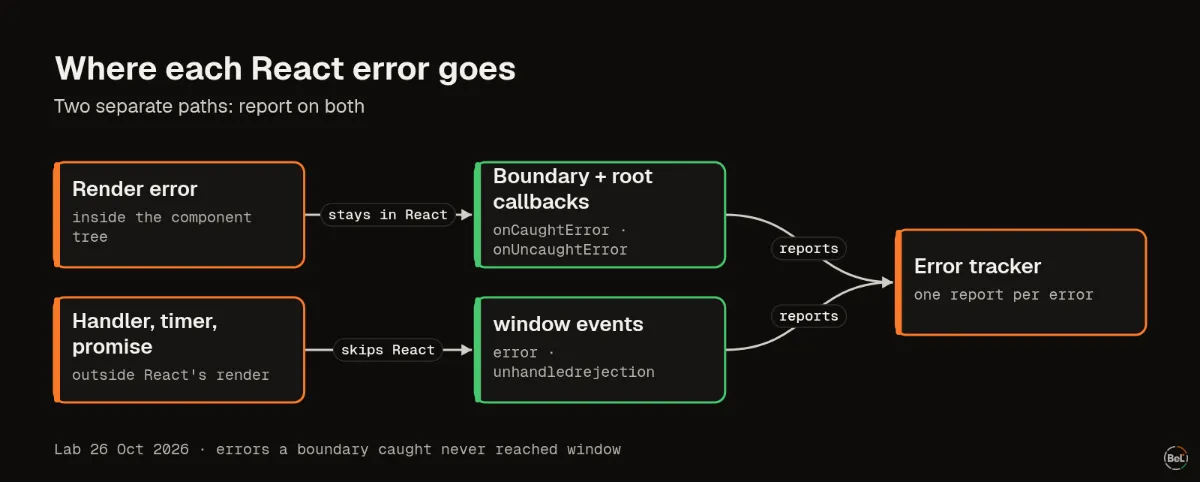
A React error boundary catches errors thrown while rendering, and errors thrown in a useTransition action. That is all. Errors in click handlers, timers and promises skip it and reach only window events, and errors the boundary does catch never reach the window.
So an error tracker that listens only to window misses everything your boundaries catch. One that relies only on boundaries misses every handler error. You need both, plus React 19's root callbacks.
We tested eight cases on 26 October 2026 in a React 19.2 production build running in Chromium. Each case ran three times with React's default root options and three times with all three root callbacks set. Every run gave the same result.
The test page#
The page had one class error boundary around a row of buttons. Each button failed in a different way. The page also listened to window error and unhandledrejection itself, so we could see what a browser error tracker would receive.
const root = createRoot(container, { onCaughtError: (error) => note("root.onCaughtError", error), onUncaughtError: (error) => note("root.onUncaughtError", error), onRecoverableError: (error) => note("root.onRecoverableError", error),});The second configuration passed no options, so React used its defaults.
What each observer saw#
| What threw | Boundary | Root callbacks set | Defaults | The page |
|---|---|---|---|---|
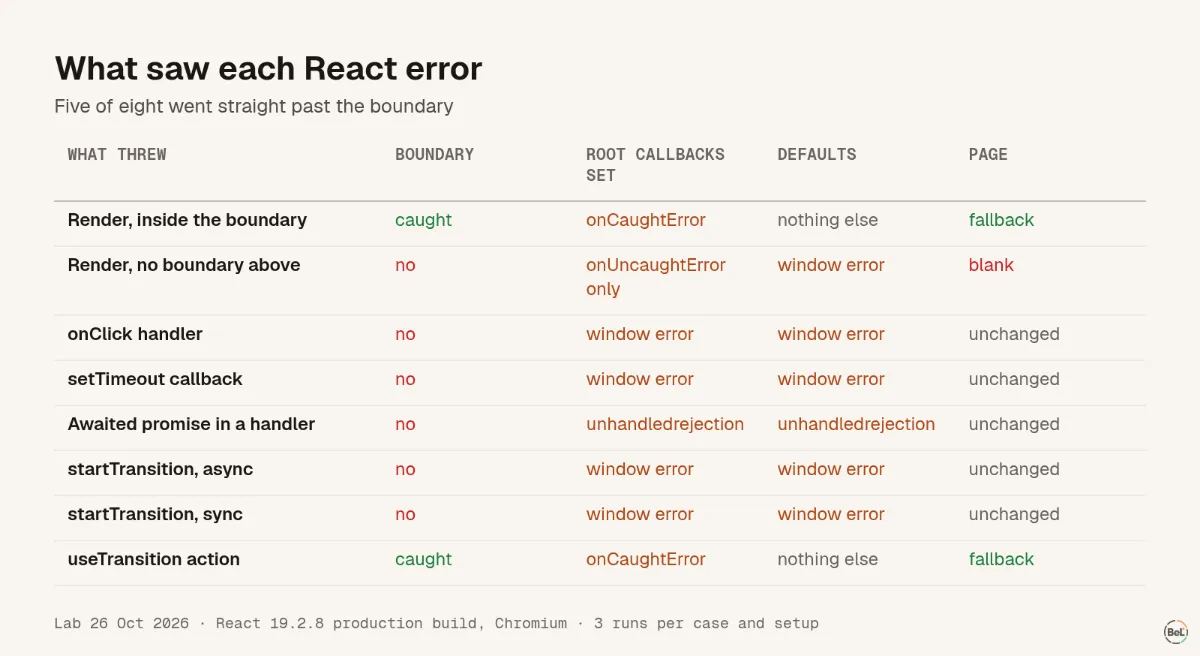
| Render, inside the boundary | caught | onCaughtError | nothing else | fallback |
| Render, no boundary above | no | onUncaughtError only | window error | blank |
onClick handler | no | window error | window error | unchanged |
setTimeout callback | no | window error | window error | unchanged |
| Awaited promise in a handler | no | window unhandledrejection | same | unchanged |
Standalone startTransition, async | no | window error | window error | unchanged |
Standalone startTransition, sync | no | window error | window error | unchanged |
useTransition action | caught | onCaughtError | nothing else | fallback |
onRecoverableError never fired: it covers errors React recovers from on its own, such as hydration mismatches, and this page rendered only in the browser.
Three things the table shows#
Boundaries catch less than their name suggests#
The React docs list what boundaries do not catch, including “Event handlers” and asynchronous code. The lab matched that list. Five of the eight cases went straight past the boundary, and for all five the page stayed exactly as it was. A user who presses a broken button sees nothing at all.
Caught errors are invisible to the window#
When the boundary caught an error, nothing reached window in either setup. React logs caught errors to the console by default, and a console is not a report. If your error tracker hooks only window.onerror, it never hears about any error a boundary handled.
This is why React 19 added two root options “to complement onRecoverableError”: onCaughtError and onUncaughtError. Report from them, or from componentDidCatch in your boundary.
Setting onUncaughtError takes over the window path#
With default options, a render error with no boundary above it reached window error, and the whole page went blank. Once we set onUncaughtError, the same error reached only that callback. If you set it for logging and forget to report from it, you lose the worst kind of error, the one that blanks the page.
The transition surprise#
The docs for boundaries add one exception to the async rule: “Errors thrown inside the transition function are caught by error boundaries”. In our lab that held for the startTransition returned by the useTransition hook. The standalone startTransition imported from react sent the same error, async or sync, to window error instead, and the boundary showed nothing.
We do not claim the docs are wrong; we tested one version in one browser. If you rely on boundaries for action errors, use useTransition, and test your own setup with a deliberate throw.
The setup that sees every case#
- An error tracker that starts before your app and listens to
windowerrorandunhandledrejection. That covers handlers, timers, promises and standalone transitions. - All three root callbacks, each reporting. That covers render errors caught by a boundary, render errors no boundary caught, and recoverable errors after hydration.
- Boundaries around risky parts of the page, so one broken chart shows a fallback instead of blanking everything.
- Something visible in handlers that fail. A
try/catchthat shows a message, plus a report, so the user is not left pressing a dead button.
Where Belvador fits#
@belvador/react includes the browser SDK's window listeners, an ErrorBoundary that reports with the component stack, and reactErrorHandler() for the three React 19 root options. The React SDK guide shows the React 18 and React 19 setups side by side, and the browser SDK guide covers the window listeners. The React page has the whole setup in one place.
Keep reading#
Part of the guide: JavaScript error handling for AI-generated apps: where errors escape
Related posts
All posts
Guides
JavaScript error handling for AI-generated apps: where errors escape
We threw errors in eight places in a React 19 page and five places in a Node.js server, three runs each. Some crashed the server, some left a button that did nothing, and one hung a request forever.
Andrew Babo6 min read
Engineering
Production source maps with Vite: what each setting really ships
We built one module with each of Vite's three source map settings and threw an error from each build. One gave a useless stack frame; the other two shipped our whole source code in a file.
Andrew Babo4 min read
Read next in the docs
See your own production errors this way
Belvador runs on your own Hetzner server: errors, cron jobs, uptime and traces, with your data staying yours.