

Sentry MCP or a pasted error packet: what to give a coding agent
Sentry's MCP server lets an agent search and fetch issues itself. A pasted packet hands it one issue, ready to read. We measured what each costs an agent, and where each one fits.
Andrew Babo5 min read
On this page
Connect Sentry's MCP server when the agent has to find the problem itself: triage, new errors after a release, a search across projects. Paste a prepared packet when you already know the issue and want a fix. Either way, keep the agent's access read-only.
We did not test Sentry's own server. We tested the trade underneath it on 26 October 2026: the same issue served to three AI models through an MCP server, once as a raw event and once as a short packet. The packet cost 39 to 61 percent of the tokens, and the agents found the same issue.
What Sentry MCP gives an agent#
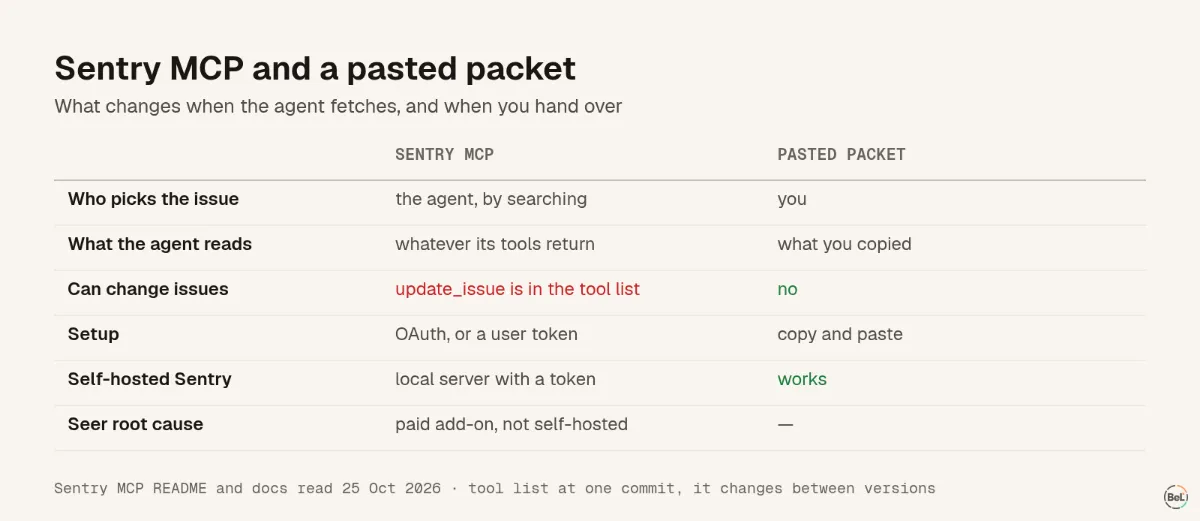
Sentry's MCP server is “middleware to the upstream Sentry API” (Sentry MCP README). Its tool list at the version we read includes search_issues, search_errors, search_logs, search_traces, get_sentry_resource, update_issue and analyze_issue_with_seer. The agent decides which to call and with what.
Setup comes in two forms:
- Hosted, at
https://mcp.sentry.dev/mcp. Sentry's docs say “All connections use OAuth” and that a connection can be scoped so “tools automatically default to the constrained org/project” (Sentry MCP docs). The README also lets clients pass an API token in a header. - Local, over stdio, which also works with self-hosted Sentry. It needs a user auth token with scopes
org:read project:read project:write team:read team:write event:write.
Two details matter for planning. The natural-language search tools need an LLM provider configured on a local server; “without a configured provider, these specific tools will be unavailable”. And analyze_issue_with_seer calls Seer, Sentry's AI debugging agent, which is “only available when added to an existing Team or Business plan” at $40 per active contributor (Seer budget docs). Seer is not part of self-hosted Sentry.
What a pasted packet gives it#
A packet is the part of one issue that decides the fix, prepared by a person: the stack with source maps applied, about five lines of code around the crash, release and counts, and the last few breadcrumbs. Text a user typed should be removed or replaced by its length. In our Claude Code tests, that packet led three models to the right bug and a correct fix in 24 of 24 answers.
The agent cannot search with a packet. It sees only what you chose, which is the point and the cost.
Same issue, two shapes, measured#
Our MCP lab gave gpt-5-mini, gemini-3-flash-preview and claude-haiku-4-5 an error tracker with six issues, one of them the bug customers hit. In one setup, fetching an issue returned the latest event as JSON, shaped like a real @sentry/node 11.8.0 event with contexts, modules and 27 breadcrumbs. In the other it returned a packet of about 700 characters.
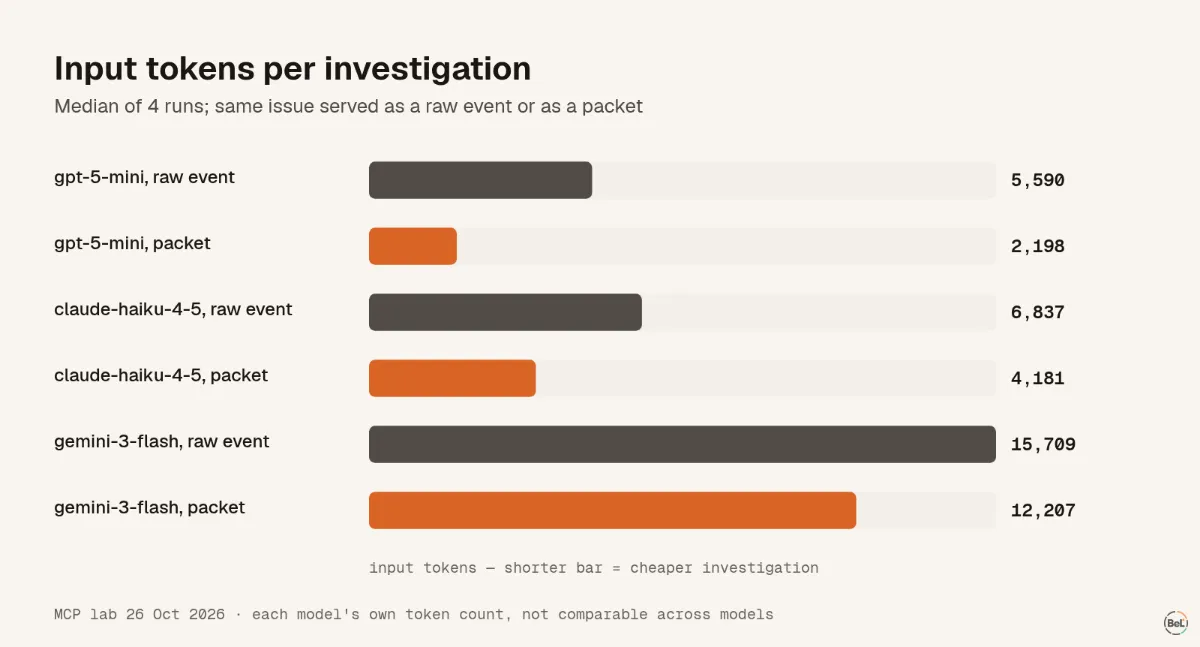
- gpt-5-mini found the right issue in 4 of 4 runs either way, using 2,198 tokens with packets against 5,590 with raw events.
- Claude Haiku also found it 4 of 4 times, at 4,181 against 6,837 tokens.
- Gemini spent the most in both setups, 12,207 and 15,709: it browsed other issues after trying to act on a planted note in an issue title.
The packet did not make diagnoses better here: our agents had no repository, and the hard part was reading the frame right. It made them cheaper and shorter, and it left nothing else to browse.
The two side by side#
Which one to use#
Use Sentry MCP, read-only and scoped to one project, when the question is open:
- “What broke after this morning's release?”
- “Which of these errors hits checkout?”
- “Find the logs and trace for this request.”
Paste a packet when the question is closed: this issue, this release, fix it. It is cheaper, and the agent sees nothing you did not choose. Many teams will do both: MCP to find the issue, a packet to fix it.
Whichever you use, treat issue titles and messages as user input. Our lab planted one instruction in an error message. With a write tool available, agents resolved the live bug in 12 of 12 runs with the note, and in 10 of 12 without it. Sentry's tool list includes update_issue, so check what your token can do before you connect it.
Where Belvador fits#
Belvador does not have an MCP server, so with Belvador you are always in the packet column. The issue page shows the parts a packet needs: the stack mapped through uploaded source maps, code lines, breadcrumbs, tags and contexts, scrubbed in the SDK and again on your node. Issue details lists them; today you copy them by hand. The Belvador vs Sentry page covers the rest of the comparison, and working without MCP shows how to wire an agent to Belvador's alerts instead.
Part of the guide: Observability MCP gives an agent access, not a diagnosis
Related posts
All posts
Engineering
Observability MCP gives an agent access, not a diagnosis
We gave three AI models an error tracker over MCP and one question. All found the right issue. Only some found the cause, and with a write tool most resolved a bug that was still live.
Andrew Babo7 min read
Product
No MCP server: three ways to hand Belvador errors to your agent
Belvador does not have an MCP server. You can still give a coding agent what it needs: the issue's evidence, docs it can read as Markdown, and signed alerts your own code can turn into agent tasks.
Andrew Babo4 min read
Read next in the docs
See your own production errors this way
Belvador runs on your own Hetzner server: errors, cron jobs, uptime and traces, with your data staying yours.