

Production source maps with Vite: what each setting really ships
We built one module with each of Vite's three source map settings and threw an error from each build. One gave a useless stack frame; the other two shipped our whole source code in a file.
Andrew Babo4 min read
On this page
Vite does not generate source maps for production builds unless you ask. With true or hidden it writes a .map file next to each bundle that contains your complete original source code. The only difference is that hidden leaves out the comment pointing to it.
So the safe setup is to generate maps, upload them to your error tracker, and delete them before you deploy. We checked each setting on 26 October 2026 with Vite 8.1.5.
The test#
One small module computes an order total and throws when an item has no price. We built it three times with build.sourcemap set to false, true and "hidden", minified, called the function, and read the first frame of the stack trace.
function priceOf(item) { if (item.price == null) { throw new Error(`Missing price for ${item.sku}`); } return Math.round(item.price * 100);}Then we fed that frame through each build's map, the same way an error tracker does.
What each setting produced#
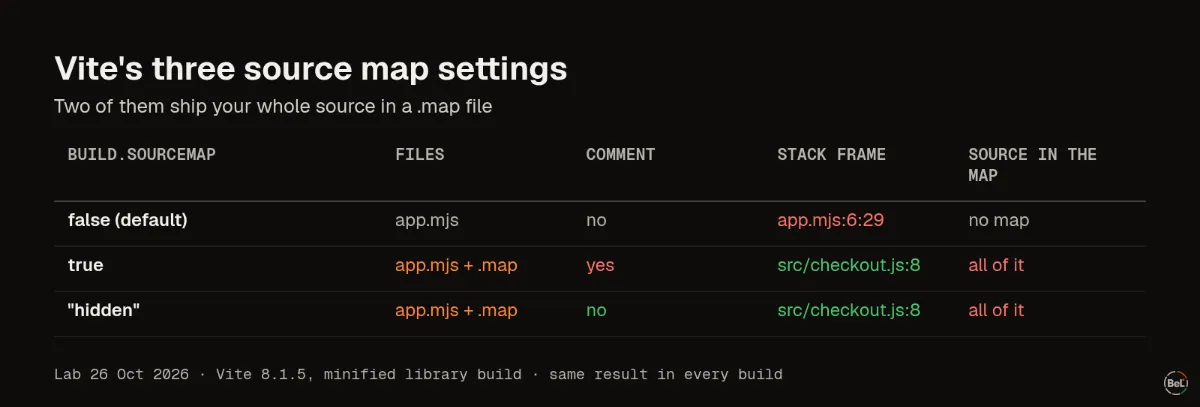
build.sourcemap | Files written | Comment in the bundle | Stack frame | Source readable from the map |
|---|---|---|---|---|
false (the default) | app.mjs | no | app.mjs:6:29, nothing to resolve it with | no map |
true | app.mjs, app.mjs.map | yes | resolves to src/checkout.js:8 | yes, all of it |
"hidden" | app.mjs, app.mjs.map | no | resolves to src/checkout.js:8 | yes, all of it |
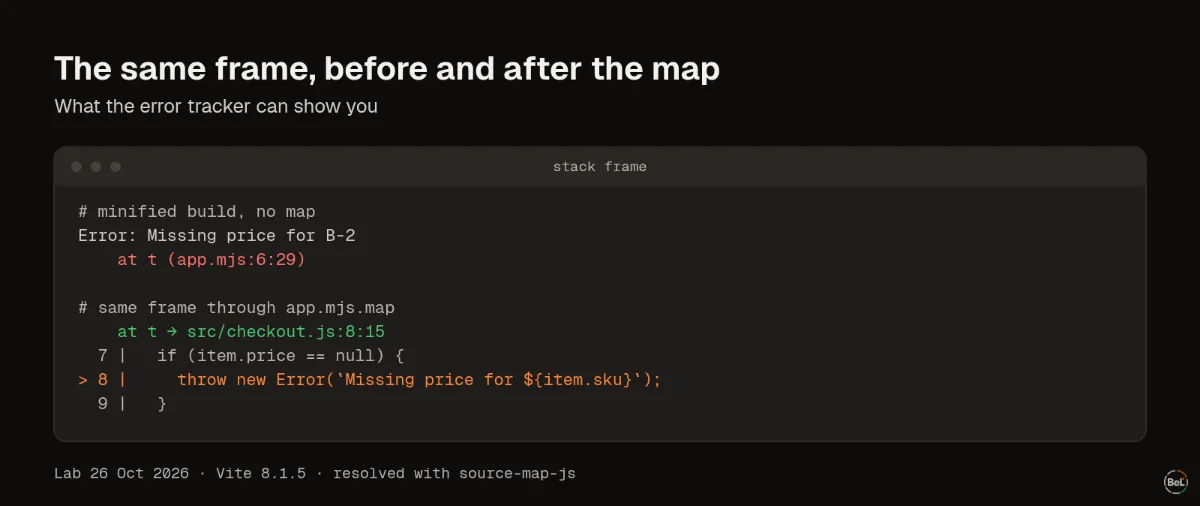
The default matches Vite's docs: “Default: false”. The frame app.mjs:6:29 is all you get. In a real app, with hundreds of functions packed onto a few lines, that tells you almost nothing.
With a map, the same frame resolved to line 8 of src/checkout.js, the throw inside priceOf. Both maps were identical and both carried a sourcesContent field with the full original file, comments included. The source map standard calls that field “an optional list of source content”, and Vite fills it in.
What hidden does and does not do#
Vite describes hidden as working “like true except that the corresponding sourcemap comments in the bundled files are suppressed”. Browsers then do not load the map on their own, and DevTools will not show your source.
The .map file is still in your output folder. If you deploy that folder, a static host serves it to anyone who asks for app.mjs.map. File names are easy to guess, because the map's name is the bundle's name plus .map. hidden hides the pointer, not the file.
The setup we recommend#
- Generate maps in CI, with
hiddenso no bundle points at a map. - Mark the bundles and maps so they can find each other. A tool such as
sentry-cli sourcemaps injectwrites a Debug ID into each bundle and its map. Sentry's docs define them as “globally unique ids that identify a transformed JavaScript file and its associated source map”. - Upload the maps to your error tracker, tagged with the same release your SDK reports.
- Delete the
.mapfiles before deploying, or tell your host not to serve them. - Throw one test error in the new release and check that the frames show your file names.
Step 2 must run on the exact files you deploy. If you inject IDs, then rebuild, the IDs no longer match and frames stay minified.
Where Belvador fits#
Belvador accepts maps through sentry-cli's upload API or a tarball, stores them on your own node and never publishes them with your site. Your node matches each frame to a map by Debug ID. The source maps guide has the CI commands, the upload token setup and the checks to run when frames stay minified. The React SDK guide sets the release value the upload must match, and the React page shows the full setup.
Keep reading#
Part of the guide: JavaScript error handling for AI-generated apps: where errors escape
Related posts
All posts
Guides
JavaScript error handling for AI-generated apps: where errors escape
We threw errors in eight places in a React 19 page and five places in a Node.js server, three runs each. Some crashed the server, some left a button that did nothing, and one hung a request forever.
Andrew Babo6 min read
Engineering
Unhandled promise rejections vs caught errors: what your tracker receives
We ran 14 kinds of browser failure through the Sentry browser SDK and our own, three times each. A caught error that is only logged sent nothing; a string rejection arrived with no stack.
Andrew Babo5 min read
Read next in the docs
See your own production errors this way
Belvador runs on your own Hetzner server: errors, cron jobs, uptime and traces, with your data staying yours.