

Unhandled promise rejections vs caught errors: what your tracker receives
We ran 14 kinds of browser failure through the Sentry browser SDK and our own, three times each. A caught error that is only logged sent nothing; a string rejection arrived with no stack.
Andrew Babo5 min read
On this page
In our lab, uncaught exceptions and unhandled promise rejections reached the error tracker, apart from canceled requests that Belvador drops. Anything the code caught did not, even when it went to console.error, unless the code reported it itself. And a rejection with something that is not an Error arrived without a stack.
We checked this on 26 October 2026 with 14 kinds of failure, each on a fresh page in Chromium 141, three runs each. The trackers were the Sentry browser SDK with its defaults (@sentry/browser 10.76.2) and our own @belvador/browser 0.5.1, which is built on it. Every run gave the same count.
The 14 cases#
Each case is a few lines, like the ones that end up in real code:
async function loadInvoice(): Promise<never> { throw new Error("invoice load failed");}void loadInvoice(); // called without awaitloadInvoice().catch((e) => console.error(e)); // caught and loggedloadInvoice().catch((e) => captureException(e)); // caught and reportedvoid Promise.reject("invoice load failed"); // rejected with a string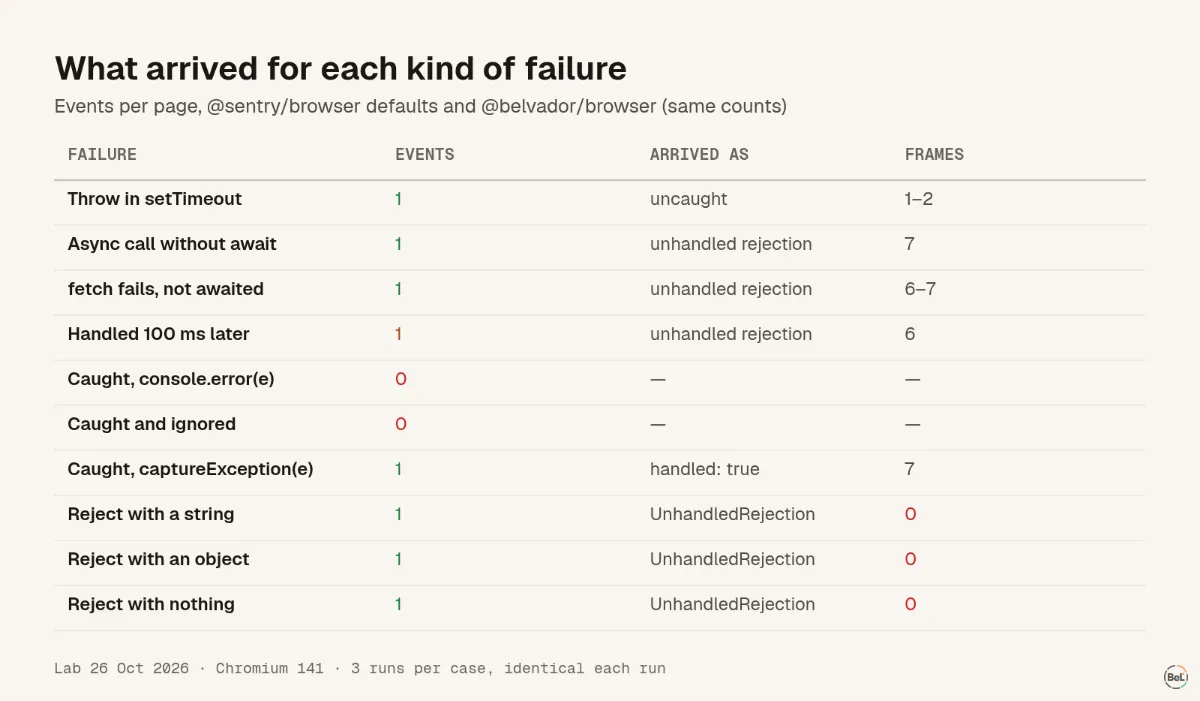
| Failure | Events | How it arrived | Stack frames |
|---|---|---|---|
Throw inside setTimeout | 1 | uncaught error | 1–2 |
| Throw in a click listener | 1 | uncaught error | 2–4 |
Promise.reject(new Error(...)), nobody listens | 1 | unhandled rejection | 6 |
Async function called without await | 1 | unhandled rejection | 7 |
fetch to an unreachable server, not awaited | 1 | unhandled rejection, TypeError | 6–7 |
| Rejection handled 100 ms later | 1 | unhandled rejection | 6 |
Caught, then console.error(e) | 0 | nothing sent | none |
| Caught and ignored | 0 | nothing sent | none |
Caught, then captureException(e) | 1 | reported, handled: true | 7 |
| Reject with a string | 1 | UnhandledRejection | 0 |
throw "a string" in a timer | 1 | error with the text as message | 0–1 |
| Reject with a plain object | 1 | UnhandledRejection | 0 |
| Reject with nothing | 1 | UnhandledRejection | 0 |
fetch canceled with AbortController | Sentry 1, Belvador 0 | unhandled AbortError | 2 |
Where the two SDKs differ, the range shows both. The rows that matter most are the ones with a 0.
Caught means invisible#
A tracker listens to two browser events: error for uncaught throws and unhandledrejection, sent when “a JavaScript Promise that has no rejection handler is rejected”. A catch handler is a rejection handler. Once it exists, the browser has nothing to report, and neither does the tracker.
console.error(e) does not change that. It writes to the console of the visitor's browser, which you will never read. With default settings neither SDK turned console calls into events. Sentry has an opt-in integration for that; Belvador's console option only records breadcrumbs.
A try/catch around a fetch with a console.error and a toast is a familiar pattern. In our lab it sent no event at all. If the user can see that something failed, report it:
try { await saveInvoice(draft);} catch (e) { captureException(e); toast.error("Could not save the invoice");}Late handlers still count as unhandled#
A promise rejected, and a .catch was attached 100 ms later. The browser had already fired unhandledrejection, so the tracker reported it as unhandled, handled: false, in all three runs.
The browser does tell you afterwards. MDN describes rejectionhandled, sent “when a handler is attached to the promise after its rejection had caused an unhandledrejection event”. The event we had received stayed as it was, still handled: false. If your tracker shows rejections that your code does handle, look for promises created early and handled later, such as a request started before a dialog opens. A handler attached before the rejection happens prevents the report.
Reject with an Error, not a string#
When code rejects with something that is not an Error, there is no stack to send, because only Error objects carry one: strings, plain objects and undefined all arrived with 0 frames. A string thrown in a timer fared little better, 0 frames from Sentry and 1 from Belvador, the line it was thrown on. Instead of a stack, the tracker sends a sentence:
UnhandledRejection: Non-Error promise rejection captured with value: invoice load failedUnhandledRejection: Object captured as promise rejection with keys: code, detail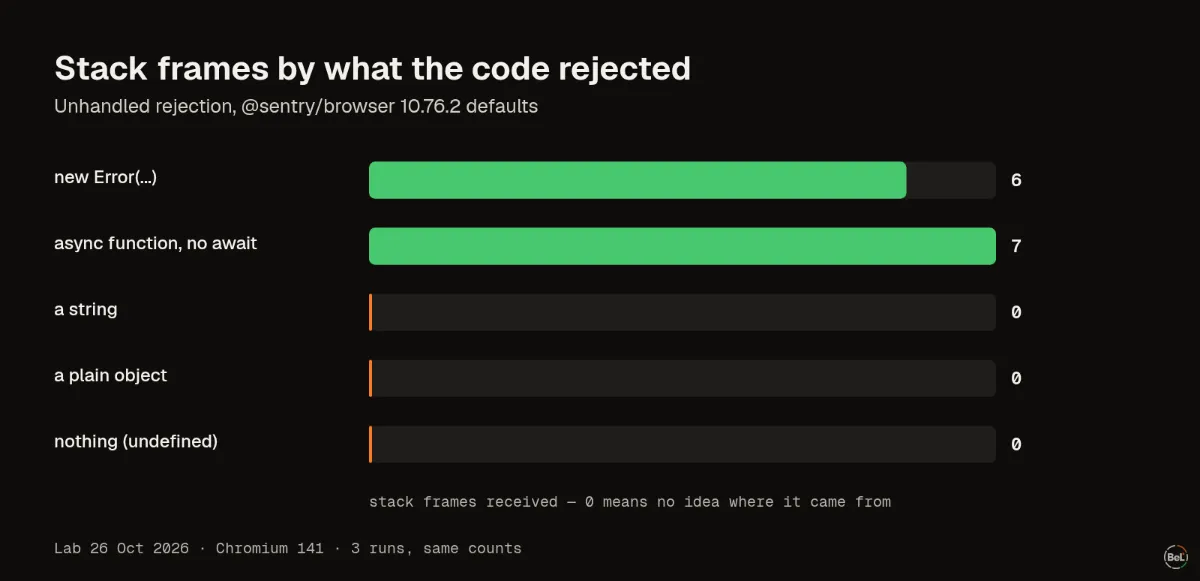
The message survives; where it came from does not. A plain object's fields were sent along in the event's extra data, which matters if that object carries user data. The fix is small: reject(new Error("invoice load failed", { cause: original })), or in a library you do not control, wrap at the boundary where you call it.
What to do#
- Search for
catchblocks that only log. Report the ones a user would notice. - Make every
throwandrejectanError. Lint rules help:prefer-promise-reject-errorsfor rejections,@typescript-eslint/only-throw-errorfor thrown values. - Await or handle promises where you create them, so late handlers do not show up as unhandled.
- Decide what to do with canceled requests. An
AbortErrorfrom a visitor leaving the page is not a bug; Belvador drops it by default, plain Sentry sends it. - Test once in production mode: trigger a caught and an uncaught failure and check which arrived.
Where Belvador fits#
@belvador/browser reports uncaught errors and unhandled rejections once init runs, drops canceled requests unless you set captureAborted, and leaves console capture off. The browser SDK guide lists what it reports, and the SDK options cover captureAborted and breadcrumbs. For React apps the React page shows the full setup. Stacks are only useful when they map to your source, which is what the source maps post checks.
Keep reading#
Part of the guide: JavaScript error handling for AI-generated apps: where errors escape
Related posts
All posts
Guides
JavaScript error handling for AI-generated apps: where errors escape
We threw errors in eight places in a React 19 page and five places in a Node.js server, three runs each. Some crashed the server, some left a button that did nothing, and one hung a request forever.
Andrew Babo6 min read

Engineering
Production source maps with Vite: what each setting really ships
We built one module with each of Vite's three source map settings and threw an error from each build. One gave a useless stack frame; the other two shipped our whole source code in a file.
Andrew Babo4 min read
Read next in the docs
See your own production errors this way
Belvador runs on your own Hetzner server: errors, cron jobs, uptime and traces, with your data staying yours.