

JavaScript error handling for AI-generated apps: where errors escape
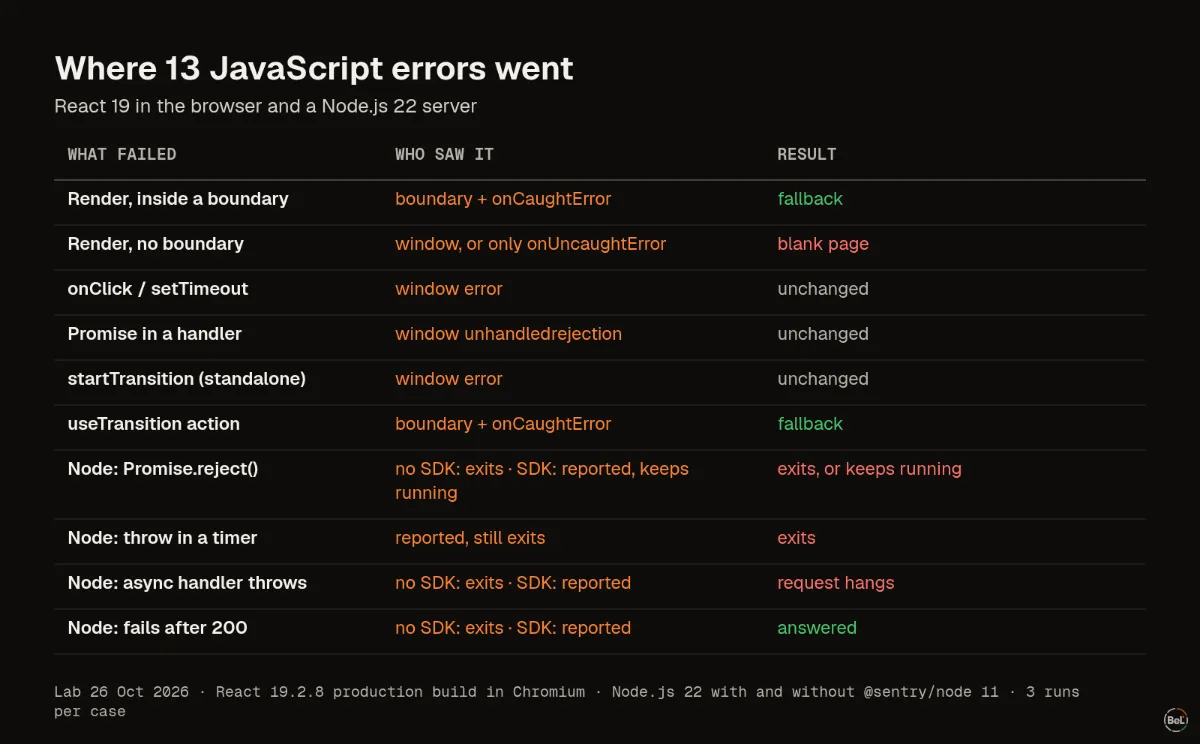
We threw errors in eight places in a React 19 page and five places in a Node.js server, three runs each. Some crashed the server, some left a button that did nothing, and one hung a request forever.
Andrew Babo6 min read
On this page

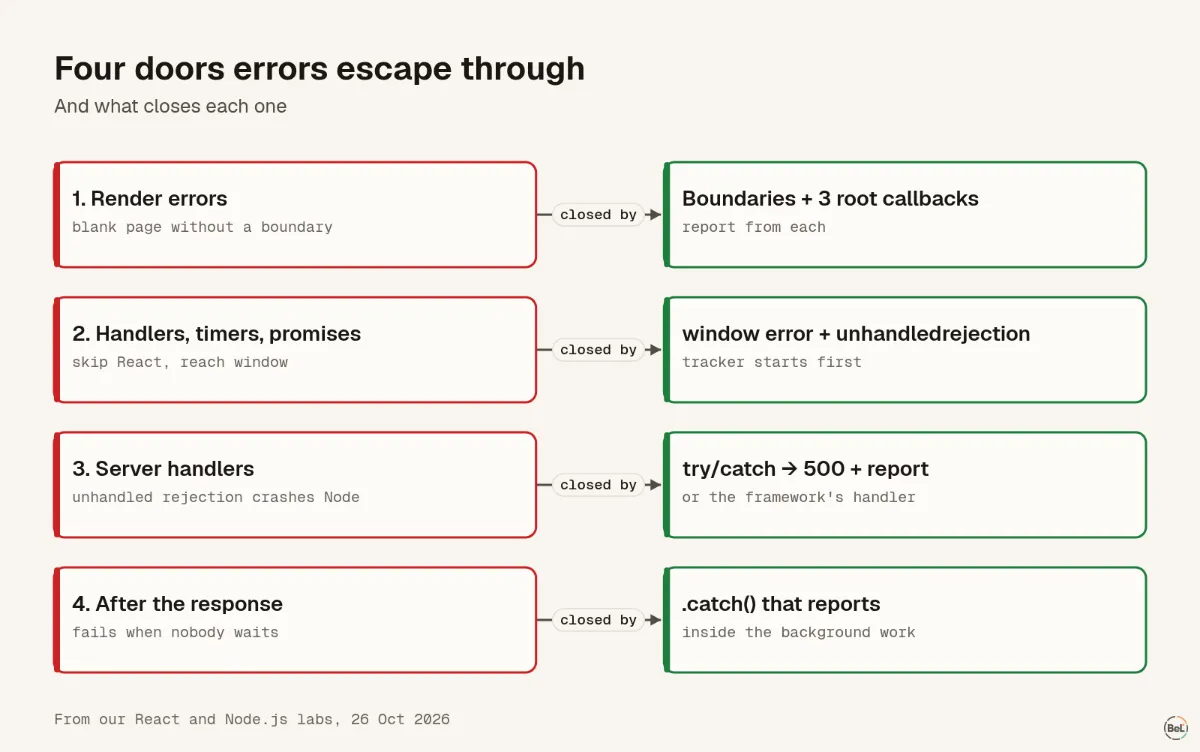
JavaScript errors escape a React and Node.js app through four doors: render errors with no boundary, handler and promise errors that skip React, unhandled rejections that crash a Node.js server, and work that fails after the response. Each door needs its own few lines of code. This post shows what each door looks like and how to close it.
We tested all four on 26 October 2026: eight failure cases in a React 19 production build running in Chromium and five in a Node.js 22 server, three runs each. Every run gave the same result.
This matters more when an AI coding tool wrote much of the code. Not because the code is worse, but because you did not write the error paths yourself and may not know they exist.
The browser: eight ways a React page can fail#
The test page had one error boundary around a set of buttons, and listened to window error and unhandledrejection itself. Each button failed in a different way.
| What threw | Who saw it | What the user saw |
|---|---|---|
| Render, inside a boundary | the boundary, plus onCaughtError if set | the fallback |
| Render, no boundary above | window error by default; only onUncaughtError once set | a blank page |
onClick handler | window error | nothing changed |
setTimeout callback | window error | nothing changed |
| Awaited promise in a handler | window unhandledrejection | nothing changed |
Standalone startTransition, async or sync | window error | nothing changed |
useTransition action | the boundary | the fallback |
Two rows deserve a second look. A render error with no boundary above it removed the whole UI, and once the app passed its own onUncaughtError to createRoot, the window never heard about it. And for most errors React left the UI as it was: the user pressed a button and nothing happened. That is the bug report you never get.
The React error boundaries post has the full lab and the setup for each case.
The server: five ways a Node.js process can fail#
Node.js changed its default for unhandled rejections to throw in version 15: “Changed default mode to throw. Previously, a warning was emitted.” We measured what that means for a server with a slow request already in flight.
| What failed | No SDK | With @sentry/node 11 |
|---|---|---|
Promise.reject() with no handler | process exits | reported, warning printed, process keeps running |
Throw inside setTimeout | process exits | reported, process still exits |
try/catch around that setTimeout | process exits, the catch never runs | reported, process still exits |
Async HTTP handler throws after await | process exits, the in-flight request dies too | reported; that request never gets a response |
Background promise rejects after res.end("ok") | client got 200, then the process exits | reported; every request answered |
Without an SDK, one unawaited rejection in one handler took the server down, along with a request that was doing nothing wrong. The SDK changed that: it registers its own unhandledRejection listener, reports the error and keeps the process alive.
Staying alive is not the same as answering. With the SDK, the request whose handler threw never got a response, and our client gave up after two seconds. The user would see a spinner. Only a try/catch that sends a 500, or your framework's error handler, closes that request.
The try/catch around setTimeout row is the oldest trap in JavaScript. MDN puts it plainly: errors thrown from a later callback “are not catchable by the caller”.
The four doors and what closes each#
1. Render errors: boundaries and root callbacks#
Wrap each risky part of the page in an error boundary so one broken widget shows a fallback, not a blank page. On React 19, pass a reporting function to all three createRoot options: onCaughtError, onUncaughtError and onRecoverableError. Errors a boundary caught never reach the window, so a tracker that only listens there will not see them.
2. Handlers, timers and promises: window listeners#
These skip React entirely. A browser error tracker listens to window error and unhandledrejection, which MDN describes as firing “when a JavaScript Promise that has no rejection handler is rejected”. Make sure it starts before your app code, and that nothing else replaces window.onerror later.
3. Server handlers: catch, answer, report#
In every request handler that awaits something, catch the error, send a 500 and report it. Frameworks such as Express and Fastify have an error handler for this; use it, and check that it reports. Do not add a bare process.on("unhandledRejection", () => {}) to stop the crashes: it hides every future bug and leaves requests hanging.
4. Work after the response: report from inside#
Background work, waitUntil on Cloudflare, or a void promise after res.end() fails when no one is waiting. Put a .catch() on it that reports the error. Our Cloudflare Workers post found the same gap on the edge: a rejected waitUntil promise still returned 200.
What to search for in code you did not write#
These patterns are worth a quick search in any codebase, especially one that an AI tool generated faster than you could read it:
catch {}orcatch (e) {}with nothing inside: the error is gone.catch (e) { console.log(e) }on the server: the error reaches a log nobody reads..then(without a.catch(on the same chain, andvoid someAsyncCall().asyncrequest handlers with notry.throw "message"orthrow { ... }instead ofthrow new Error(...): no stack trace.- A new error thrown inside a
catchwithout the original. Pass it along ascause, which keeps “the specific original cause of the error”.
Once errors are reported, make the stack traces readable: a minified frame like app.mjs:6:29 tells you very little. The source maps post shows what Vite's three settings actually produce.
Where Belvador fits#
Belvador's browser and React packages listen to window errors and rejections, ship an error boundary, and provide reactErrorHandler() for the three React 19 root options. The browser SDK guide and the React SDK guide show the setup. On Node.js, Belvador uses the official Sentry SDK with a Belvador DSN, the same SDK we tested here; the Node.js guide covers it. The React and Node.js pages show the whole setup in one place.
Keep reading#
In this topic
- Production source maps with Vite: what each setting really ships
Andrew Babo4 min read
- Unhandled promise rejections vs caught errors: what your tracker receives
Andrew Babo5 min read
- TanStack Start loader errors: why the SSR stack points at your HTML page
Andrew Babo5 min read
- React error boundaries and async errors: what our lab caught
Andrew Babo4 min read
- Duplicate error reports: why one failure arrives twice and 20 arrive once
Andrew Babo4 min read
Related posts
All posts
Engineering
Production source maps with Vite: what each setting really ships
We built one module with each of Vite's three source map settings and threw an error from each build. One gave a useless stack frame; the other two shipped our whole source code in a file.
Andrew Babo4 min read
Engineering
Unhandled promise rejections vs caught errors: what your tracker receives
We ran 14 kinds of browser failure through the Sentry browser SDK and our own, three times each. A caught error that is only logged sent nothing; a string rejection arrived with no stack.
Andrew Babo5 min read
Read next in the docs
See your own production errors this way
Belvador runs on your own Hetzner server: errors, cron jobs, uptime and traces, with your data staying yours.