

Sentry SDK migration checklist: test every assumption
Changing a DSN is the easy part. We ran the official Sentry Node.js SDK with two configs and listed every item it sent, and what a Sentry-compatible backend does with each one.
Andrew Babo5 min read
On this page
A Sentry DSN swap takes a minute and can still break things nobody notices for weeks. Before you switch, list the items your SDK really sends and check which ones the new backend keeps. Then test personal data, check-ins and source maps one at a time.
We built this checklist from one lab run on 26 October 2026 with the official Sentry SDK for Node.js. The backend we checked against is Belvador's, because we can read its code, but the same questions apply to any Sentry-compatible service.
Why a DSN swap is not the whole migration#
A Sentry SDK does not send "errors". It sends envelopes, and each envelope holds typed items: event, check_in, log, span, sessions, client_report and more, as listed in Sentry's envelope item reference. A compatible backend has to decide what to do with each type.
Most accept errors. Fewer handle check-ins, logs or sessions. An item a backend does not support is usually dropped without an error in your app, so nothing tells you a monitor or a log stream went quiet.
The run: one request, two configs#
A small node:http server ran @sentry/node 11.8.0 on Node 22. One request came in with a Cookie, an Authorization header and X-Forwarded-For: 203.0.113.7. The handler called Sentry.logger.info(), then caught an error and called captureException(). After the request, a withMonitor() wrapper ran a short job.
We ran it with two configs, three times each:
- Sentry-style:
sendDefaultPii: true,tracesSampleRate: 1.0andenableLogs: true, a common combination in Sentry's setup guides. - Belvador's documented setup:
sendDefaultPii: false,tracesSampleRate: 0and a scrubbingbeforeSendhook.
A local collector recorded every request, and all three runs of each config sent the same items in the same order.
What the SDK sent#
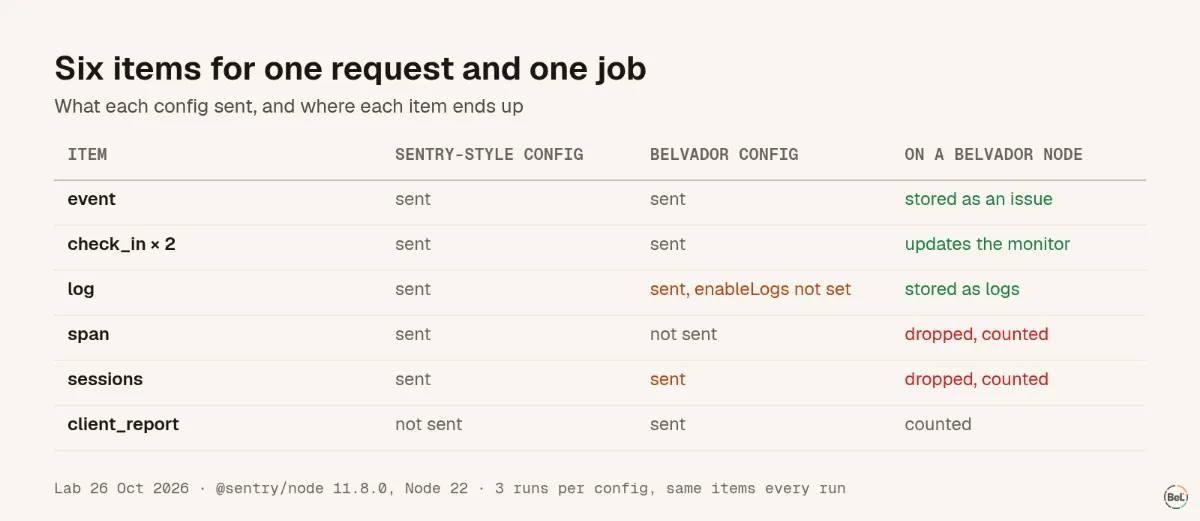
Both configs sent six items for one request and one job: two check-ins (start and finish), the error event, a log, and a sessions summary. The Sentry-style config added a span for the request. The Belvador config sent a client_report instead, counting two spans it threw away because tracing was off.
Two results surprised us:
- The log went out in both configs. We never set
enableLogsin the Belvador config, but in version 11.8.0 the SDK's own type definitions list it as on by default, and the app calledSentry.logger.info(). sessionswent out in both configs too. The HTTP integration'ssessionsoption also defaults to on. When we turned it off in a third run, the SDK sent a singlesessionitem instead.
On a Belvador node, the event becomes an issue, the check-ins update the monitor, the log goes to the log store, and the client report is counted. The span and sessions items are counted as Not supported yet and dropped.
Personal data: check the event, not the config#
With sendDefaultPii: true, the SDK already filtered the cookie and authorization headers to [Filtered]. It kept x-forwarded-for: 203.0.113.7 and copied the same address into user.ip_address. With Belvador's hook, the event had none of the three headers and no user at all.
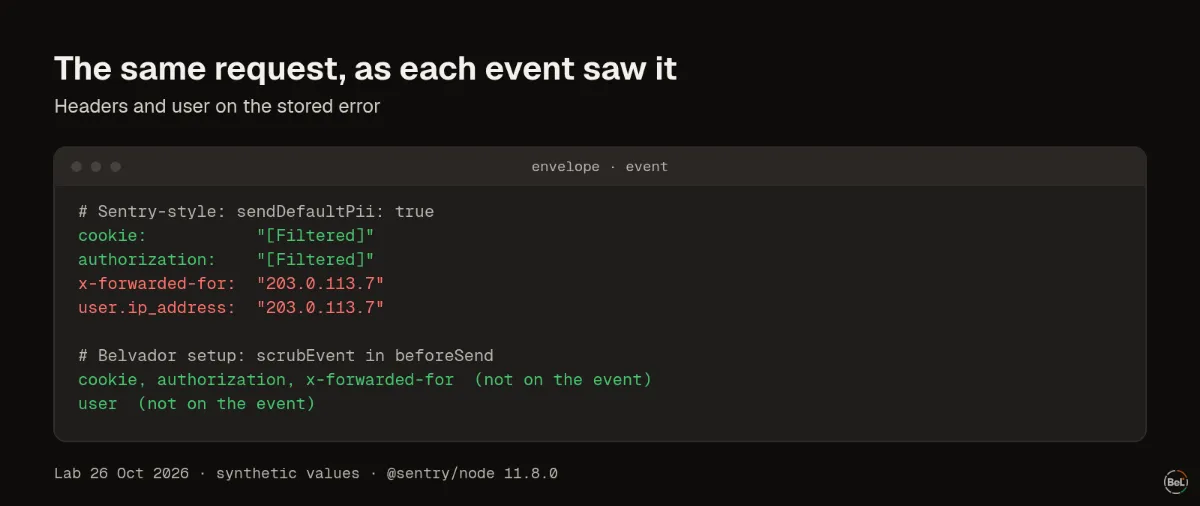
So sendDefaultPii: false alone is not the whole story. Read one real event from your new backend and look for IP headers, cookies, tokens in URLs and emails in messages. Our PII scrubber test shows which patterns a scrubber catches and which it misses.
The checklist#
- Run one SDK at a time. Two SDKs both hook global error handlers, so every error arrives twice.
- List the item types you send. Point the DSN at a local collector for one run, or read the envelopes in your browser's Network tab. Compare the list with what the new backend stores.
- Turn off what will be dropped. If tracing data is not stored, set
tracesSampleRate: 0so the SDK does not do the work. Check the result in a collector, because some items, like sessions, come back in another form. - Read one stored event end to end. Check headers,
user, breadcrumbs and URLs for personal data. - Move check-ins deliberately. A monitor that stops receiving check-ins looks like a missed job. Create the monitors in the new backend first, then switch the DSN.
- Re-point source map uploads. Keep
sentry-cli, change the URL and token, and check that a new error shows original file names. Our source maps test shows what a frame looks like without them. - Check the DSN format. A DSN is
{PROTOCOL}://{PUBLIC_KEY}@{HOST}/{PROJECT_ID}, and the secret part is deprecated. Backends can be stricter than Sentry: Belvador's own SDK accepts only a 32-character hex key. - Prove delivery from production. Send a tagged test error from each runtime after you deploy, and wait for a real error before you turn the old tool off.
- Plan for history. Old issues stay in the old tool. Keep it read-only for a few weeks if you need to look things up.
Where Belvador fits#
Belvador accepts Sentry envelopes and stores events, attachments, check-ins and Sentry logs on a node in your own Hetzner project; tracing data goes over OpenTelemetry instead. The migration guide maps each Sentry package and option. The Node.js setup has the scrubbing hook we used here, and monitors with Sentry SDKs covers withMonitor(). The Sentry alternative page lists what Belvador does not do.
Keep reading#
Part of the guide: Sentry alternative for AI-built apps: what to check before you switch
Related posts
All posts
Product
Sentry alternative for AI-built apps: what to check before you switch
We put Sentry's browser SDK and Belvador's on the same page and recorded what each one sent. For an app an AI agent wrote, defaults, data location and proof of delivery matter before price.
Andrew Babo5 min read
Product
Self-hosted Sentry vs BYOC on Hetzner: what you actually run
We counted what a self-hosted Sentry 26.10.0 install pulls and starts, and set it next to a managed node in your own Hetzner project. Both keep data on your servers; the work is not the same.
Andrew Babo4 min read
Read next in the docs
See your own production errors this way
Belvador runs on your own Hetzner server: errors, cron jobs, uptime and traces, with your data staying yours.