

Self-hosted Sentry vs BYOC on Hetzner: what you actually run
We counted what a self-hosted Sentry 26.10.0 install pulls and starts, and set it next to a managed node in your own Hetzner project. Both keep data on your servers; the work is not the same.
Andrew Babo4 min read
On this page
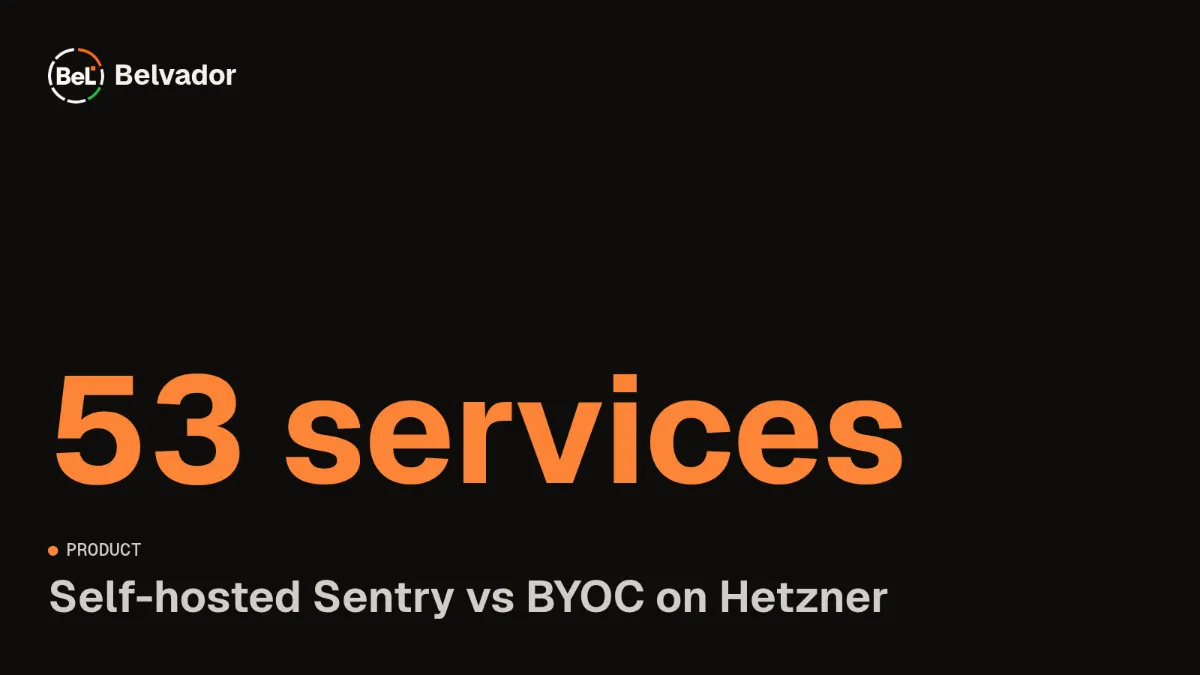
Self-hosted Sentry and a managed node in your own Hetzner project both keep error data on servers you control. The difference is how much you run. Sentry 26.10.0 defines 53 services and pulls 2.74 GB of images, while a Belvador node runs three services that Belvador updates for you.
We measured the Sentry side from its release files and image registries on 26 October 2026. We did not install it this time, so this post has no install times or idle memory readings.
What we counted#
Self-hosted Sentry ships as a Docker Compose project in the getsentry/self-hosted repository. We took the docker-compose.yml and .env at tag 26.10.0, released on 16 October, and resolved every image they name. Then we asked each image's registry for its linux/amd64 manifest and added up the compressed layers.
Two images are built during install, sentry and clickhouse. We counted the images they are built from.
The install, in numbers#
The default .env sets the feature-complete profile, which starts all 53 services from 17 distinct images. The images add up to 2.74 GB compressed. The errors-only profile cuts that to 28 services and 2.02 GB, but it still runs Kafka, ClickHouse, PostgreSQL, Redis-compatible Valkey and the Sentry workers.
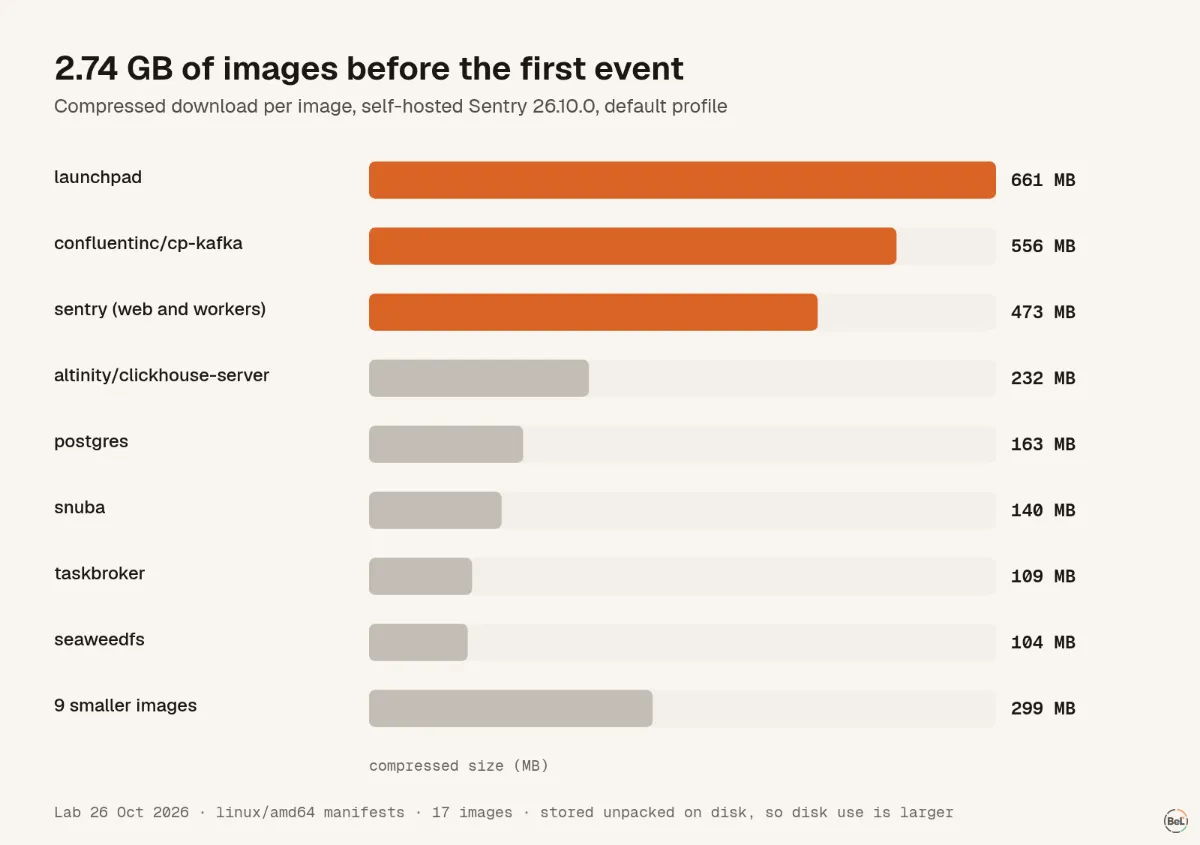
Compressed size understates disk use. Images are stored unpacked, and the databases and Kafka logs grow on top.
Sentry's self-hosted guide asks for 4 CPU cores, 16 GB of RAM plus 16 GB of swap and 20 GB of free disk, and recommends 32 GB of RAM. On Hetzner's price page, the cost-optimized CX43 with 8 vCPUs and 16 GB listed at €16.49 a month before VAT on 26 October.
Upgrades are a path, not a step#
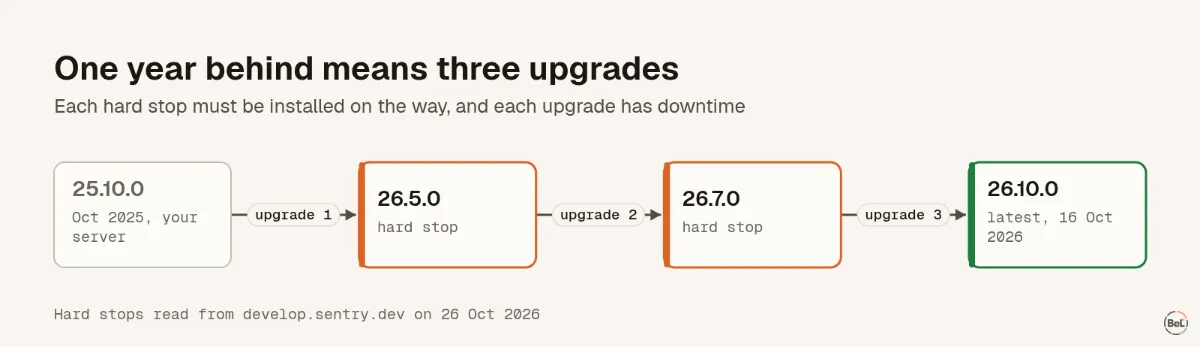
Sentry releases self-hosted every month and does not patch old versions. Its release notes list hard stops: versions you must install on the way, so the database migrations run in order. On 26 October the list ended with 25.5.1, 26.5.0 and 26.7.0, and seven versions were marked "avoid".
So a server last upgraded in October 2025, on 25.10.0, needs three upgrades to reach 26.10.0. Each one stops the services and runs migrations, which means downtime.
None of this is unusual for software this size. It is a standing job, and somebody has to own it.
The other side: a managed node#
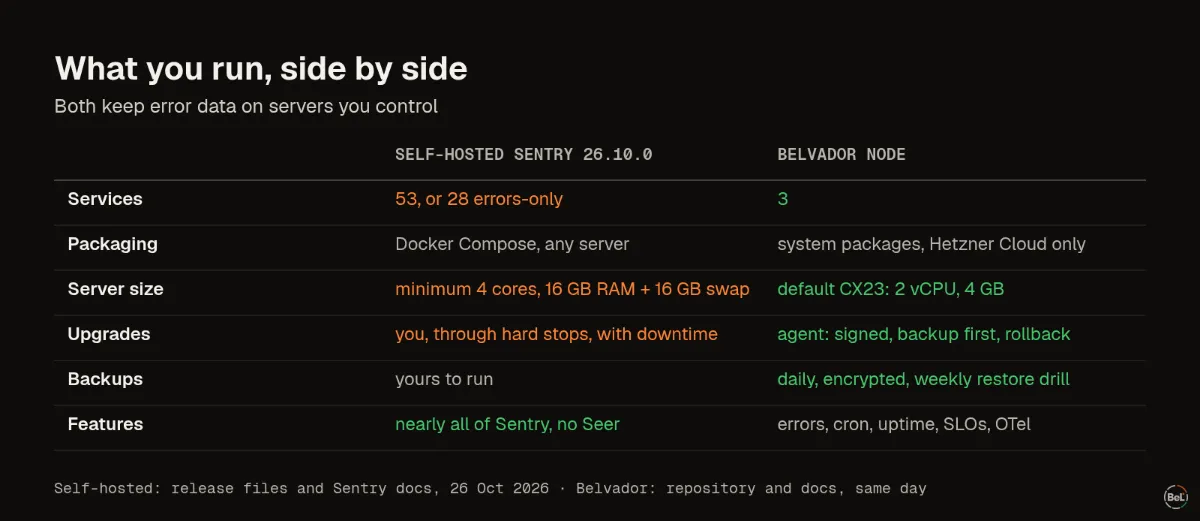
A Belvador node runs three services as system packages, without Docker: ClickHouse, the node itself and an agent. Belvador creates it inside your Hetzner project. The agent checks for signed releases every 15 minutes, takes a backup first and rolls back a release that fails to start. Backups run daily, encrypted, with a weekly restore drill.
For scale, Belvador's own production node is a CAX11 with 2 Arm vCPUs and 4 GB of RAM. Its health report at 00:43 UTC on 26 October showed 15% memory and 18% disk in use. That is one reading from a node serving a handful of small apps, not a load test.
What you give up either way#
Self-hosted Sentry gives you almost all of Sentry, including tracing, session replay and profiling. Seer and other AI features are not included, because they are closed source, and the code is under the Functional Source License.
A Belvador node gives you far less. Errors, cron and uptime monitoring, SLOs and OpenTelemetry traces and logs are there. There is no replay, profiling or integration catalog, and the node runs only on Hetzner Cloud. You own the Hetzner project and can see the server, but the node software is managed through the app, not over SSH.
Pick self-hosted Sentry if you need its feature set and have someone to run it. Pick a managed node if you want the data on your own servers and do not want to run a 53-service stack. In both cases, storage location is only half of a data question; where an AI provider processes an error is the other half.
Where Belvador fits#
The BYOC on Hetzner page explains what runs where and who can read it. The self-hosted Sentry comparison puts the two side by side with sources. Before you move, the migration checklist lists what to test when you change the DSN.
Keep reading#
Part of the guide: Sentry alternative for AI-built apps: what to check before you switch
Related posts
All posts
Product
Sentry alternative for AI-built apps: what to check before you switch
We put Sentry's browser SDK and Belvador's on the same page and recorded what each one sent. For an app an AI agent wrote, defaults, data location and proof of delivery matter before price.
Andrew Babo5 min read
Product
Sentry SDK migration checklist: test every assumption
Changing a DSN is the easy part. We ran the official Sentry Node.js SDK with two configs and listed every item it sent, and what a Sentry-compatible backend does with each one.
Andrew Babo5 min read
Read next in the docs
See your own production errors this way
Belvador runs on your own Hetzner server: errors, cron jobs, uptime and traces, with your data staying yours.