

How to scrub PII from error monitoring without losing context
We ran Belvador's scrubber on 16 synthetic error samples, fixed the three gaps that were ours and ran it again. Secrets with a known shape went; phones and a name still got through.
Andrew Babo5 min read
On this page

Automatic scrubbing in error monitoring is good at one thing: secrets with a recognizable shape. API keys, tokens, JWTs, card numbers and passwords in URLs all have patterns a rule can match. Personal data without a fixed shape, such as a name or a local phone number, gets through, and rules based on key names also remove things you wanted to keep.
We measured both on 26 October 2026. We ran Belvador's own node scrubber, with every rule on, over 16 synthetic samples, and wrote down what a careful person would want removed before running it. Three of the misses were bugs in our rules, so we fixed them and ran the same samples again with the code that shipped as node 0.1.30.
Why the scrubber exists at all#
Error reports collect context on purpose, and context includes whatever was in memory when things broke. Sentry, for example, turns server-side scrubbing on by default: “Data scrubbing is enabled by default and we highly recommend you keep it that way.” OpenTelemetry's guidance makes the limit plain: a tool “can’t determine what data is sensitive in your specific context on its own.”
So there are two jobs. A generic scrubber removes what looks dangerous everywhere. Your own code removes what is sensitive in your app.
The 16 samples#
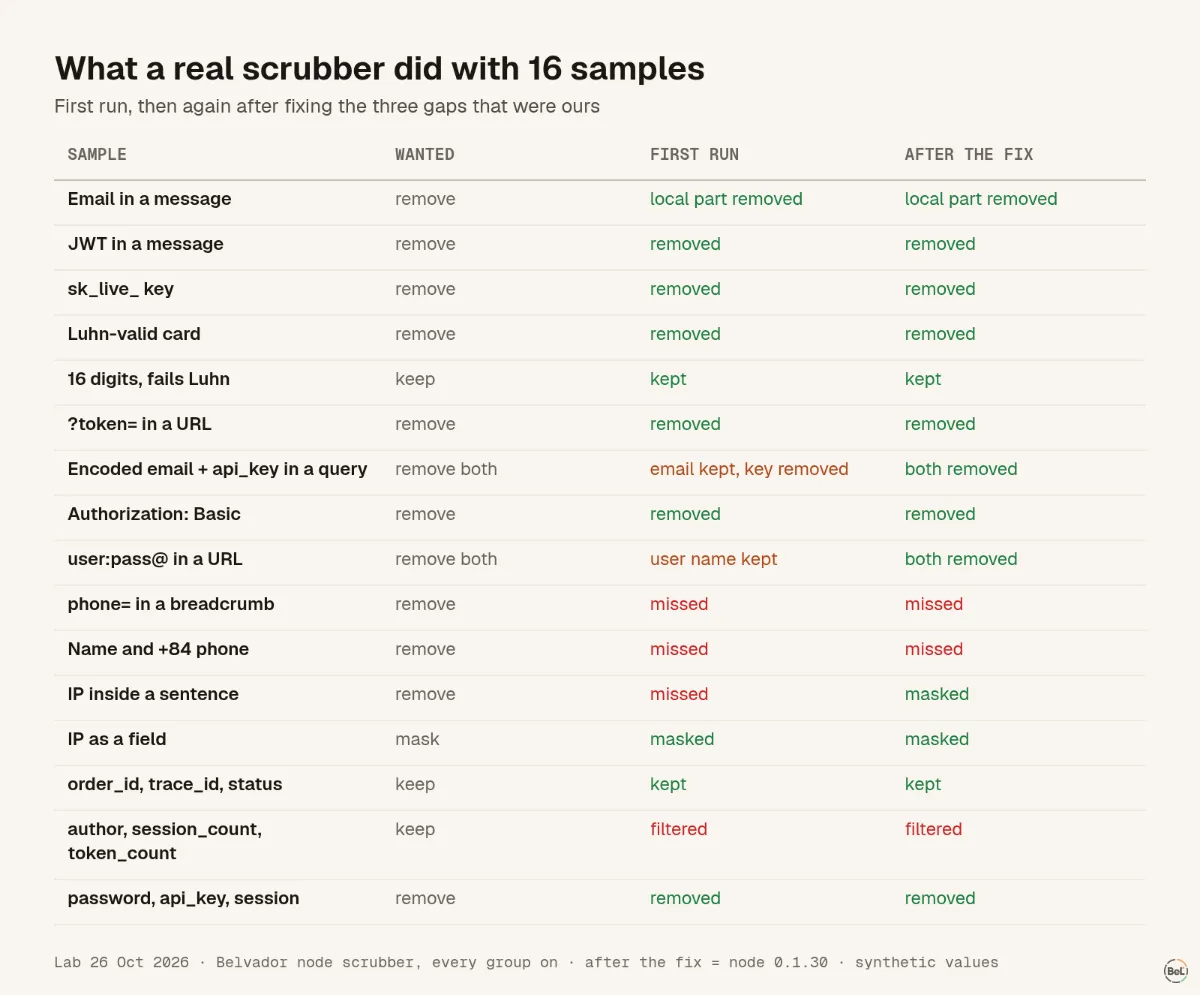
| Sample | Wanted | First run | After the fix (node 0.1.30) |
|---|---|---|---|
| Email in an error message | remove | local part removed, domain kept | same |
| JWT in a message | remove | removed | same |
sk_live_… key in a message | remove | removed | same |
| Card number that passes the Luhn check | remove | removed | same |
| 16 digits that fail the Luhn check | keep | kept | same |
?token= in a URL | remove | removed, order=ORD-42 kept | same |
email=linh%40example.test in a query | remove | kept: the @ was encoded as %40 | local part removed |
Authorization: Basic … in text | remove | removed | same |
https://user:pass@host | remove both | password removed, user name kept | both removed |
phone=0912345678 in a breadcrumb | remove | kept | kept |
A name and a +84 phone number in a note | remove | kept | kept |
| An IP address inside a sentence | remove | kept | last part zeroed |
| An IP address as a field value | mask | last part zeroed: 192.0.2.0 | same |
order_id, trace_id, status, retries | keep | kept | same |
author, session_count, token_count | keep | all three filtered | all three filtered |
password, api_key, session | remove | removed | same |
Thirteen samples should have lost something. In the first run, seven were fully cleaned and one masked as designed; two were only partly cleaned, and three were missed. After the fix, nine were fully cleaned and two masked, and only the two samples with a phone number got through. Both samples that should have been kept were kept in both runs, and the same three harmless keys were filtered.
What the misses have in common#
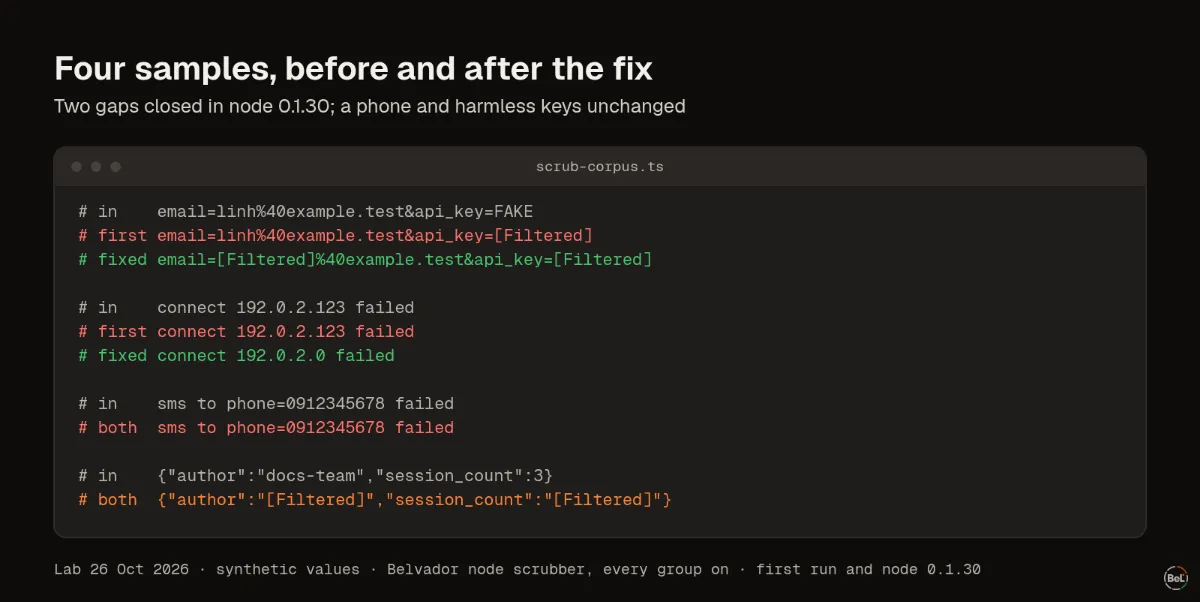
The misses had no shape a generic rule could rely on.
- Phone numbers come in many local formats. A rule broad enough to catch
0912345678and+84 912 345 678would also eat order numbers, timestamps and IDs. - Names are just words. No pattern separates “Nguyễn Văn An” from a product name.
- The encoded email had the right shape, but only after decoding. The first run matched the raw text.
- The IP in a sentence was skipped because the first run masked IP addresses only when the whole value was one.
The encoded email, the user name in the URL and the IP inside text were gaps in our own rules, and node 0.1.30 closes them (SDK 0.4.1 does the same for the email and the IP): the scrubber now also reads %40 as @, drops the whole user:pass@ part of a URL, and zeroes the last part of a public IPv4 address inside text. Private addresses such as 10.0.3.17 stay readable, because they help debugging and identify no one. Names and phone numbers will always need help from your code.
Why harmless keys disappear#
Key-name rules work by “contains”: any key whose name includes auth, session or token is filtered. That catches user_auth_header and sessionToken, which you want. It also catches author, session_count and token_count, which you did not.
This trade is deliberate: a scrubber that misses a secret is worse than one that hides a counter. If a field matters for debugging, rename it, for example llm_tokens_used becomes llm_usage_units, or keep it as a tag your team has checked.
What to add in your own code#
Error SDKs give you a hook that runs before anything is sent. Sentry's docs describe beforeSend as one that “can be used, for instance, for manual PII stripping before sending.” Use it for what only your app knows:
- Replace user objects with an internal ID. Never send emails or names as the user.
- Remove free-text fields you collect: notes, addresses, messages, search queries.
- Normalize phone numbers in your own format, then mask them.
- Decode query strings before your own checks run.
- Keep what helps debugging and is not personal: order IDs, trace IDs, status codes, retry counts, feature flags.
Test it with fake values only. OWASP's list of what must never be logged starts with “Authentication passwords Database connection strings Encryption keys”; a test that uses a real one has already leaked it.
Where Belvador fits#
Belvador scrubs twice: the SDK cleans events before they leave your app, right after your own beforeSend runs, and your node cleans them again with separately written rules before storing anything. Data protection lists every rule and the cases no filter can guarantee, and SDK configuration shows where beforeSend goes. Scrubbed events are stored on a node in your own Hetzner project, as the BYOC on Hetzner page explains, and the security page covers the rest of Belvador's controls.
Keep reading#
Part of the guide: How to send production errors to an LLM safely
Related posts
All posts
Guides
How to send production errors to an LLM safely
Error events hold secrets, personal data and text users typed. We sent one with a hidden instruction to four models 72 times; pasted raw, one model obeyed every time and once said to turn off auth.
Andrew Babo6 min read
Engineering
Secrets in exception messages: what the Node SDK sends by default
We put a fake secret into 14 real Node.js errors and reported them with Sentry's Node SDK at its defaults. 13 of 15 secrets left the process, in the message, a breadcrumb or the source lines.
Andrew Babo6 min read
Read next in the docs
See your own production errors this way
Belvador runs on your own Hetzner server: errors, cron jobs, uptime and traces, with your data staying yours.