

Secrets in exception messages: what the Node SDK sends by default
We put a fake secret into 14 real Node.js errors and reported them with Sentry's Node SDK at its defaults. 13 of 15 secrets left the process, in the message, a breadcrumb or the source lines.
Andrew Babo6 min read
On this page
API keys, tokens and webhook URLs end up in exception messages, and an error tracker's privacy default does not remove them. sendDefaultPii: false controls request data such as cookies, headers and IP addresses. It does not read the text of an error.
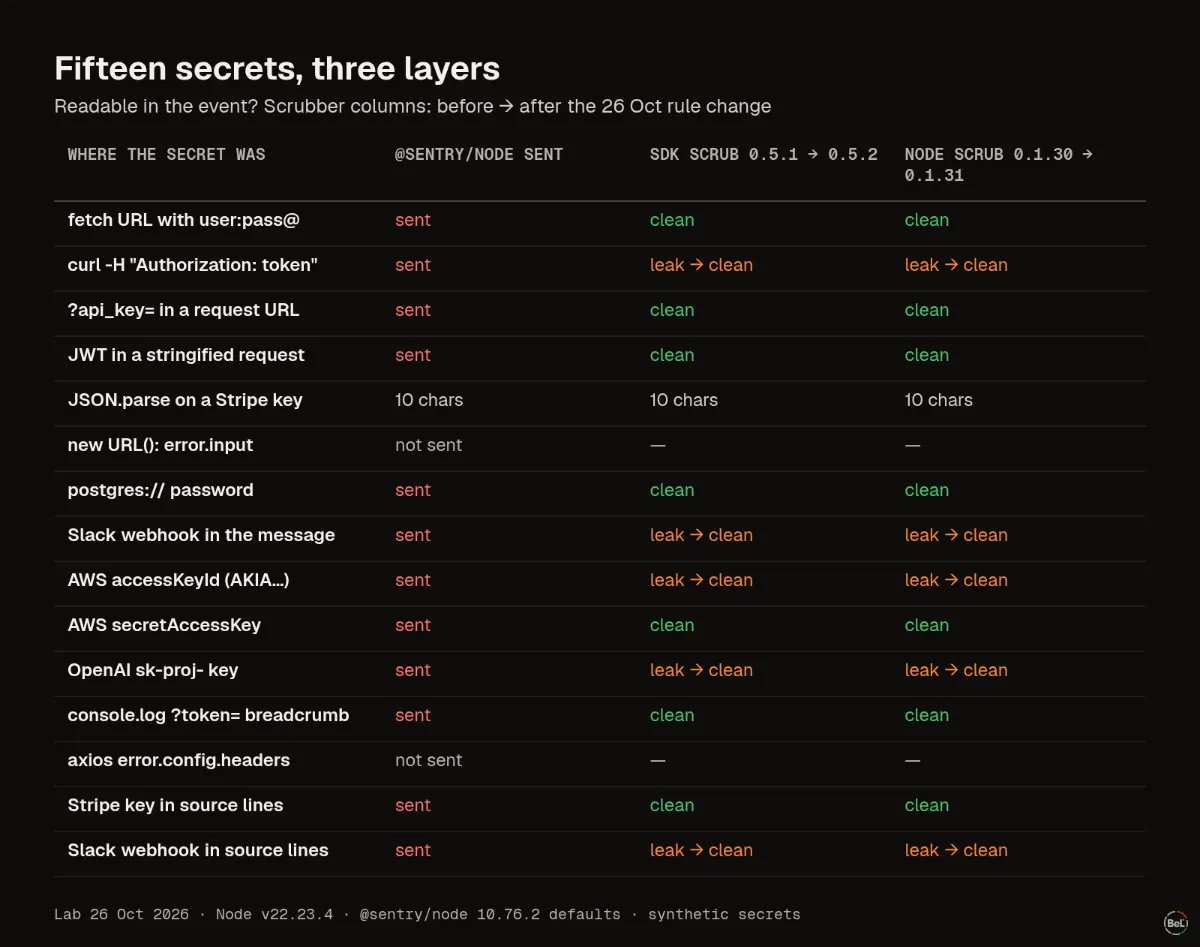
We checked on 26 October 2026. Fourteen real Node.js errors, each carrying a fake secret in a realistic shape, reported with Sentry's official Node SDK (@sentry/node 10.76.2) at its default options. 13 of the 15 secrets left the process: 12 whole, one as its first ten characters. Then we ran every event through two scrubbers, ours, and found the shapes they missed.
Where the secrets came from#
Some of these errors are written by Node itself, some by the kind of app code that is easy to write:
TypeError: Request cannot be constructed from a URL that includes credentials: https://lab:Pa55-word-91@api.example.test/v1/ordersError: Command failed: curl -sf -H "Authorization: token ghp_LabTok3n…" http://127.0.0.1:9/reposError: GET https://api.example.test/v1/orders?api_key=lab_key_8f3a91c2d4e5&page=2 returned 401Error: S3 client config invalid: {"region":"eu-central-1","accessKeyId":"AKIALABEXAMPLE7Q2W3E",…}SyntaxError: Unexpected token 's', "sk_live_51"... is not valid JSONNode's fetch quotes the whole URL, password included, when it refuses one. execSync puts the full command line into the message, so a token passed as a curl header goes with it. V8's JSON.parse quotes the first ten characters of the input, which is enough to identify a Stripe live key. The rest came from app code: a request URL with an api_key parameter, a stringified request object, a connection string, a config dump, a webhook URL, an OpenAI key.
| Where the secret was | Sent by @sentry/node |
|---|---|
Message: 9 secrets in 8 errors (URL password, curl command, api_key, JSON request, connection string, webhook, AWS key pair, OpenAI key) | yes, whole |
Breadcrumb from a console.log of a URL with ?token= | yes, in the message and the arguments |
Source context: a key hard-coded on the line above the throw (2 cases) | yes, in the lines the SDK sends around each frame |
JSON.parse error on a Stripe key | first 10 characters |
error.input of new URL() | no |
error.config.headers of an axios-style error | no |
Three of those paths are easy to forget. The Node SDK records console calls as breadcrumbs by default, so a debug log line before the failure travels with it. It also sends a few lines of source around each stack frame, so a key hard-coded next to the throw is in the event even though the error never mentions it. And the two that stayed home were on error properties, not in the message: the SDK does not serialize those unless you turn on its extra error data integration, which we did not test here.
What sendDefaultPii covers#
Sentry's data management guide is clear that the SDK's defaults are about personal data in request context, and that scrubbing everything else is up to you, in beforeSend or on the server. Our lab only confirms it: none of the 13 secrets that left the process was touched by the SDK, because none of them was in a cookie, a header or a user field.
That is not a flaw in one SDK. An exception message is free text written by your code and your libraries. An SDK cannot know which part of it is a secret without guessing, and guessing has a cost: our PII scrubbing post shows harmless fields lost to rules that err toward filtering.
Two scrubbers, and the shapes they missed#
Belvador scrubs twice: once in its own @belvador/* SDKs before an event leaves the app, once on the node before anything is stored, whatever SDK sent the event. The two are written separately and share only their test cases. We ran each raw event through both.
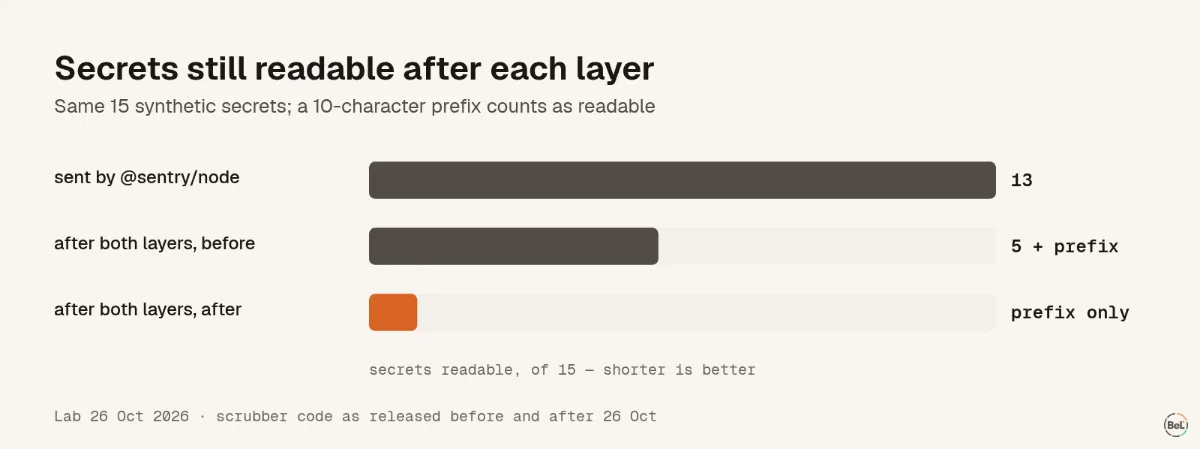
With the rules released before that day (SDK 0.5.1, node 0.1.30), the scrubbers caught every secret with a shape they knew: the URL password, api_key= and token= parameters, the JWT inside the JSON request, the postgres:// userinfo, the secretAccessKey field, the hard-coded Stripe key in the source lines. Five were still readable after both layers:
- the GitHub token behind
Authorization: token, because onlyBearerandBasicwere known schemes; - the AWS access key ID (
AKIA…), because its field name,accessKeyId, is not a sensitive name; - the OpenAI
sk-proj-key; - the Slack webhook URL, twice, in the message and in source context.
Each of these has a documented, recognizable prefix. GitHub, for example, documents its token prefixes (ghp_, gho_, github_pat_ and others) precisely so they can be found. So we added rules for provider-prefixed keys, for the secret path of Slack and Discord webhooks and Telegram bot URLs, and for Authorization: <scheme> <value> in text, with 16 new test cases and 4 lookalikes that must stay untouched. Released the same day as SDK 0.5.2 and node 0.1.31, the same 15 secrets left nothing readable after either layer.
The 10-character JSON.parse prefix stays. It names a Stripe live key but is not one, and no rule can remove a fragment without removing ordinary text.
What to do in your own code#
- Keep secrets out of messages. Log the host and status, not the URL with its query. Throw
new Error("orders API returned 401")and attach safe fields separately. - Do not stringify whole objects into an error. Request objects and configs are where keys live.
- Pass tokens through the environment, not the command line, so a failed
execSynccannot quote them. - Scrub in
beforeSendfor the shapes your app uses, and test it: throw an error containing a fake key and look at the event you receive. - Check breadcrumbs and source lines, not only the message. Turn off console breadcrumbs if your logs carry tokens.
- Rotate any key you find in an event. Removing it from the tracker does not undo the copy.
Where Belvador fits#
Belvador's data protection page lists every rule both layers apply, including the provider-prefixed keys added in SDK 0.5.2 and node 0.1.31. On Node.js servers Belvador uses Sentry's own SDK with a scrubbing hook, as the Node guide shows, so the node's scrubber is the layer every event goes through, on a server in your own Hetzner project. The security page covers the other controls. If those events then go to an AI tool, the pillar on sending production errors to an LLM covers the next step.
Keep reading#
Part of the guide: How to send production errors to an LLM safely
Related posts
All posts
Guides
How to send production errors to an LLM safely
Error events hold secrets, personal data and text users typed. We sent one with a hidden instruction to four models 72 times; pasted raw, one model obeyed every time and once said to turn off auth.
Andrew Babo6 min read
Engineering
How to scrub PII from error monitoring without losing context
We ran Belvador's scrubber on 16 synthetic error samples, fixed the three gaps that were ours and ran it again. Secrets with a known shape went; phones and a name still got through.
Andrew Babo5 min read
Read next in the docs
See your own production errors this way
Belvador runs on your own Hetzner server: errors, cron jobs, uptime and traces, with your data staying yours.