

TanStack Start loader errors: why the SSR stack points at your HTML page
A route loader that throws during server rendering reaches the browser as a message and nothing else. We traced one error through three setups and counted what an error tracker received each time.
Andrew Babo5 min read
On this page
A TanStack Start route loader that throws during server rendering reaches the browser as its message and nothing else. If your error tracker only runs in the browser, it reports that rebuilt error, and the stack points at your HTML page instead of the loader. If you also report on the server, you can get the same failure twice.
The fix is to report on the server, where the real stack exists, and tell the browser that error is already taken care of. We traced one failing loader through three setups on 26 October 2026 and counted every event.
Why the stack disappears#
On the first page load, TanStack Start runs the route loaders on the server, renders the HTML and sends the router's state along with it, errors included. The browser picks that state up and shows the route's error component.
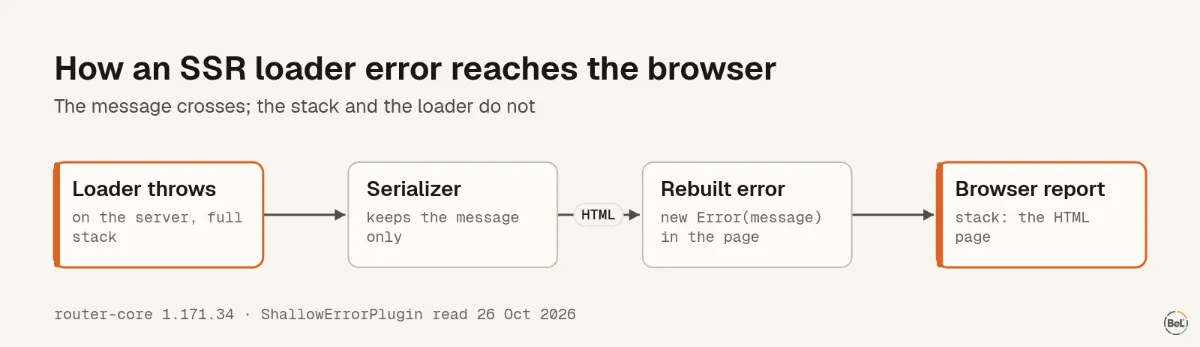
Errors do not cross that line whole. The router's serializer has a plugin for them, and its source says what it keeps: “this plugin serializes only the message part of an Error”. The comment gives the reason, errors with functions attached that cannot be serialized, and it is a sensible trade. On the other side it becomes new Error(message), built by a script inside the page.
So the browser holds an error with the right message, a fresh stack, and no trace of the loader.
The lab#
One small TanStack Start app, built for production with @tanstack/react-start 1.168.60 and @tanstack/router-core 1.171.34. Its /orders route has a loader that always throws:
function loadOrders(): { count: number } { throw new Error("orders loader failed on the " + (typeof window === "undefined" ? "server" : "browser"));}export const Route = createFileRoute("/orders")({ loader: () => loadOrders(), component: Orders });We opened /orders directly, so the loader ran during server rendering, and we navigated to it from /, so it ran in the browser. Three runs each, in Chromium, with a local collector recording every event: where it came from, how it was captured and its top frames. We used our own SDK, @belvador/tanstack-start, in three setups.
What arrived#
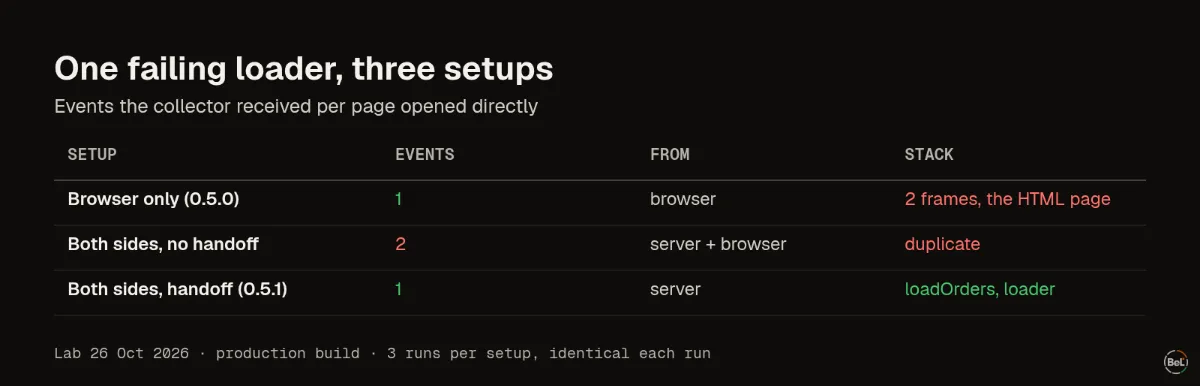
| Setup | Events per SSR failure | Reported from | Stack |
|---|---|---|---|
| Browser only (SDK 0.5.0) | 1 | browser | 2 frames, both the /orders HTML page |
| Browser and server, no handoff | 2 | server, then browser | duplicate |
| Browser and server, with handoff (0.5.1) | 1 | server | loadOrders and loader in the server bundle |
Browser only. Every run reported the error once, which is good: nothing was lost. But both frames were /orders itself, the page that rebuilt the error. A reader of that issue learns the message and the URL, and has to find the loader on their own. After a client navigation the same setup did better, because the loader ran in the browser and the stack showed loader in the bundle.
Both sides, no handoff. Reporting from the route's onError on the server gave the right stack, and then the browser reported the rebuilt copy too: two events for one failure, in all three runs. A tracker that marks an error as "already sent" cannot recognize the copy, because that mark lives on the original error object, which never left the server.
Both sides, with a handoff. The server reports the error, then adds a short hash of its message to the state it sends with the page. The browser skips one error whose message matches that hash. One event per failing page, from the server, with the loader's frames. With 40 concurrent requests, half to /orders and half to /, all 20 failing pages carried a hash, none of the 20 home pages did, and the collector received 20 server events.
How to set this up, with any tracker#
TanStack Router gives you two hooks, and they answer different questions. onError is “called when an error occurs during the route loading”; that is the place to report on the server, where it still has the original error. onCatch and defaultOnCatch run when an error boundary catches it, which in the browser includes the rebuilt SSR copy.
- Report loader errors on the server, from
onErroror the server half of your SDK, so the stack is the real one. - Decide how the browser avoids the copy. Either skip errors the server already reported, as above, or accept two events and group them. Do not drop all SSR errors in the browser: an app without server reporting would then lose them.
- Make sure an error component exists, on the route or through
defaultErrorComponent, as TanStack Start's error boundary guide shows.defaultOnCatchdoes not run for the router's outermost fallback. - Test it once in a production build: throw from a loader, load the page directly, then navigate to it, and count the events. Test the build you ship, not only the dev server.
Where Belvador fits#
@belvador/tanstack-start 0.5.1 does the handoff above: withBelvadorRouter wraps your router options and the server half reports loader errors with the server stack, then the browser skips that one error. Without the server half, the browser still reports it once. The hash never contains the message, and your own dehydrate and hydrate keep working. The TanStack Start guide has the three places to wire it, and the TanStack Start page shows the rest of the setup. Lovable apps are TanStack Start apps, so the blank page post covers the other way these apps fail on first load.
Keep reading#
Part of the guide: JavaScript error handling for AI-generated apps: where errors escape
Related posts
All posts
Guides
JavaScript error handling for AI-generated apps: where errors escape
We threw errors in eight places in a React 19 page and five places in a Node.js server, three runs each. Some crashed the server, some left a button that did nothing, and one hung a request forever.
Andrew Babo6 min read
Engineering
Production source maps with Vite: what each setting really ships
We built one module with each of Vite's three source map settings and threw an error from each build. One gave a useless stack frame; the other two shipped our whole source code in a file.
Andrew Babo4 min read
Read next in the docs
See your own production errors this way
Belvador runs on your own Hetzner server: errors, cron jobs, uptime and traces, with your data staying yours.