

Lovable app shows a blank page: find the cause in the console
Open the published page, open the console, reload. In our tests the first red line told five kinds of blank or frozen page apart, and each one has a different fix.
Andrew Babo5 min read
On this page
- First: is it only the published site?
- Read the first red line
- "X is required" as the page loads: missing configuration
- "Cannot read properties of undefined": a render crash
- "Failed to fetch dynamically imported module": an old tab
- A red 404 in Network: the main file is missing
- Give Lovable the line, not "it's broken"
- So you hear about the next one first
- Limits of these tests
When a Lovable app shows a blank page, open the published site itself, open the browser's developer tools and reload. The first red line in the Console names the cause, and the Network tab confirms it. Paste that exact line into Lovable, and switch to Plan mode if one fix has already failed.
We broke a small React app and a TanStack Start app on purpose on 26 October 2026 and wrote down what the console said each time. Five different causes gave five different first errors. Each one has its own fix.
First: is it only the published site?#
Open the preview and the published URL side by side. If both are blank, the problem is in the code, and Lovable can see it in the preview. If only the published site is blank, the difference is in what was published: its configuration, its files, or the hosting.
Check the platform before your code. On 27 March 2026, Lovable's status page reported "an issue that is causing published projects to display blank pages", and said republishing fixed it (Lovable status). If status.lovable.dev shows an incident, wait for it or republish.
Read the first red line#
In Chrome or Edge, press F12 (Cmd+Option+J on a Mac) and open the Console tab. Then open the Network tab, tick "Disable cache" and reload. Ignore everything after the first error: later errors are usually the same failure spreading.
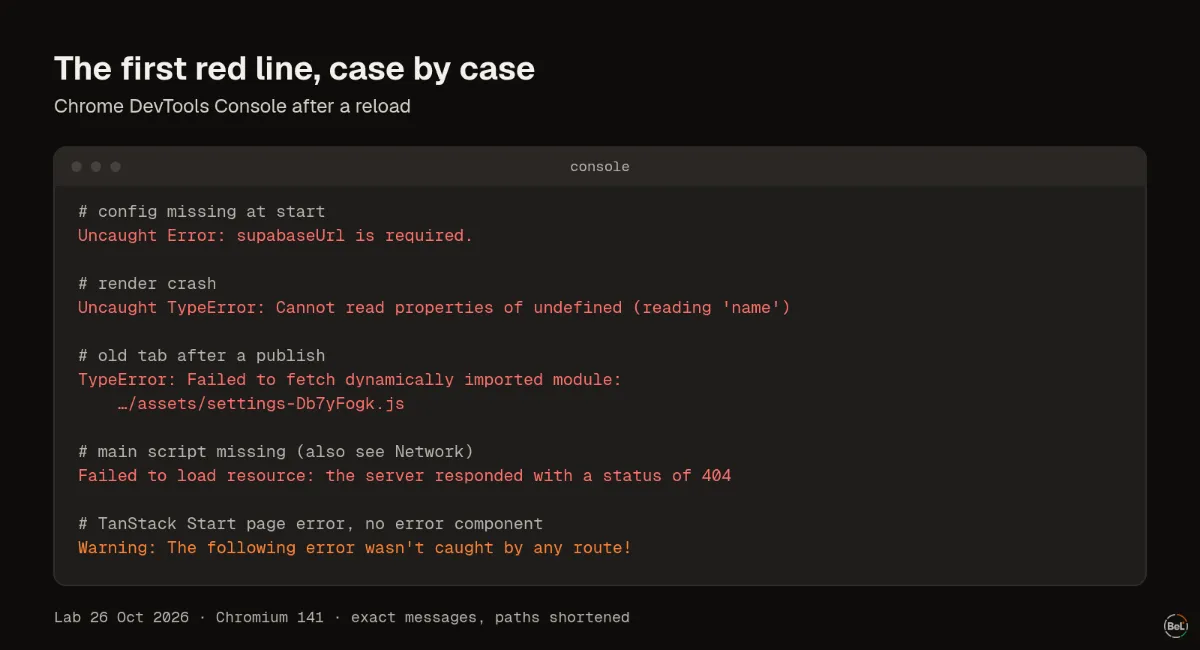
These are the first lines we saw, and what each one means.
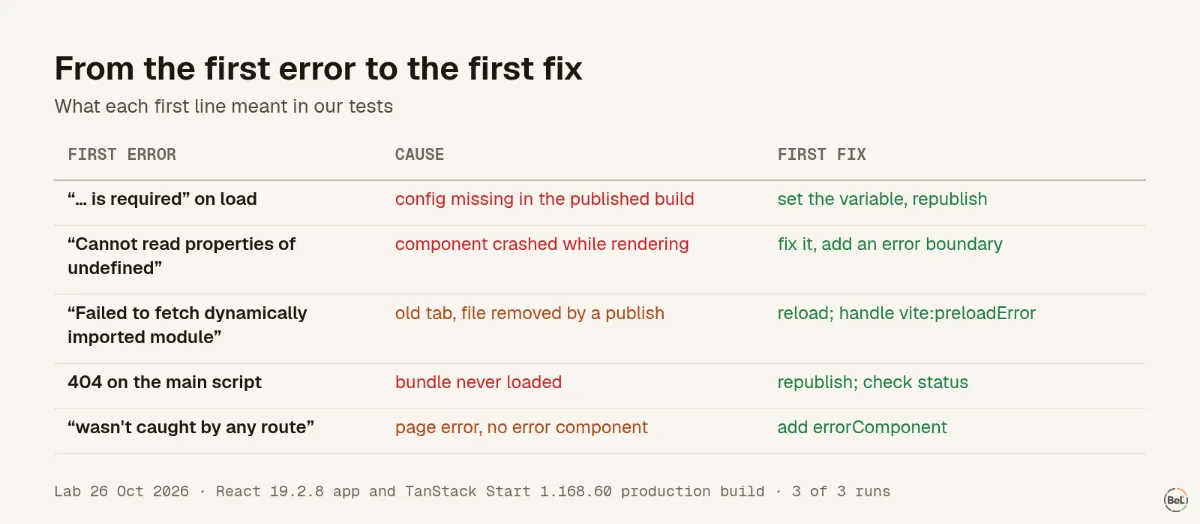
"X is required" as the page loads: missing configuration#
Uncaught Error: supabaseUrl is required. appeared before anything rendered. The app creates its Supabase client when the file loads, and the published build had no URL for it. In a single-page app the result is a blank page. In a TanStack Start app, where the server renders the page first, it looked fine but nothing on it worked: the "Add to cart" button did nothing in 3 runs of 3.
The fix is the value, not the code. Add the missing variable or secret where the published app reads it, then republish. Ask Lovable to show you which variables the code expects and where each one is set.
"Cannot read properties of undefined": a render crash#
TypeError: Cannot read properties of undefined (reading 'name') with a component name in the stack means a component got data in a shape it did not expect. With no error boundary, React removes the whole page. Lovable can fix the component; the stack tells it which one.
Ask for an error boundary as well, so the next crash replaces one part of the page instead of all of it. Our post on React error boundaries tested which errors a boundary catches and which it never sees.
In a TanStack Start app, a crash in a page shows the router's fallback, "Something went wrong!", instead of a blank page. The console shows the real error and, if the app has no error component, a warning that it "wasn't caught by any route".
"Failed to fetch dynamically imported module": an old tab#
TypeError: Failed to fetch dynamically imported module: …/assets/settings-….js after a publish means a visitor's tab still runs the previous version. It asks for a page file that the new publish no longer has. Reloading fixes it for that visitor.
Vite, which builds Lovable apps, fires a vite:preloadError event for exactly this case, and its docs suggest reloading the page (Vite docs). In our TanStack Start build the event fired in 3 runs of 3. A handler that reloads once, and gives up if the file is really missing:
if (typeof window !== "undefined") { window.addEventListener("vite:preloadError", () => { const last = Number(sessionStorage.getItem("reloaded-at") ?? 0); if (Date.now() - last < 10_000) return; // reloaded already: the file is really gone sessionStorage.setItem("reloaded-at", String(Date.now())); window.location.reload(); });}We tested that the event fires, not this handler's reload. Vite also notes that the HTML must not be cached, or the reload brings back the old file names.
A red 404 in Network: the main file is missing#
If the Console shows Failed to load resource: the server responded with a status of 404 and nothing else, look at the Network tab. When the failing file is the main script, usually index-<hash>.js, no app code ran at all. An error tracker cannot report this, because it is part of the code that did not load.
Republish first. If it comes back, compare the file name the HTML asks for with what the published site serves. Our monitoring post has a 15-line script that checks this after every publish.
Give Lovable the line, not "it's broken"#
Lovable's own guide says to describe what is broken, where, and what happened, and to paste the exact error when it happens "outside the preview, for example on your published site". It also says "switching to Plan mode after one or two failed attempts is usually faster than trying again" (Lovable debugging guide). A prompt that follows both:
My published app (not the preview) shows a blank page on /settings.First console error after a reload:TypeError: Failed to fetch dynamically imported module: https://my-app.lovable.app/assets/settings-Db7yFogk.jsNetwork: that file returns 404. The preview works.Before changing code, explain the cause and what you would change.Notice the file names. Lovable's own example error, Q9() is undefined at …/assets/index-DWQbrtrQQj.js:435, points into a minified bundle. That tells you where the code broke in the built file, not which source file to open. Source maps turn it back into a file and line, and the source maps guide shows how Belvador applies them.
So you hear about the next one first#
Every case above happened in a visitor's browser, and every page returned HTTP 200. You only saw it because someone told you. An error tracker started before your app's code reports four of the five on its own; the missing bundle needs the outside check. The setup prompt post gives the prompt that sets both up in a Lovable app, and the TanStack Start guide lists each file it touches.
Limits of these tests#
Two small apps, Chromium only, run locally rather than on Lovable's hosting. Your first error may be worded differently in Safari or Firefox, and a large app can fail in ways this list does not cover. The scripts and results are in our evidence folder, and the TanStack Start page shows what Belvador reports in these apps.
Part of the guide: Monitoring vibe-coded apps: what breaks after you publish
Related posts
All posts
Guides
Monitoring vibe-coded apps: what breaks after you publish
We served five broken builds of a React app. Every page was blank and returned HTTP 200. An error tracker reported three, one of them only after we moved a single import line.
Andrew Babo7 min read
Guides
A prompt to add error tracking to a Lovable app, and how to check it
A setup prompt is only as good as its file order. Ours put init a few lines too late: in a production build it reported 0 of 12 start-up and page crashes. The fixed order reported 12 of 12.
Andrew Babo6 min read
Read next in the docs
See your own production errors this way
Belvador runs on your own Hetzner server: errors, cron jobs, uptime and traces, with your data staying yours.