

OpenTelemetry GenAI conventions in practice: what gets recorded
We ran the official OpenAI instrumentation for Python in five settings. By default it uses older attribute names, records nothing for the Responses API and leaves agent and tool spans to you.
Andrew Babo3 min read
On this page
The OpenTelemetry GenAI conventions name the spans an LLM app should emit, such as chat {model} and execute_tool {tool}, and keep prompts out by default. We ran the official OpenAI instrumentation for Python in five settings on 26 October 2026. By default it used older attribute names, recorded nothing for the Responses API and left agent and tool spans to us.
What the conventions ask for#
The conventions live in their own repository and are marked “Development”, so names can still change (GenAI spans). The parts an agent needs:
- A model call is a
CLIENTspan named{gen_ai.operation.name} {gen_ai.request.model}, such aschat gpt-4o. - An agent run is
invoke_agent {gen_ai.agent.name}; a tool run isexecute_tool {gen_ai.tool.name}, bothINTERNAL. - The provider goes in
gen_ai.provider.name, which replacedgen_ai.system. gen_ai.tool.call.idis set only when the model supplied one. Never make one up.- Prompts and answers “SHOULD NOT” be captured by default; capturing them is opt-in.
Install: pin both packages#
We used opentelemetry-instrumentation-openai-v2 2.4b0, the newest on PyPI that day (PyPI). A plain install failed on import. The package asks for opentelemetry-util-genai>=0.4b0.dev, pip chose 1.3b0, and that release no longer has the module 2.4b0 imports:
ModuleNotFoundError: No module named 'opentelemetry.util.genai.instruments'Pinning the helper to the version released alongside it fixed it:
pip install "opentelemetry-instrumentation-openai-v2==2.4b0" "opentelemetry-util-genai==0.4b0"Old names unless you opt in#
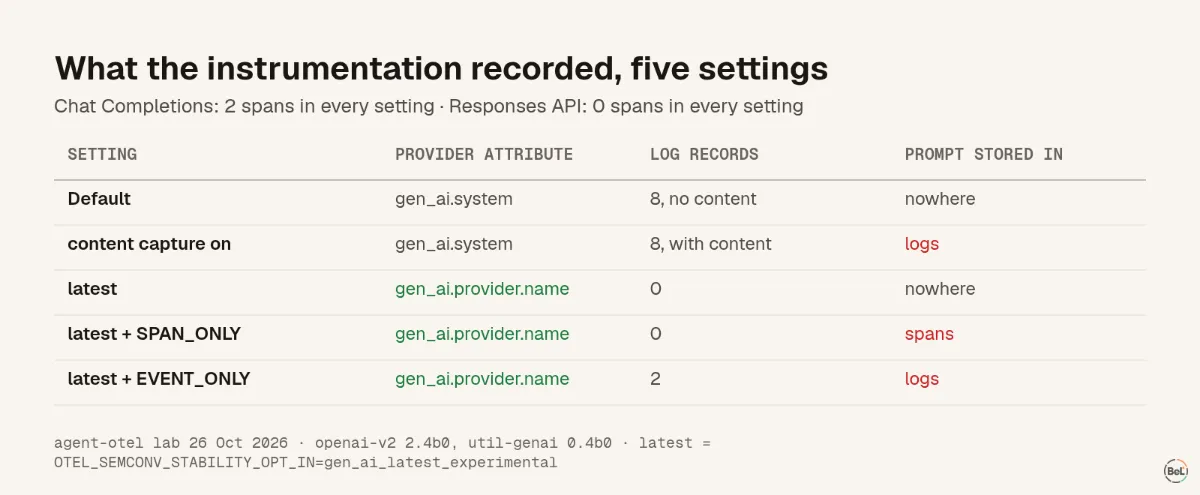
Out of the box, chat spans carried gen_ai.system: openai, and each pair of model calls also wrote 8 log records, even with content off. With OTEL_SEMCONV_STABILITY_OPT_IN=gen_ai_latest_experimental, spans switched to gen_ai.provider.name and the log records stopped. If your backend or dashboards filter on one of these names, pick the mode on purpose.
What it does not record#
- The Responses API. The package wraps
chat.completions.createandembeddings.create. A streamed Responses call produced 0 spans in all five settings. - Agent and tool spans. It records model calls only;
invoke_agentandexecute_toolare yours to write, or your framework's. - The real vendor behind a gateway. We sent a Gemini model through an OpenAI-compatible endpoint, and the provider read
openai. The model name,google/gemini-3-flash-preview, is the honest field.
Turning prompts on: size and privacy#
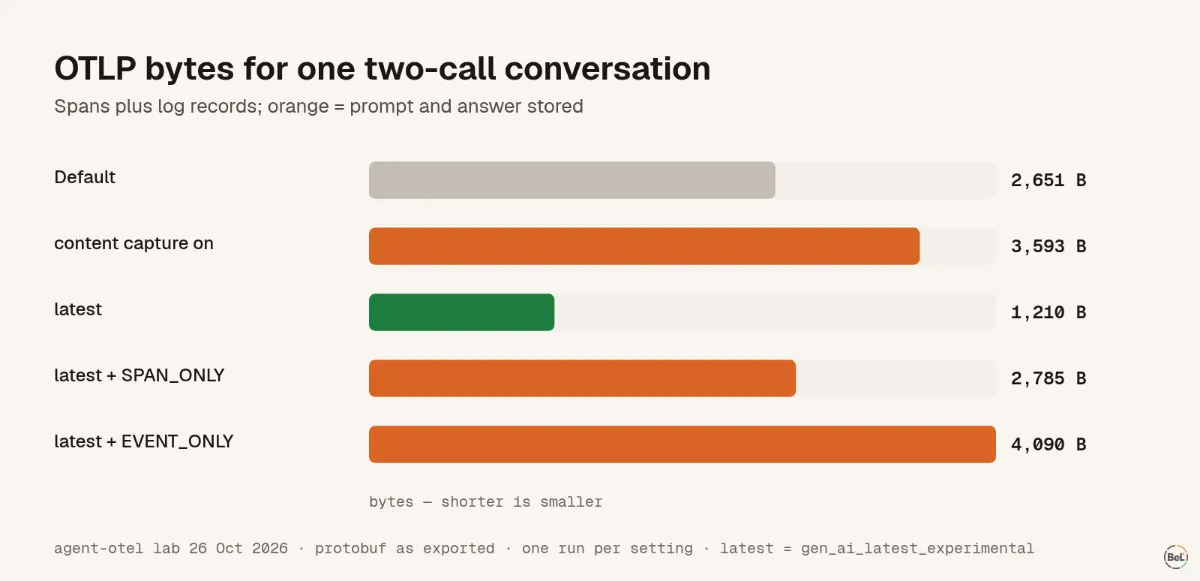
Capturing content on spans grew the span payload from 1,210 to 2,785 bytes for a short conversation, 2.3 times. Real agents resend the whole history on every call, so the growth compounds.
Our test message included a name and an email address. When we ran the captured data through Belvador's own node filter, the email became [Filtered]@example.com. The name and the rest of the message were stored as sent. A filter can catch patterns, not meaning, which is why scrubbing PII from error data starts in your code. The conventions suggest storing content externally and putting a reference on the span.
Where Belvador fits#
Belvador takes GenAI spans like any other OTLP spans, from the Python setup, and stores them on your node. Its OpenTelemetry privacy guide lists GenAI prompt and completion content among the settings to leave off. It shows these spans in the ordinary waterfall; there are no LLM-specific screens. The OpenTelemetry page has the overview, and AI agent observability shows what these spans revealed in a real agent. For the error side of tool spans, see tracing failed tool calls. The GenAI conventions overview lists the other operation types.
Part of the guide: AI agent observability: the failures that still return 200
Related posts
All posts
Engineering
AI agent observability: the failures that still return 200
We ran a support agent 60 times with seeded failures. Every failed refund returned HTTP 200 and reached no error tracker. Only the trace showed it, and customers heard the truth in 13 of 30 failures.
Andrew Babo4 min read
Engineering
How to trace failed agent tool calls without losing or doubling errors
When a tool fails, the agent hands the error to the model and the request still succeeds. Mark the tool span, record the exception once, and report it from the handler.
Andrew Babo3 min read
Read next in the docs
See your own production errors this way
Belvador runs on your own Hetzner server: errors, cron jobs, uptime and traces, with your data staying yours.