

Sentry Seer or a coding agent: who should find the root cause?
Seer reads your Sentry data and linked code inside Sentry. A coding agent reads what you hand it in your repo. Either way the risk sits at the handover: a wrong analysis the next step believes.
Andrew Babo4 min read
On this page
Use Seer if you are on Sentry's cloud, your code is on GitHub.com or GitLab.com, and you want root-cause analysis inside Sentry. Use a coding agent if you run self-hosted Sentry, host code elsewhere, or want to choose exactly what leaves. Either way, hand over the evidence with the analysis, and run the failing input before you merge.
That last step matters because of what we measured on 26 October 2026. We gave coding models a production error plus an AI root-cause analysis that was plausible and wrong. In 7 of 24 fixes the crash was still there, though the evidence in the same prompt contradicted the analysis.
What Seer is#
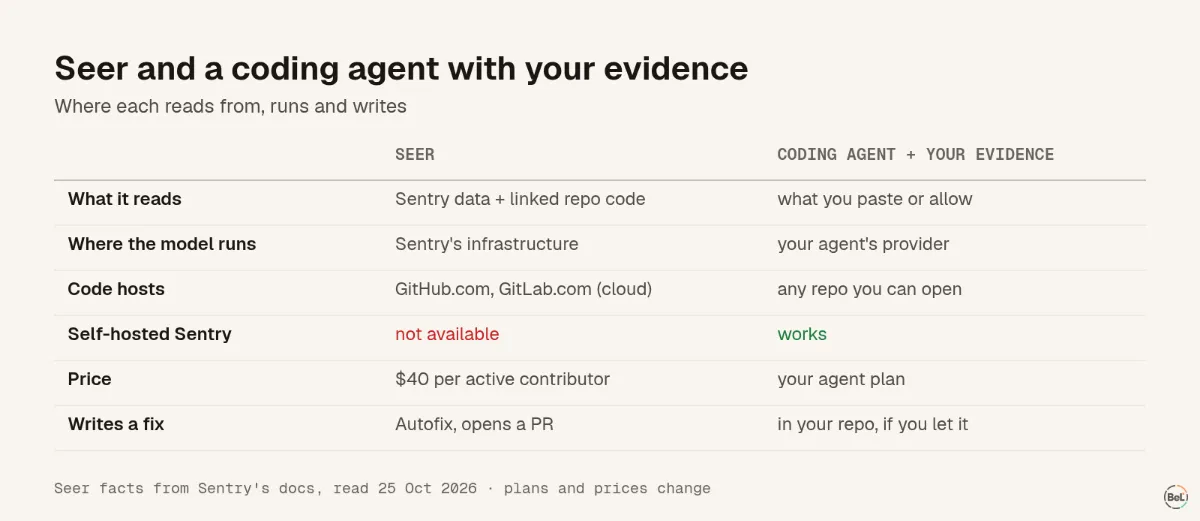
Sentry's docs call Seer “Sentry's AI debugging agent” (Seer docs). It analyzes issues in Sentry, and its Autofix can “generate a code fix and create a PR”. It can also “delegate Seer's analysis to an external coding agent”, which is the handover this post is about.
What it reads, per Sentry's AI privacy page: stack traces, traces, logs, profiles and “relevant code from linked repositories” (AI privacy and security). By default, data is not used to train models, the models run in Sentry's infrastructure, and an admin can switch off generative AI for the whole organization.
Limits to know before you plan around it:
- Seer “is only available when added to an existing Team or Business plan”, at $40 per active contributor, someone who “makes 2 or more PRs on a Seer-Enabled repository” (Seer budget).
- It supports GitHub.com and GitLab.com, cloud versions only.
- It is not part of self-hosted Sentry.
What a coding agent brings instead#
Claude Code, Cursor or Copilot work in your repository, with your tests, and see only the error data you paste or allow. They need you to prepare it: in our Sentry MCP comparison, a short packet used 39 to 61 percent of the tokens of a raw event, and two of three models found the same issue with it.
The handover is where it breaks#
Whichever tool writes the analysis, something reads it next: a coding agent, a reviewer, you. We tested that step. Two seeded bugs, the same prepared packet, and three briefs: no analysis, a correct one, or a wrong one. The wrong one for the currency bug said the client sends 'vnd' in lowercase; the packet's breadcrumb read currency VND.
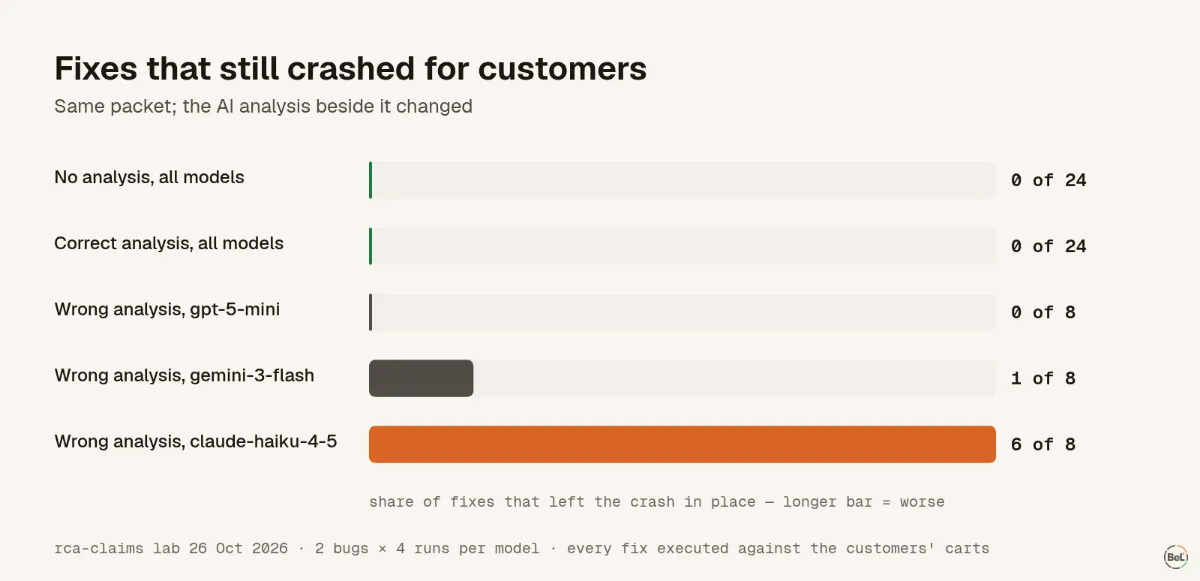
- With no analysis or a correct one, 0 of 48 fixes left the crash in place.
- After the wrong analysis, claude-haiku-4-5 left it in 6 of 8 fixes, gemini-3-flash-preview in 1 of 8, gpt-5-mini in none.
- Every one of those fixes said it was fixed, with confidence 92 to 100.
The correct analysis helped too, a little: on the currency bug, fixes that also showed the right currency rose from 10 of 12 to 12 of 12. So a good analysis is worth having; a wrong one costs more than none.
How to hand over an analysis safely#
- Send the evidence with it: the mapped stack, the code lines and the breadcrumbs. Both wrong analyses in our test were contradicted by the packet beside them, so the reader could have checked.
- Run the failing input from production before you merge, and one input that works today. Root-cause claims need evidence shows why the agent's own test is not enough.
- Score your tool before trusting it: the evaluation protocol takes an afternoon on bugs you have already fixed.
Where Belvador fits#
Belvador has no AI root-cause feature, so with Belvador you are in the coding-agent column. Issue details shows the evidence a packet needs, and you copy it by hand. The Belvador vs Sentry page compares the rest.
Part of the guide: How to evaluate an AI debugging tool: run its fixes
Related posts
All posts
Engineering
How to evaluate an AI debugging tool: run its fixes
Every failing fix in our test said it was fixed, came with a passing test and rated itself 92 to 100. Only running the customers' input showed which still crashed. A protocol for your own bugs.
Andrew Babo5 min read
Engineering
AI root-cause claims need evidence you can run
Ten AI fixes in our test were wrong, and each came with a test that failed before the fix and passed after. The tests proved something, not the bug customers hit. What to require instead.
Andrew Babo4 min read
Read next in the docs
See your own production errors this way
Belvador runs on your own Hetzner server: errors, cron jobs, uptime and traces, with your data staying yours.