

Monitoring vibe-coded apps: what breaks after you publish
We served five broken builds of a React app. Every page was blank and returned HTTP 200. An error tracker reported three, one of them only after we moved a single import line.
Andrew Babo7 min read
On this page

A vibe-coded app breaks where its builder cannot see it: in a visitor's browser, after you publish. Watch three things. Browser errors, with the error tracker started before any of your app's code; whether the page's own script files load; and errors from the server and scheduled jobs.
We tested this on 26 October 2026 with a small shop app. We made five broken builds of it, and every one showed a blank page. Every one of them also returned HTTP 200, so a check that only asks "is the page up?" saw a healthy site the whole time.
Why the preview is not production#
While you build, the app runs in the builder's preview, and the builder can read what goes wrong there. Lovable's debugging guide says so directly: "Lovable reads your app's console logs itself", and adds that pasting the exact error still helps "when the error happens outside the preview, for example on your published site" (Lovable debugging guide).
After you publish, errors happen on other people's devices. They use other browsers, keep tabs open across your next publish, and load the app with whatever configuration the published build actually has. Nobody has the console open there.
Builders are adding their own checks. Lovable's Project monitoring, in beta on paid plans, reviews your code and "recent errors from visitors" on a schedule, daily by default, and emails the project owner about important findings (Project monitoring docs). That is a useful daily review. Its own page also says it "does not replace testing" and can miss issues. What follows is the part a scheduled review cannot give you: a report of each error when it happens, and a check for failures that produce no error at all.
Five broken builds, all HTTP 200#
The lab app is a single-page React 19 shop: a home page, a settings page loaded on demand, and a Supabase client created when its module loads, the way many generated apps do it. We built it with esbuild, served it locally, and opened it in Chromium three times per case. A local collector recorded what the error tracker sent.
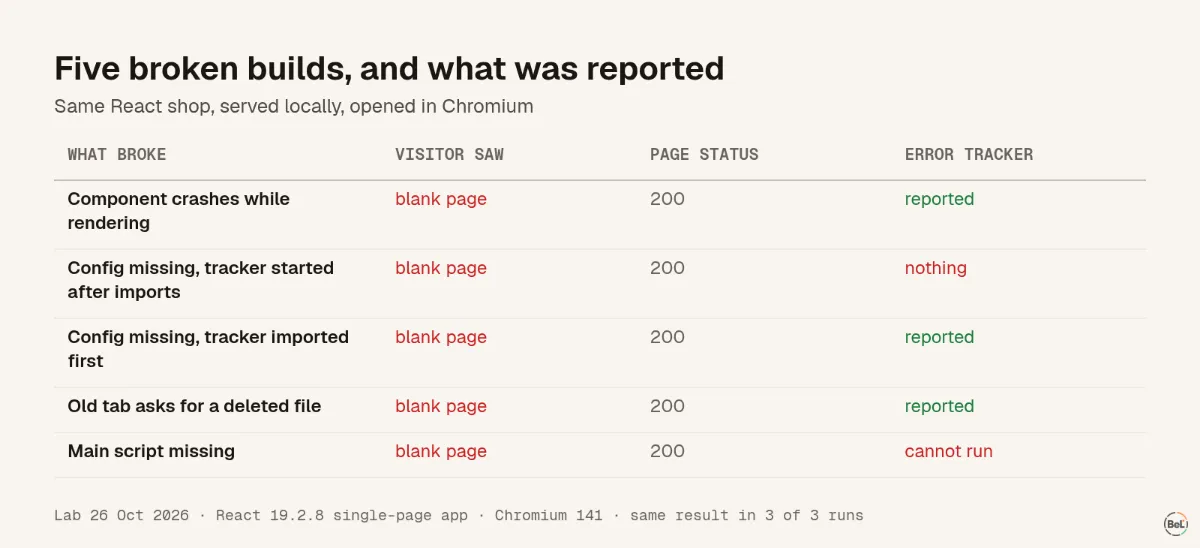
- A component crashes while rendering. No error boundary, so React removes the whole page. The tracker reported it.
- A configuration value is missing in the published build.
createClient()throwssupabaseUrl is required.before anything renders. Whether the tracker saw it depended on one line, covered in the next section. - An old tab asks for a file the new publish removed. The visitor clicks to the settings page and its code file is gone. Blank page; reported.
- The main script is missing. The HTML points at a bundle the server does not have. No code runs, so no tracker can say anything.
The status code is the uncomfortable part. A single-page app sends the same small HTML shell whether the app inside it works or not. An uptime check that requests the page, or even checks that the HTML contains some text, gets the same answer from a working app and a dead one.
Start the error tracker before your app's code#
In the missing-configuration case, the tracker reported the error 3 times in 3 when it was started first, and 0 times in 3 when it was started a few lines later. Those few lines were the problem:
import { createRoot } from "react-dom/client";import { App } from "./App"; // loads supabase.ts, which throws hereimport { init } from "./tracker";init({ dsn: "…" }); // never runscreateRoot(document.getElementById("root")!).render(<App />);JavaScript runs every import before the rest of the file. MDN puts it plainly: an import's "side effects are produced before the rest of the module's code runs" (MDN). So when a module that App imports throws while loading, the init() call below it never runs. The fix is to give the tracker its own file and import it first:
import "./instrument"; // calls init(); must be the first lineimport { createRoot } from "react-dom/client";import { App } from "./App";createRoot(document.getElementById("root")!).render(<App />);This applies to any browser error tracker that starts with an init call. It also applied to our own setup guide: until this test, Belvador's React and TanStack Start instructions put init after the app's imports. We changed them the same day.
Apps on TanStack Start, which Lovable uses for some projects (its Logs page shows server logs "only on TanStack Start projects"), add two twists. The server renders the page, so a start-up crash in the browser leaves the page visible but frozen: in our test the "Add to cart" button did nothing, 3 times in 3. And the router only reports errors through defaultOnCatch where an error component exists. The blank-page post shows how to tell these cases apart, and the setup prompt post has the exact file order.
Check that the page's own files load#
The missing-bundle case needs a different kind of check, because nothing runs that could report it. The page loads, asks for its main script, and gets a 404. The only way to see it is from outside: fetch the page, then fetch every script and stylesheet it references.
// After a publish: fetch the page, then every script and stylesheet it references.const url = process.argv[2];const res = await fetch(url);const html = await res.text();const refs = [...html.matchAll(/<(?:script[^>]+src|link[^>]+href)="([^"]+\.(?:js|css))"/g)] .map((m) => new URL(m[1], url).href);let bad = res.ok ? 0 : 1;for (const ref of refs) { const r = await fetch(ref); console.log(r.status, ref); if (!r.ok) bad++;}if (refs.length === 0) bad++; // a page with no scripts is not your appprocess.exit(bad ? 1 : 0);Against the lab server it exited 0 for the working app and 1 for the missing bundle. Run it with node check-assets.mjs https://your-app.example right after each publish.
Running it on a schedule as well catches the case where nothing changed on your side. On 27 March 2026, Lovable's status page reported "an issue that is causing published projects to display blank pages"; republishing fixed affected projects (Lovable status). For a schedule, put the script in any cron job or CI schedule and send a heartbeat only when it passes: node check-assets.mjs https://your-app.example && curl -fsS <heartbeat-url>. If the check fails or stops running, the heartbeat goes quiet and the monitor alerts you. Belvador's cron monitoring works this way, and the heartbeat guide covers the setup.
Do not forget the server and scheduled jobs#
Server functions, edge functions and scheduled jobs fail where no browser can see them. Builders show their logs, and they are worth reading. Lovable's Logs view covers server, function and database logs, but "Logs do not stream live", the quick ranges go back 5 days, and for long-term retention the docs suggest asking Lovable "to build logging or analytics into your app itself" (Lovable Logs docs).
For errors, report them from the server the same way as from the browser: a server-side tracker or middleware that sees each failed request. For jobs, a missing run produces no error at all, which is why heartbeats exist. Our post on cron jobs that never finish tested what a job's last signal looks like when it is killed.
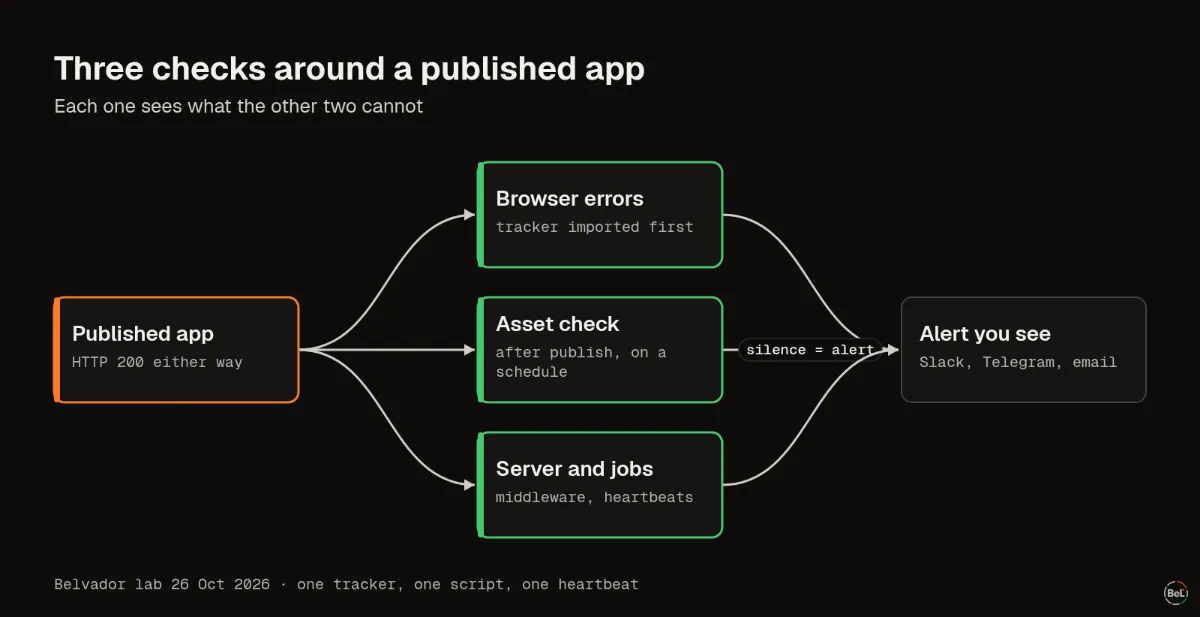
What to set up, and what each check misses#
| Check | Catches | Misses | Effort |
|---|---|---|---|
| Browser error tracker, imported first | Render crashes, start-up errors, missing code files after a publish, failed requests your code reports | A bundle that never loads; problems that throw no error | One file and one import line |
| Asset check after publish and on a schedule | Missing or stale bundles, broken publishes, platform-side blank pages | Anything that happens after the scripts load | One script and a heartbeat |
| Server errors and job heartbeats | Failed server functions, jobs that fail or never run | Browser-only problems | Middleware plus one heartbeat per job |
| Builder's own review (for example Project monitoring) | Code problems and recent visitor errors, explained in the editor | Real-time alerts; it runs on a schedule | A setting |
If you build with Lovable or another tool that edits the code for you, you do not need to write any of this by hand. The setup prompt post gives the prompt and the checks to ask for, and the TanStack Start guide and React guide show the files it should produce. Our earlier test of where JavaScript errors escape covers the errors that happen after start-up.
What this test does not show#
This was a controlled test of two small apps, not a count of real incidents. We ran Chromium only, so Safari and Firefox may differ in details such as error messages. The TanStack Start half ran its server on Node, not Cloudflare Workers; the failures under test were all in the browser. A tracker that reports an error does not tell anyone the page is broken by itself, so route new errors to an alert you will see. The full setup, scripts and results are in our evidence folder, and the TanStack Start page lists what Belvador's package covers.
In this topic
- A prompt to add error tracking to a Lovable app, and how to check it
Andrew Babo6 min read
- Lovable app shows a blank page: find the cause in the console
Andrew Babo5 min read
Related posts
All posts
Guides
A prompt to add error tracking to a Lovable app, and how to check it
A setup prompt is only as good as its file order. Ours put init a few lines too late: in a production build it reported 0 of 12 start-up and page crashes. The fixed order reported 12 of 12.
Andrew Babo6 min read
Guides
Lovable app shows a blank page: find the cause in the console
Open the published page, open the console, reload. In our tests the first red line told five kinds of blank or frozen page apart, and each one has a different fix.
Andrew Babo5 min read
Read next in the docs
See your own production errors this way
Belvador runs on your own Hetzner server: errors, cron jobs, uptime and traces, with your data staying yours.