

Cron jobs that never finish: what your heartbeat actually sees
We stopped a job with SIGTERM and SIGKILL, three times each. One common way of pinging reported success for a job that had been killed.
Andrew Babo6 min read
On this page

Send the heartbeat from the line that starts the job, not from inside the job, and give the monitor a maximum runtime. In our lab, a ping sent from an EXIT trap inside a bash script reported success for a job that SIGTERM had stopped, in 3 runs out of 3. Pinged from the cron line, the same job reported its real exit status, 143 or 137.
Only one case leaves no last ping at all: the whole cron line is killed. For that one, the max-runtime check is the alarm.
Four ways a scheduled job ends badly#
A heartbeat monitor (a dead man's switch) only knows which pings arrived and when. So it helps to list what can happen to a job before deciding where the pings come from:
- It fails. The script exits with a non-zero status. Easy to report, if something is still running to report it.
- It is stopped. Something sends SIGTERM:
timeout, a systemd unit's stop timeout,docker stop, a deploy that restarts the box. The timeout(1) manual says it plainly: "Upon timeout, send the TERM signal to COMMAND, if no other SIGNAL specified." - It is killed. SIGKILL cannot be caught. The OOM killer uses it,
kill -9uses it, and systemd sends it to whatever is still running once the stop timeout has passed (systemd.kill). - It never starts, or never ends. The host is down, the crontab line was lost in a migration, or the job waits forever on a lock or a network call.
The first three leave a process that may or may not get a chance to send one last ping. The fourth leaves nothing to send it.
The lab#
We wanted numbers, not intuition, so we ran a small lab on 25 October 2026. A local HTTP receiver on 127.0.0.1 wrote down every ping with a timestamp. The job slept for 20 seconds and was stopped after 2. Every case ran three times. Versions: GNU bash 5.3.3, dash 0.5.13.1, curl 8.18.0, Python 3.13.12, on a Linux 4.19 sandbox (gVisor). No real ping URL was involved.
The first lab pinged from inside the job, the way many scripts do it:
#!/usr/bin/env bash# job2.sh <variant> <seconds> — pings a local receiver onlyset -uV="$1"; WORK="$2"; PING="http://127.0.0.1:8765/hb/$V"ping() { curl -fsS -m 10 -o /dev/null "$PING/$1" || true; }ping startcase "$V" in naive) trap 'ping $?' EXIT sleep "$WORK" ;; term-trap) trap 'ping fail; exit 143' TERM INT trap 'ping $?' EXIT sleep "$WORK" ;; term-wait) trap 'ping fail; exit 143' TERM INT trap 'ping $?' EXIT sleep "$WORK" & wait $! ;;esacThe second lab pinged from outside, on the line cron runs, with both bash and dash (Debian and Ubuntu run cron lines with dash):
curl -fsS -m 10 -o /dev/null "$P/start"; ./work.sh; curl -fsS -m 10 -o /dev/null "$P/$?"What arrived#
All three repetitions of every case produced the same pings.
| Where the last ping is sent | Job stopped (SIGTERM) | Job killed (SIGKILL) |
|---|---|---|
Inside, EXIT trap only | start, then 0: reported as success | start only |
| Inside, TERM trap, job in the foreground | start, fail, 143, but 18.1 s after the signal | start only |
Inside, TERM trap, job run with wait | start, fail, 143, 0.07 s after the signal | start only |
| Outside, on the cron line (bash and dash) | start, 143 | start, 137 |
| Whole cron line killed | — | start only |
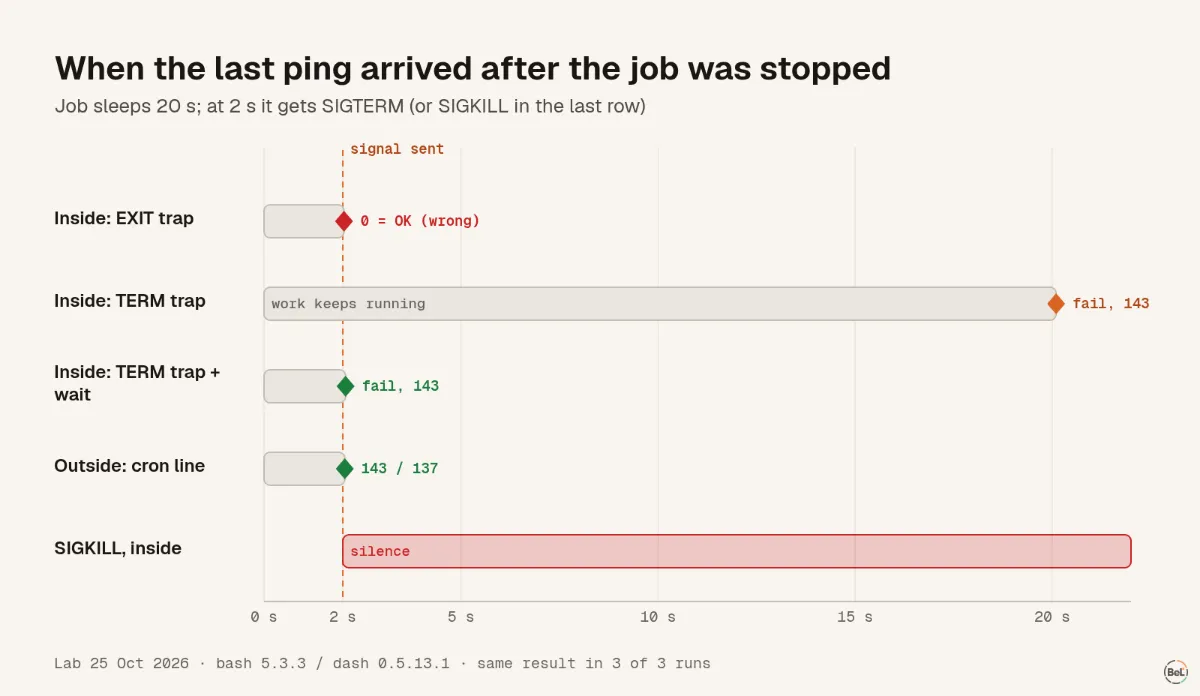
Three results stand out.
The EXIT trap reported a killed job as healthy#
Bash ran the trap when SIGTERM ended the script, but $? inside it held the status of the last command that had finished, the start ping, which was 0. A monitor that trusts exit codes would mark that run healthy. Nothing in the job's own logs would say otherwise, because the job never got to write anything.
A TERM trap waits for the foreground command#
With the job's work running in the foreground, the trap fired only when sleep finished, 18 seconds later. That matches the bash manual: if bash "receives a signal for which a trap has been set, it will not execute the trap until the command completes." The same page gives the fix: when bash is waiting through the wait builtin, wait returns at once with a status above 128 and the trap runs. In a real stop, 18 seconds is often longer than the grace period, so the trap would be cut off by SIGKILL and never run.
Nothing inside the job survives SIGKILL#
Every inside pattern sent start and then went silent. Pinging from the cron line, the shell that ran the line was still alive and reported 137, the code for a process killed by signal 9.
Who is still alive to send the last ping#
The pattern is easier to see as a process tree. Cron starts a shell for the line, and the shell starts your job. Whatever sends the final ping has to outlive the job.
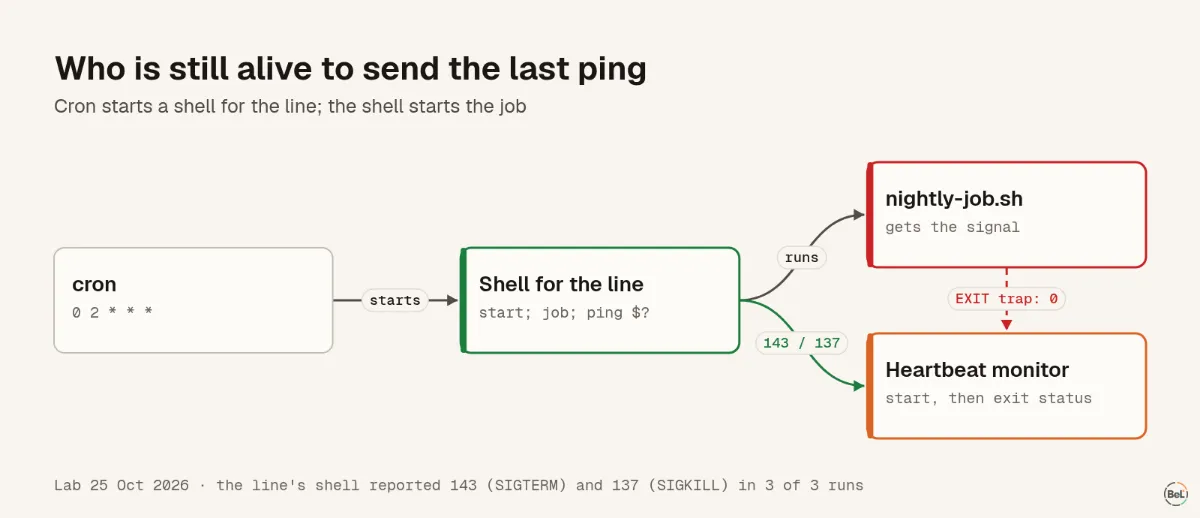
From that, the setup that held up in the lab:
# crontab: start ping, the job, then its exit status (0 = OK, 1–255 = failed)0 2 * * * curl -fsS -m 10 --retry 5 -o /dev/null "$PING_URL/start" ; /usr/local/bin/nightly-job.sh ; curl -fsS -m 10 --retry 5 -o /dev/null "$PING_URL/$?"If the job has to be a script that pings by itself, keep the work behind wait and trap TERM explicitly, as in the term-wait variant. Then add a maximum runtime on the monitor for everything a trap can never see.
What a heartbeat still cannot see#
Two gaps remain, and no ping pattern closes them.
The first is the case at the bottom of the table: the whole line dies, for example when a container is killed or the host reboots. The monitor receives start and then nothing. Only a maximum runtime turns that silence into an alert, so set one that is a little longer than your slowest healthy run.
The second is a job that exits 0 having done nothing useful, such as an export that wrote zero rows. A heartbeat measures that the job ran, not that it was right. If the result matters, have the job exit non-zero when the output is empty, or send the row count with the ping so you can see it in the run.
Where Belvador fits#
Belvador's ping URL monitors use the same shape as the lab: call /start when the job begins, then the plain URL on success, /fail, or the exit status as a suffix (/143). A run that called /start and is still open after its max runtime (30 minutes by default) counts as failed. A run that never starts is flagged once the schedule plus the allowed delay (5 minutes by default) has passed.
The deadlines are kept at the edge, so the alert still goes out when your own server is the thing that died. The ping URL docs list every suffix and status, background work covers jobs that run inside your app, and cron monitoring explains how this fits with the rest of Belvador.
Keep reading#
- Monitoring agents across serverless boundaries, the guide this lab belongs to.
- Error tracking for Cloudflare Workers, for scheduled handlers that run at the edge.
- Stop paging on every exception, so that a failed run does not wake you twice.
Part of the guide: Monitoring AI agents that run on serverless functions
Related posts
All posts
Guides
Monitoring AI agents that run on serverless functions
An agent run on serverless is a chain of short invocations, each with its own time limit. Here is what to watch at every link, with three small experiments to show where the signal gets lost.
Andrew Babo6 min read
Engineering
Cloudflare Workers error tracking: the errors that still return 200
We deployed a Worker that fails in five different ways and watched what the client, Cloudflare and an error tracker each saw. Two of the five returned 200, and one of those left no trace anywhere.
Andrew Babo5 min read
Read next in the docs
See your own production errors this way
Belvador runs on your own Hetzner server: errors, cron jobs, uptime and traces, with your data staying yours.