

Monitoring AI agents that run on serverless functions
An agent run on serverless is a chain of short invocations, each with its own time limit. Here is what to watch at every link, with three small experiments to show where the signal gets lost.
Andrew Babo6 min read
On this page
Treat every serverless invocation as one step of a run. At each step, watch three things: errors carrying one trace id for the whole run, whether the run started and finished inside its time limit, and the errors your code catches or hands to background work. That last kind never reaches a handler, so it is the easiest to miss.
An agent that plans, calls a tool, waits and tries again rarely fits in one function call. It becomes a chain: a request handler, a queue consumer, a cron Worker that resumes stuck runs, a tool behind another HTTP call. Each link can fail on its own, and each has its own way of failing quietly.
Why agents break differently on serverless#
A long-running server keeps its memory and its logs in one place. A serverless agent does not. Its run is spread across invocations that start cold, end on a deadline and share nothing except what you pass along.
Three problems follow from that.
- The run is longer than any single step. If a step is stopped at its limit, nothing in that step can report it.
- The steps do not know they belong together. Without a shared id, an error in the tool call and an error in the agent step look like two unrelated issues.
- Much of the work happens after the response. Background work is where errors get swallowed.
Know the deadline of every step#
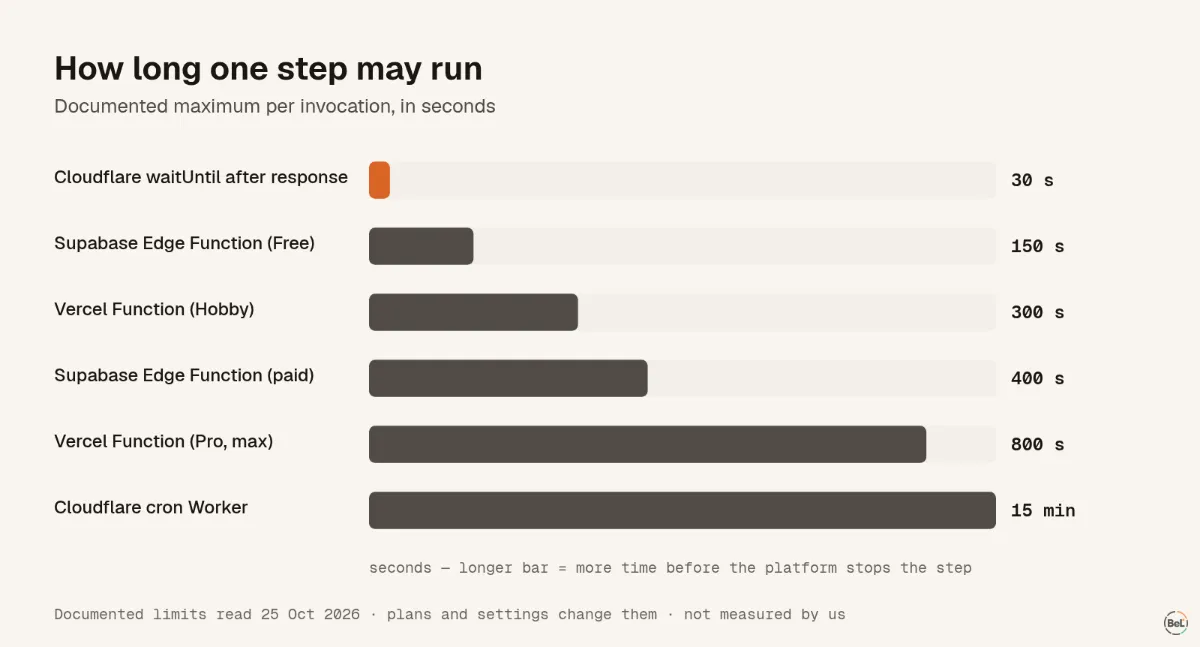
Before choosing what to monitor, write down how long each step is allowed to run. These are the documented limits we read on 25 October 2026; they change with plans and settings, so check yours.
| Step type | Documented limit |
|---|---|
Cloudflare waitUntil work after the response | up to 30 s, then unsettled promises are canceled (context API) |
| Cloudflare cron (scheduled) Worker | 15 min wall time per invocation (Cloudflare limits) |
| Cloudflare HTTP Worker | no hard duration limit; CPU time is limited by plan |
| Supabase Edge Function | 150 s wall clock on Free, 400 s on paid plans, 2 s CPU (Supabase limits) |
| Vercel Function | 300 s on Hobby; 300 s default and up to 800 s on Pro and Enterprise (Vercel limitations) |
Two things to take from the table. A step that can run longer than its limit needs a monitor with a maximum runtime, because the platform will stop it before it can report anything. And CPU limits are separate from wall-clock limits: a step can be killed for computing too long while it is still well inside its duration.
Give the whole run one trace id#
The W3C Trace Context standard defines a traceparent header that carries a trace id from one service to the next. If every step forwards it, every error from the run carries the same id and you can read the run as one story.
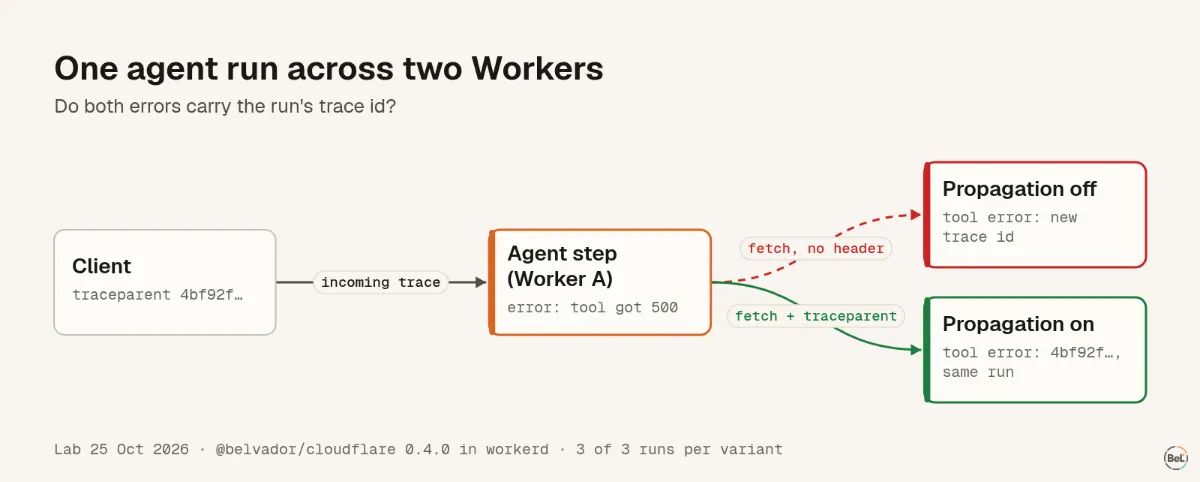
We tested whether that happens by itself. An agent step in one Worker called a tool in a second Worker over HTTP; the tool threw, and the step reported the failed call. Both used the same error-tracking SDK. We ran it three times with trace propagation off and three times with it on.
| Propagation | Tool received traceparent | Agent step error | Tool error |
|---|---|---|---|
| Off | no | the incoming trace id | a new random id every run |
| On, tool URL listed | yes | the incoming trace id | the same incoming trace id |
The incoming request already carried a traceparent, and the first Worker kept it without any setup. The second hop is where the run fell apart: the outgoing call carried no trace header until we listed the tool's URL as a propagation target. So list every service your agent calls, and only your own: adding headers to a third-party API can fail its CORS checks.
Catch what never reaches a handler#
Error trackers report what your handlers throw. Agents do a lot of work that never throws back to a handler: a tool call wrapped in try/catch that returns a polite error message, a log write handed to waitUntil, a fire-and-forget promise.
We measured this on a deployed Cloudflare Worker in Cloudflare Workers error tracking: the errors that still return 200. A promise rejected inside waitUntil returned 200 to the client and was marked ok by Cloudflare, with the error only listed on the invocation; our own SDK did not report it until we fixed that in 0.4.1. A floating promise left no trace at all.
For an agent, the rule is simple: every catch that turns an error into a message for the model should also report the error. Tag it with the step and tool name, and leave out the prompt and the tool arguments.
Know when a run stopped#
Errors tell you something went wrong. They cannot tell you a step never ran, or ran until the platform killed it. For that you need a monitor that expects a start and an end.
The details depend on where the ping is sent from, which we tested in Cron jobs that never finish. A ping sent from an EXIT trap inside a bash job reported success for a job that SIGTERM had stopped, in 3 of 3 runs. A ping from the cron line reported the real exit status. The same idea applies to agents. Report the start of a run early, report the end from the code that outlives the step, and let a maximum runtime catch everything else.
Agent runs with no fixed schedule (one per user request) are better tracked as monitors that run when something happens, with one run per agent run, than as a schedule that will always look late. The background work guide covers queue consumers, webhooks and long-lived workers the same way.
A setup that holds up#
- Wrap every entry point: HTTP handlers, queue consumers, cron handlers.
- Turn on trace propagation for the URLs of your own steps and tools.
- Report every caught error that changes what the agent does next.
- Give every background promise a
.catch()that reports, and ban floating promises in lint. - Add a monitor per run type, with a maximum runtime a little longer than the slowest healthy run.
- Keep prompts and tool arguments out of tags. Use ids and short codes; send the content only where you have decided it may go. Sending production errors to an LLM safely covers what to strip first.
Where Belvador fits#
Belvador's SDKs continue an incoming traceparent and, once you list your own URLs, forward it, so errors and monitor runs from one agent run show up together on the issue under Same trace. They link errors; they do not create spans or timings. For those, send OpenTelemetry traces. The trace propagation docs show the options, ping URL monitors cover runs from any language, the Cloudflare Workers page shows the Worker setup, and cron monitoring covers scheduled steps.
Keep reading#
In this topic
- Cron jobs that never finish: what your heartbeat actually sees
Andrew Babo6 min read
- Cloudflare Workers error tracking: the errors that still return 200
Andrew Babo5 min read
- Ping URLs for shell jobs: the one-liners that report the wrong status
Andrew Babo5 min read
- Retried jobs, duplicate errors: what each attempt sends to your tracker
Andrew Babo6 min read
Related posts
All posts
Engineering
Cron jobs that never finish: what your heartbeat actually sees
We stopped a job with SIGTERM and SIGKILL, three times each. One common way of pinging reported success for a job that had been killed.
Andrew Babo6 min read
Engineering
Cloudflare Workers error tracking: the errors that still return 200
We deployed a Worker that fails in five different ways and watched what the client, Cloudflare and an error tracker each saw. Two of the five returned 200, and one of those left no trace anywhere.
Andrew Babo5 min read
Read next in the docs
See your own production errors this way
Belvador runs on your own Hetzner server: errors, cron jobs, uptime and traces, with your data staying yours.