

Ping URLs for shell jobs: the one-liners that report the wrong status
We ran ten common ways of pinging a heartbeat from a shell job in bash, dash and the /bin/sh Ubuntu 24.04 ships. Three reported success for a failed job, one never ran the job at all.
Andrew Babo5 min read
On this page

Send the job's exit status, not a plain ping: job; curl URL/$?. Of the ten one-liners we tested, the plain job; curl URL reported success for a job that had failed, a pipe into tee or gzip did the same, and set -o pipefail, the usual fix for pipes, stopped the whole line in the /bin/sh that Ubuntu 24.04 ships.
The ping can also break the job it watches. In a script with set -e, a ping URL that answered 503 ended the script before the job ran. We found that in our own GitHub Actions recipe and fixed it the same day.
The lab#
On 26 October 2026 we ran each pattern as one command line, the way cron runs a crontab entry, with a job that exits 0 and the same job exiting 3. Three shells: bash 5.3.3, dash 0.5.13.1, and dash 0.5.12, the exact binary Ubuntu 24.04 installs as /bin/sh. A local collector stood in for the ping endpoint and recorded every request. Three runs each; every run gave the same result.
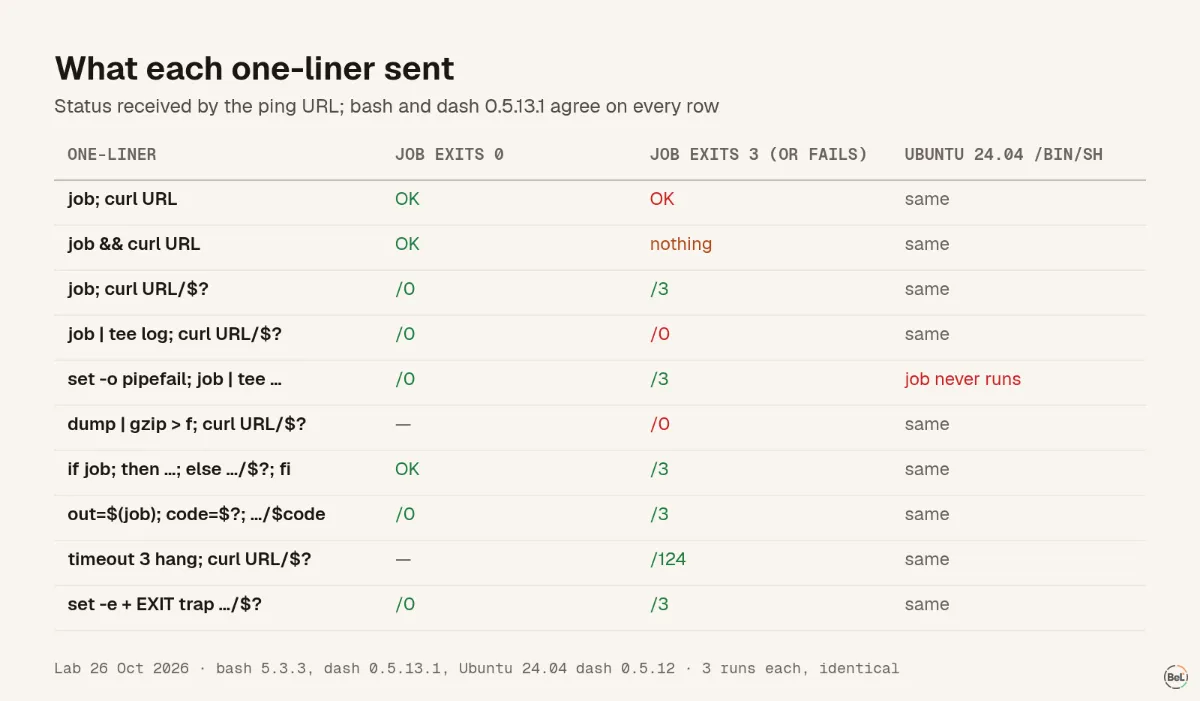
| One-liner | Job exits 0 | Job exits 3 |
|---|---|---|
job; curl URL | OK | OK |
job && curl URL | OK | nothing until the deadline passes |
job; curl URL/$? | /0 | /3 |
job | tee -a log; curl URL/$? | /0 | /0 |
set -o pipefail; job | tee -a log; curl URL/$? | /0 | /3, but Ubuntu's sh: the job never runs |
dump | gzip > out.gz; curl URL/$? (dump fails) | /0 | |
if job; then curl URL; else curl URL/$?; fi | OK | /3 |
out=$(job); code=$?; curl URL/$code | /0 | /3 |
timeout 3 hang; curl URL/$? | /124 | |
script with set -e and trap 'curl URL/$?' EXIT | /0 | /3 |
Three false successes#
job; curl URL pings after the job, whatever happened. The ping only proves the line ran. It is fine for "is the timer still firing", and wrong for "did the backup work".
A pipe hides the job's status. In a pipeline the shell reports the exit status of the last command, as the bash manual says, so job | tee -a log reports tee, which succeeded. The pg_dump | gzip > backup.gz shape is the dangerous one: our fake dump wrote one line, failed with exit 2, gzip compressed the partial output happily, and the ping said /0. You get a small, valid .gz file and a green monitor.
The fix that is not portable#
The usual fix is set -o pipefail, which makes a pipeline fail when any command in it fails. In bash and in dash 0.5.13.1 it did exactly that: /3. In the /bin/sh of Ubuntu 24.04 it did something worse:
$ /bin/sh -c 'set -o pipefail; job | tee -a log; curl …/$?'/bin/sh: 1: set: Illegal option -o pipefail$ echo $?2The shell stops at the unknown option. The job does not run, and no ping is sent, in both the success and the failure case. Cron runs crontab lines with /bin/sh unless you set SHELL= at the top of the crontab, so the same line that worked in your terminal (bash) silently stops the job in production. The heartbeat would eventually alert "no signal", which is the only reason you would find out.
Portable alternatives, all /3 in all three shells:
# Keep a log without a pipejob >> log 2>&1; curl -fsS -m 10 --retry 5 -o /dev/null "$URL/$?" || true# Or capture output, then send status and output togetherout=$(job 2>&1); code=$?printf '%s\n' "$out" | tail -c 60000 | curl -fsS -m 10 --retry 5 -o /dev/null --data-binary @- "$URL/$code" || trueOr put SHELL=/bin/bash in the crontab and keep pipefail.
When the ping itself fails#
We pointed the ping command Belvador documented, curl -fsS -m 10 --retry 5 -o /dev/null, at endpoints that misbehave:
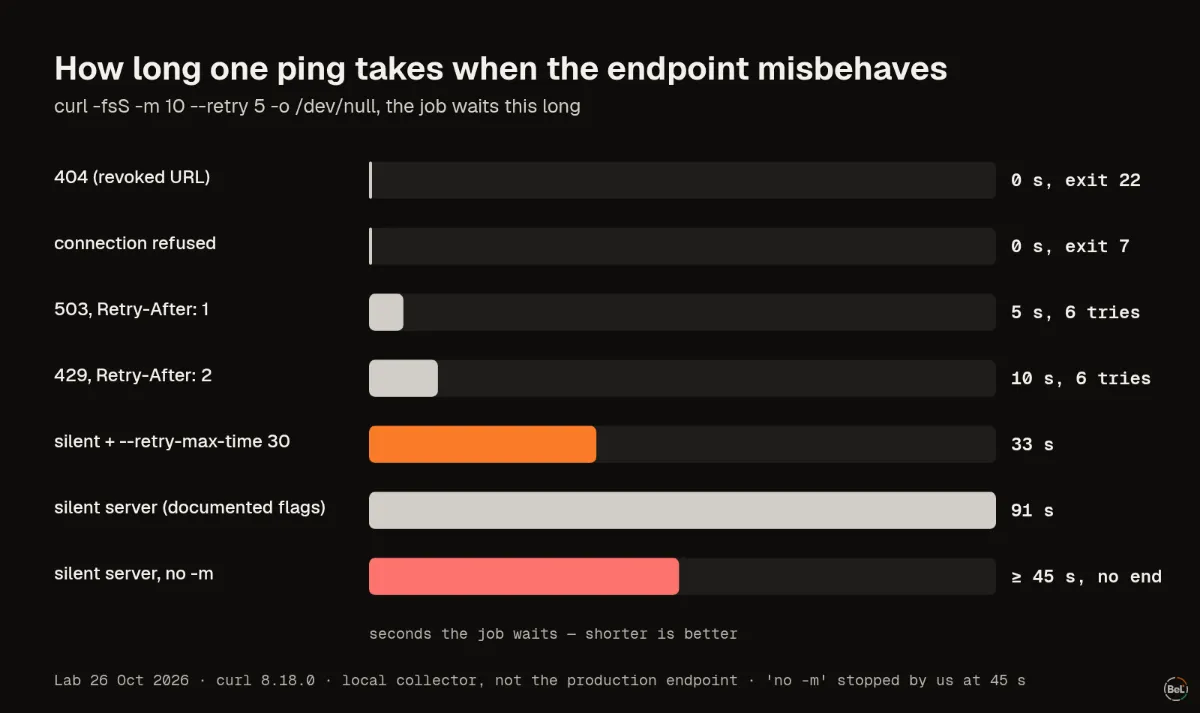
- 503 with
Retry-After: 1: six attempts one second apart, then exit 22 after 5 s.429withRetry-After: 2took 10 s. curl honours the header. - 404: one attempt, exit 22. Without
-f, exit 0: a revoked ping URL looks fine to your script. - Connection refused: no retry at all, exit 7 at once, unless you add
--retry-connrefused(31 s of backoff). - A server that accepts and never answers: without
-m, curl was still waiting when we stopped it at 45 s. With the documented flags it gave up after 91 s; adding--retry-max-time 30brought that to 33 s.
None of these should matter to the job. In a plain crontab line they don't: the failed ping prints one line of error, which cron mails you if mail is set up. In a script with set -e they do. We ran set -e; curl …/start; job against the 503 endpoint: the script ended with curl's exit 22 after 5 seconds and the job never ran, three times out of three. With || true after the ping, the job ran.
GitHub's workflow syntax reference shows why this matters beyond scripts: a run: step without shell: runs as bash -e {0}, and a failed step skips the steps after it. Our own GitHub Actions recipe pinged /start in its own step without || true, so a Belvador outage would have skipped your nightly job. Every Belvador shell recipe now ends each ping with || true, and a test fails if one doesn't.
Which one-liner to use#
- Send the status:
job; curl -fsS -m 10 --retry 5 -o /dev/null "$URL/$?" || true. - No pipes before
$?unless the line runs in bash withpipefail. Redirect to a log file instead. - Wrap jobs that can hang in
timeout:/124is a failure the monitor can show. - Keep
-fand-m: without-fa dead URL looks healthy, without-ma silent endpoint can hold your job. - End every ping with
|| true, so the monitor can never be the reason the job stopped. - Ping from the line that starts the job, not only from inside it: what a killed job's last ping says covers the case where the shell itself is stopped.
Where Belvador fits#
A Belvador ping URL monitor accepts the status as a suffix (/0 to /255, /fail, /start) and alerts at once on a failure, and when the pings stop, on time, even if your node is offline. The recipes on the monitor page are the ones above. For jobs in your own code rather than a crontab, the background work guide shows the SDK route, and the cron monitoring page puts both side by side.
Keep reading#
Part of the guide: Monitoring AI agents that run on serverless functions
Related posts
All posts
Guides
Monitoring AI agents that run on serverless functions
An agent run on serverless is a chain of short invocations, each with its own time limit. Here is what to watch at every link, with three small experiments to show where the signal gets lost.
Andrew Babo6 min read

Engineering
Cron jobs that never finish: what your heartbeat actually sees
We stopped a job with SIGTERM and SIGKILL, three times each. One common way of pinging reported success for a job that had been killed.
Andrew Babo6 min read
Read next in the docs
See your own production errors this way
Belvador runs on your own Hetzner server: errors, cron jobs, uptime and traces, with your data staying yours.