

Stop paging on every exception: one noisy day, four alert policies
We pushed one synthetic day of 2,268 errors through four alert policies. One alert per event sent 2,268 messages; the policy most teams end up with sent 5, and two of those were still noise.
Andrew Babo5 min read
On this page

Alert on issues, not on events: a new issue, a resolved issue that comes back, and a known issue that suddenly grows, with no repeat for the same issue within half an hour. On our synthetic day that sent 5 alerts instead of 2,268. Two of the five were still noise that no alert rule could remove; only not reporting them in the first place does.
Why one alert per error fails#
Google's SRE book sets the bar in one sentence: "Every page should be actionable." It also describes what happens when you miss it: when pages come too often, people "second-guess, skim, or even ignore incoming alerts". An exception is not a page. It is one sample of a problem, and a single bug in a busy code path can throw thousands of them before anyone has opened a laptop.
So the question is not whether to alert on errors, but which change in your errors is worth interrupting someone for.
The test day#
We generated one deterministic day of errors with a week of history in front of it, then ran it through four policies. Nothing here comes from a customer; it is shaped like days we have seen.
- A bot flood: 1,000
404errors from a scanner in one hour, a new group. - A real new bug: a null user profile, 800 events spread over 16 hours.
- A regression: a PDF bug fixed and resolved two days earlier comes back with 100 events.
- A network blip: 200 connection resets from an upstream service in 10 minutes.
- A known issue getting worse: a checkout timeout that normally fires twice an hour jumps to 60 an hour for two hours.
The policies:
- A. One alert per event.
- B. Alert on new issues only.
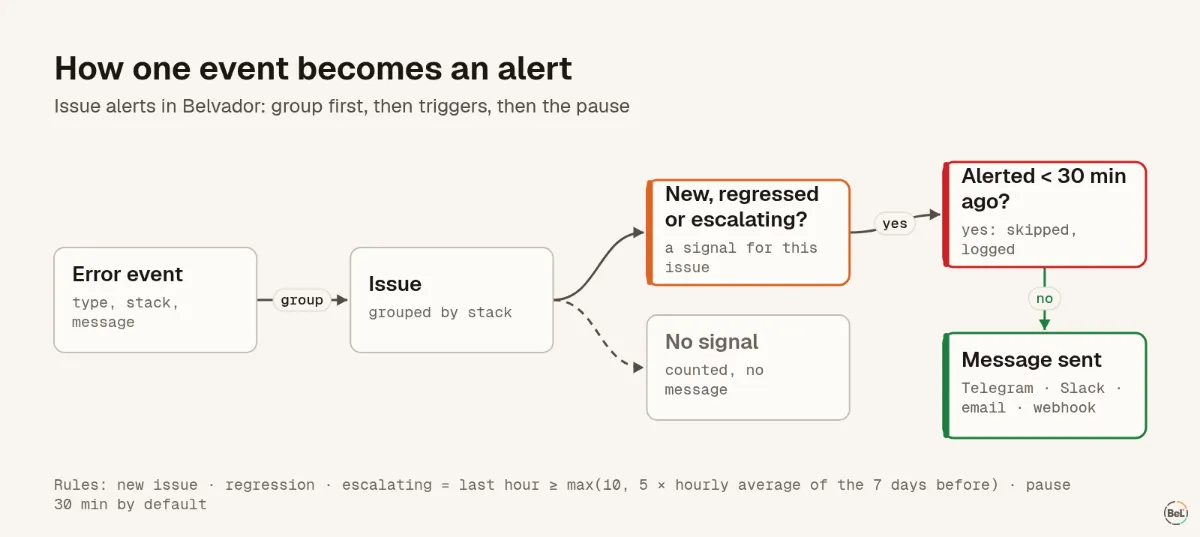
- C. New issue, regression and escalating, with a 30-minute "don't repeat" per issue. "Escalating" uses Belvador's rule: at least
max(10, 5 × the hourly average of the 7 days before)events in the last hour. - D. Policy C without the 30-minute pause.
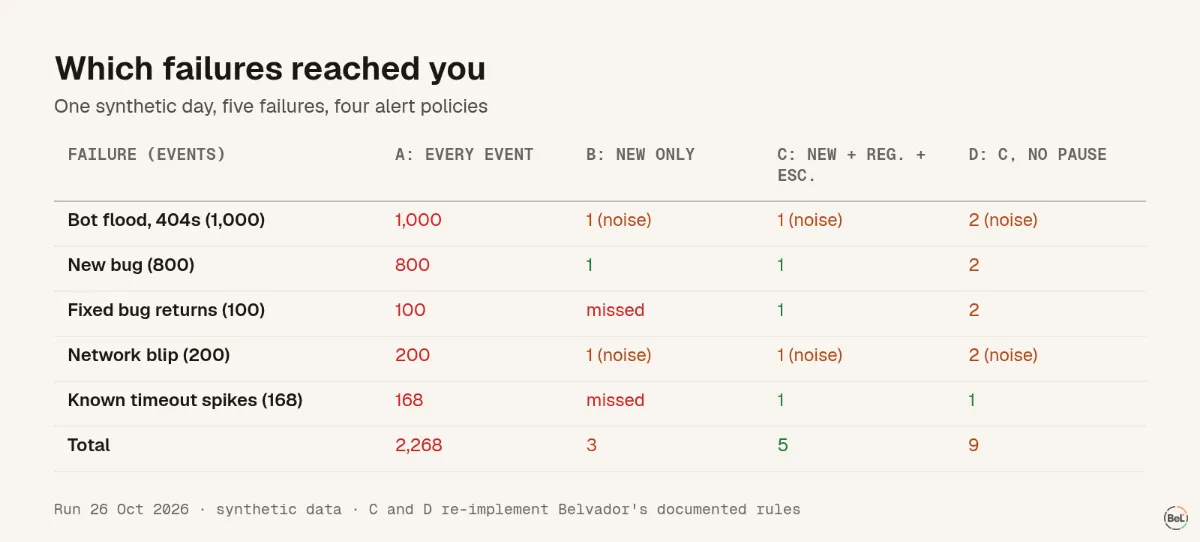
| Policy | Alerts sent | Missed |
|---|---|---|
| A: every event | 2,268 | nothing, and nobody reads them |
| B: new issues only | 3 | the regression and the checkout spike |
| C: new + regression + escalating, 30 min | 5 | nothing |
| D: C without the pause | 9 | nothing, with 4 duplicates |
What the day shows#
Grouping does most of the work#
Turning 2,268 events into 5 issues is where nearly all the noise goes. It only works if grouping is right: if a dynamic value ends up in the error message, every event can become its own "new" issue and you are back to policy A. Errors with a stable type and stack group well; errors whose message contains an id, a URL or a timestamp need a fixed message or a custom fingerprint.
"New only" is quiet and half blind#
Policy B looks attractive: three messages a day. But it said nothing when a bug you had fixed came back, and nothing when a known timeout went from twice an hour to once a minute. Those are often the two most urgent things on the day, because users have already met them.
The 30-minute pause removes a double alert#
Without the pause, policy D sent four extra messages, and all four looked the same: a new issue, then "escalating" for the same issue a few minutes later, because a brand-new issue with many events is also rising fast. The pause counts by the time the error happened, per issue, so it suppressed exactly those duplicates and nothing else.
Two of the five alerts were still noise#
The scanner flood and the network blip both alerted as new issues. Neither grouping nor triggers can tell a bot hitting old URLs from a real bug: both are a new group with many events. The fix happens before the error is reported:
- Do not capture what is not a bug. A
404for a URL that never existed, a request the client canceled, a validation error the user can fix: handle them, log them if you like, but do not send them as errors. - Use levels. Report expected, recoverable failures as warnings and set the rule's minimum level to error.
- Filter by environment. Alerts from preview deployments at 3 a.m. train people to ignore the channel.
- Archive what you have decided to live with. Archiving "until it escalates" keeps a known blip quiet until it is no longer a blip.
When to use something other than issue alerts#
Issue alerts answer "is something new or worse broken?". They do not answer "are users having a bad time?". For that, alert on an SLO: a burn-rate alert pages when the error budget is being spent fast, whatever mix of issues is spending it. We replayed four incidents through one in SLO burn-rate alerts explained; a slow 1 % leak that never creates a new issue is exactly what it catches.
And for errors your code swallows before any alert can see them, JavaScript error handling for AI-generated apps goes through the places they hide.
Where Belvador fits#
Belvador rules alert on new issue, regression and escalating, with a minimum level, environments, projects and a Don't repeat for pause that defaults to 30 minutes. Messages go to your own Telegram bot, Slack webhook, email account or signed webhook. The alert docs cover rules and destinations, the issue docs cover resolving, regressions and archiving, and the alerts page shows how it fits with monitors, uptime checks and SLOs.
Keep reading#
- Observability for small teams, the guide this post belongs to.
- SLO burn-rate alerts explained with four outages
- JavaScript error handling for AI-generated apps
Part of the guide: Observability for small teams: five signals, in the order you need them
Related posts
All posts
Guides
Observability for small teams: five signals, in the order you need them
A two-person team does not need a metrics platform on day one. It needs to know when users hit errors, when a job stops, when the site is down, and later, whether users are having a bad week.
Andrew Babo5 min read
Engineering
SLO burn-rate alerts explained with four outages
We replayed four synthetic incidents through the SLO evaluator Belvador runs every minute. A plain threshold alert on the same traffic fired 16 times for one slow leak.
Andrew Babo6 min read
Read next in the docs
See your own production errors this way
Belvador runs on your own Hetzner server: errors, cron jobs, uptime and traces, with your data staying yours.