

Observability for small teams: five signals, in the order you need them
A two-person team does not need a metrics platform on day one. It needs to know when users hit errors, when a job stops, when the site is down, and later, whether users are having a bad week.
Andrew Babo5 min read
On this page
Add signals in the order failures hurt you: errors first, then a monitor for every scheduled job, then an uptime check from outside. Once you have real traffic, add one SLO on the main path. Add traces when a single request starts crossing several services, and not before.
That order comes from a simple question: what will a user notice before you do? For a small team the honest answer is "almost everything", so the first signals should close the biggest gaps for the least setup time.
The four questions a small team needs answered#
Google's SRE book names four golden signals for a user-facing system: "latency, traffic, errors, and saturation". They are the right lens for a large service with dashboards and an on-call rotation. A team of two needs something more blunt, because nobody is watching a dashboard:
- Are users hitting errors right now, and is any of them new?
- Did the jobs that should have run actually run?
- Is the site reachable at all?
- Are users having a worse week than we promised?
Latency and saturation matter too, but they usually show up in one of those four first: as timeouts in the error list, as a job that runs past its limit, or as an SLO that starts burning.
Which signal sees which failure#
We ran four small experiments for this cluster of posts. Put together, they show that no single signal covers everything, and which one covers what.
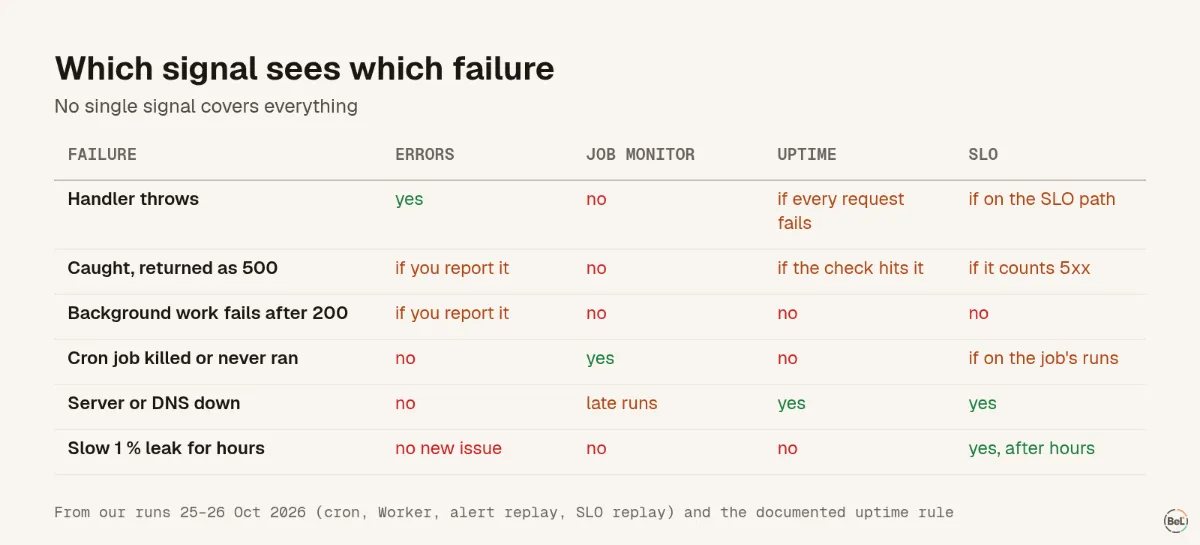
| Failure | Error tracking | Job monitor | Uptime check | SLO |
|---|---|---|---|---|
| Handler throws | yes | no | only if every request fails | yes, if it is on the SLO path |
| Error caught and turned into a 500 | only if you report it | no | only if the check hits that path | if the SLO counts 5xx responses |
| Background work fails after a 200 | only if you report it | no | no | no |
| Cron job killed or never started | no | yes | no | if the SLO is on the job's runs |
| Whole server or DNS down | no, nothing runs | late runs show up | yes | yes |
| Slow 1 % leak for hours | events, but no new issue | no | no | yes, after a few hours |
Three things stand out.
Error tracking only sees what is reported#
In our Cloudflare Worker test, a caught error turned into a 500 and a failed background promise were both invisible to the error tracker. The fix is in your code: report what you catch. Monitoring agents on serverless shows where those errors hide.
Silence needs its own signal#
A cron job that is killed or never starts produces no error at all. Only something that expects a ping and notices when it does not arrive can catch it.
Slow problems need a budget#
A steady 1 % failure rate never creates a new issue, so issue alerts stay quiet. In our replay, an SLO burn-rate alert caught it after 3 hours 37 minutes, with one alert instead of the 16 a threshold rule sent. That replay is in SLO burn-rate alerts explained.
The order to add them#
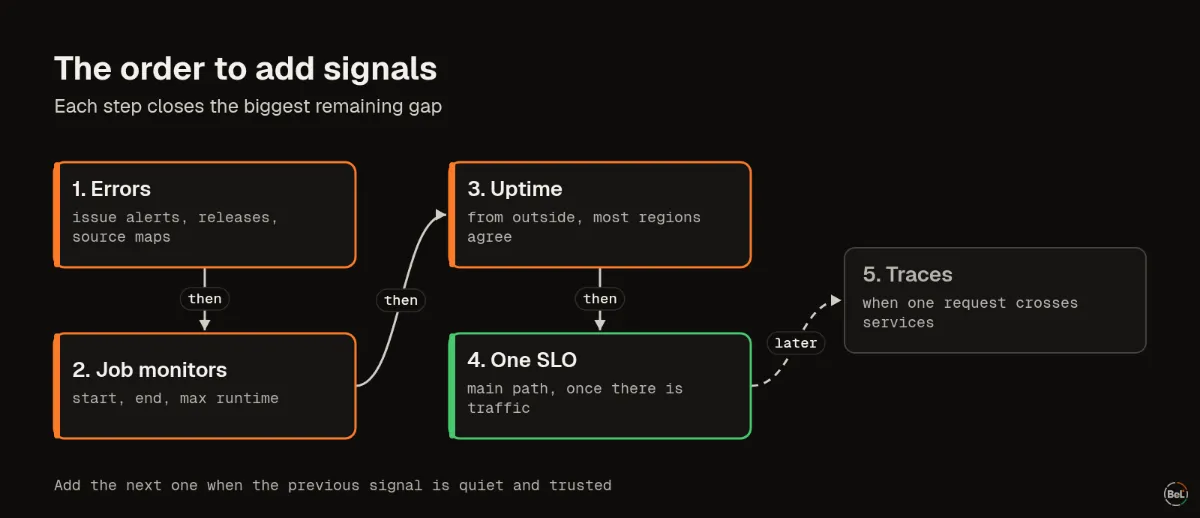
1. Errors, with alerts on issues#
Install an error-tracking SDK in the browser and on the server, set the release so you can tell which deploy broke something, and alert on new issues, regressions and sudden growth. In our synthetic noisy day, that policy sent 5 alerts where one-per-event sent 2,268; stop paging on every exception walks through the day. Turn on source maps so stack traces point at your code, not at a minified bundle.
2. A monitor for every scheduled job#
Backups, invoice runs, data syncs, agent loops on a timer: each gets a monitor that expects a start and an end. Send the last ping from outside the job, and set a maximum runtime, so a job that is killed still raises the alarm.
3. An uptime check from outside#
Error tracking runs inside your app. When the app, its server, its DNS or its certificate is gone, it reports nothing. An uptime check asks from outside, from several regions, and should only open an incident when most of them agree, so one bad network path does not page you.
4. One SLO, once there is traffic#
Pick the path users care most about, such as sign-in or checkout, and set an availability objective you can actually meet: 99.5 % or 99.9 %, not 99.99 %. With very little traffic the numbers jump around; wait until a bad minute is a small share of an hour.
5. Traces, when one request crosses several services#
OpenTelemetry describes three main signals: traces, metrics and logs. Traces earn their keep when a single click passes through a frontend, an API, a queue and a worker, and you cannot tell which one was slow. Until then, a shared trace id on your errors is enough to connect them. When you do add traces, decide on sampling up front, because keeping every span gets expensive fast.
What you can skip for now#
- Dashboards nobody opens. Alerts and a weekly look at the issue list do more for a small team.
- Metrics for everything. Start with the few numbers that would change a decision.
- Paging for warnings. Send them to a channel you read in the morning, or do not send them at all.
- Logging every request body. It is a privacy risk and rarely the thing you need when something breaks.
Where Belvador fits#
Belvador covers the first four steps in one place: error tracking with issue alerts, monitors and ping URLs for jobs, uptime checks from several regions, and SLOs with burn-rate alerts. For step 5 it accepts OpenTelemetry traces and logs. Error data is stored on a server in your own Hetzner account, which Belvador sets up and maintains. The overview explains how the pieces connect, the uptime quickstart and ping URL docs cover steps 2 and 3, and SLOs covers step 4. The alerts page and uptime monitoring page show how alerts reach you.
Keep reading#
In this topic
- SLO burn-rate alerts explained with four outages
Andrew Babo6 min read
- Stop paging on every exception: one noisy day, four alert policies
Andrew Babo5 min read
Related posts
All posts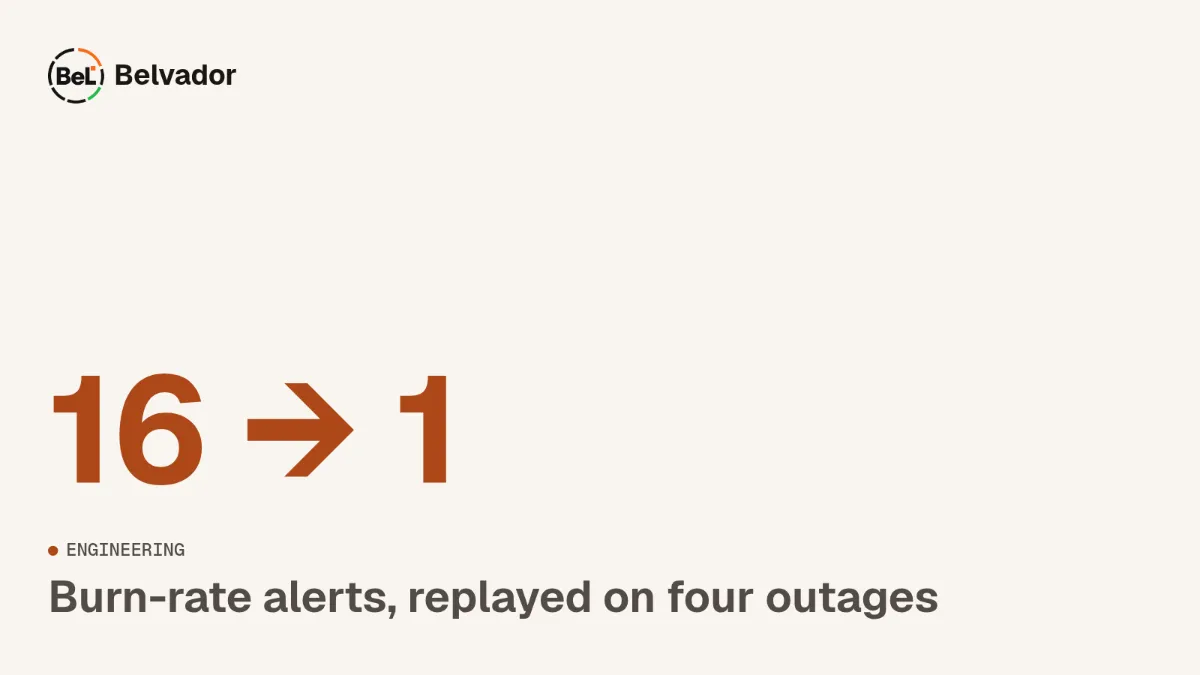
Engineering
SLO burn-rate alerts explained with four outages
We replayed four synthetic incidents through the SLO evaluator Belvador runs every minute. A plain threshold alert on the same traffic fired 16 times for one slow leak.
Andrew Babo6 min read
Engineering
Stop paging on every exception: one noisy day, four alert policies
We pushed one synthetic day of 2,268 errors through four alert policies. One alert per event sent 2,268 messages; the policy most teams end up with sent 5, and two of those were still noise.
Andrew Babo5 min read
Read next in the docs
See your own production errors this way
Belvador runs on your own Hetzner server: errors, cron jobs, uptime and traces, with your data staying yours.