

Cloudflare Workers error tracking: the errors that still return 200
We deployed a Worker that fails in five different ways and watched what the client, Cloudflare and an error tracker each saw. Two of the five returned 200, and one of those left no trace anywhere.
Andrew Babo5 min read
On this page
An error tracker wrapped around a Cloudflare Worker reports what your handler throws, not what it hides. In our test, a promise rejected inside ctx.waitUntil returned 200 to the client and was marked ok by Cloudflare with the exception attached. Our own @belvador/cloudflare 0.4.0 did not report it either; 0.4.1 does.
Two cases still need your own code whatever wrapper you use: an error you catch and turn into a 500, and a promise nobody waits for. The rest of this post shows the five cases we tested and what each observer saw.
The test Worker#
We wrote one Worker with a route for each way a Worker commonly fails:
/throw: thefetchhandler throws./caught-500: the handler catches the error and returnsnew Response(..., { status: 500 })./wait-until: the handler returnsokand hands Cloudflare a promise that rejects 50 ms later, throughctx.waitUntil./floating: the same rejection in a promise nobody awaits and nobody passes towaitUntil.scheduled(): the cron handler throws.
We ran it two ways on 25 October 2026. Locally, both a plain build and a build wrapped in @belvador/cloudflare 0.4.0 ran in workerd through Miniflare 4.20260730.0, with the SDK sending to a receiver on 127.0.0.1. Then we deployed the plain build as a temporary Worker on our own account, attached a Tail to record Cloudflare's view of every invocation, and deleted the Worker afterwards. Each case ran three times and gave the same result each time.
Who saw which error#
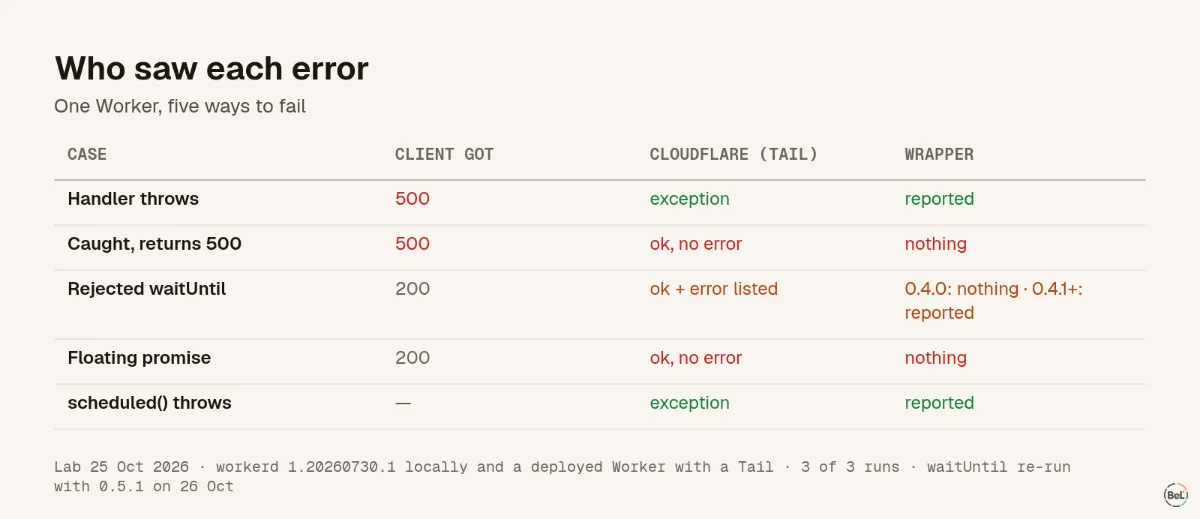
| Case | Client got | Cloudflare (Tail) | Wrapper (@belvador/cloudflare) |
|---|---|---|---|
| Handler throws | 500, Cloudflare's error page | exception, error listed | reported |
| Caught, returns 500 | 500, your body | ok, no error | nothing |
Rejected waitUntil | 200 | ok, error listed | nothing in 0.4.0; reported from 0.4.1 |
| Floating promise | 200 | ok, no error | nothing |
scheduled() throws | — | exception | reported |
Three things in that table are worth a closer look.
A caught error is only a status code#
When your code catches an error and builds a 500 itself, nothing is thrown anywhere. Cloudflare records the invocation as ok, and a wrapper has no exception to report. All you have left is the number 500 in request logs. If you want that error tracked, call captureException(error) inside the catch, before you build the response. The Cloudflare SDK docs show that pattern.
waitUntil errors land in Cloudflare's logs, not in your tracker#
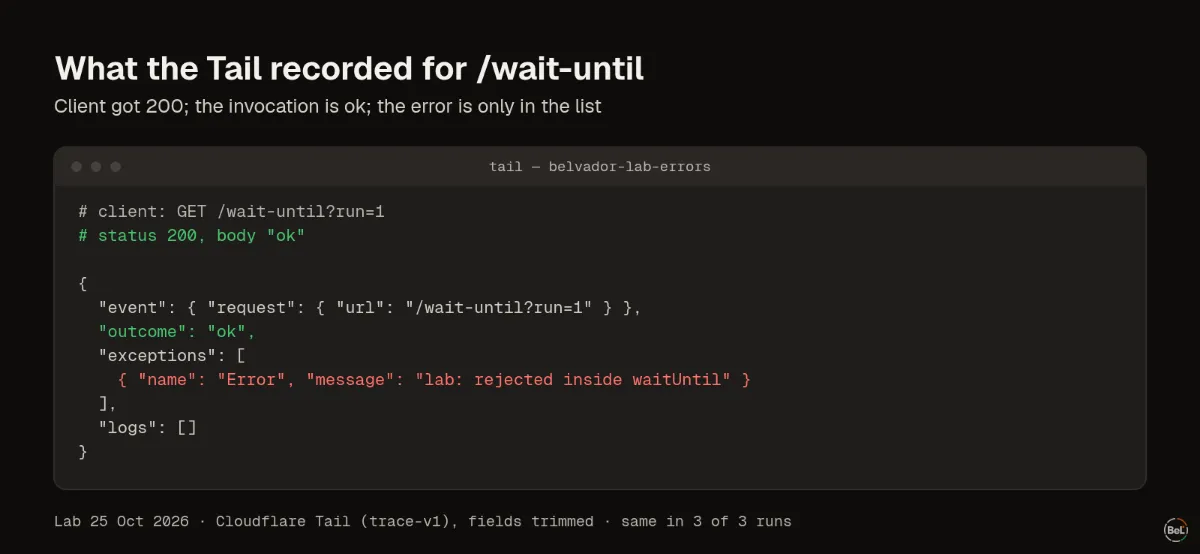
waitUntil lets work continue after the response; Cloudflare's context docs give it "up to 30 seconds after the response is sent or the client disconnects." The response is already gone by the time the promise rejects, so the client sees 200. Cloudflare did record the exception on the invocation, but the outcome stayed ok. A dashboard or alert that counts failed invocations would not count this one.
The wrapper we tested first did not report it either. That was a gap in our own SDK, not a rule about Workers. From 0.4.1, @belvador/cloudflare reports a rejected waitUntil promise as an unhandled error with the request's scope, and Cloudflare still receives the same rejection. We re-ran the case with 0.5.1 in local workerd on 26 October 2026: one event in 3 of 3 runs, and the client still got 200.
If your tracker does not do this, or you want the error marked as handled with your own context, catch inside the promise. This pattern was reported in 3 of 3 runs with both versions:
import { captureException, withBelvador } from "@belvador/cloudflare";export default withBelvador(() => ({}), { async fetch(request: Request, env: Env, ctx: ExecutionContext): Promise<Response> { ctx.waitUntil( sendReceipt(request).catch((error) => { captureException(error); // the response is already 200; this is the only report }), ); return new Response("ok"); },});Here is what Cloudflare's Tail recorded for that route, trimmed to the fields that matter:
A floating promise leaves nothing to look at#
The promise that was neither awaited nor passed to waitUntil produced no exception anywhere: not on the client, not in the Tail, not in the wrapper. From the outside we cannot even tell whether the code after the await ran. Cloudflare documents waitUntil as the way to keep work going after the response, so treat any other floating promise as work that may silently not happen. Most linters can flag them (no-floating-promises in typescript-eslint).
A checklist for a Worker you care about#
- Wrap the handlers. It catches the two cases that throw:
fetchandscheduled. Queue, email and tail handlers are wrapped the same way. - Report what you catch. Every
catchthat returns an error response should callcaptureExceptionfirst. - Make sure every
waitUntilrejection is reported: by the wrapper (Belvador from 0.4.1) or by a.catch()of your own. Treat it like a background job, because that is what it is. - Ban floating promises. Await them or pass them to
waitUntil. - Keep Cloudflare's own logs on. Workers Logs include "invocation logs, custom logs, errors, and uncaught exceptions", and Cloudflare suggests OpenTelemetry export, Logpush or Tail Workers to send them elsewhere. They are your second witness when the wrapper misses something.
- Watch time limits separately. A Worker that runs out of CPU time fails with Cloudflare's error 1102; a cron Worker has a 15-minute wall-time limit (limits). Neither is an exception in your code, so monitor the run itself, as in cron jobs that never finish.
Where Belvador fits#
@belvador/cloudflare wraps the handlers on your exported Worker, gives every invocation its own scope, reports what they throw and, from 0.4.1, rejected waitUntil promises, and re-throws so Cloudflare still sees the same failure. It cannot see an error your code catches and turns into a response, or a promise nobody waits for. Your response is returned unchanged, and sending happens after the response so it never slows the user down. The Cloudflare Workers page shows how it fits with traces and cron monitors, and the background work guide covers jobs that outlive the request.
Keep reading#
- Monitoring agents that run on serverless, the overview this post belongs to.
- Cron jobs that never finish: what your heartbeat actually sees, for scheduled Workers and jobs that just stop.
- React error boundaries do not catch async errors, the same kind of gap on the browser side.
Part of the guide: Monitoring AI agents that run on serverless functions
Related posts
All posts
Guides
Monitoring AI agents that run on serverless functions
An agent run on serverless is a chain of short invocations, each with its own time limit. Here is what to watch at every link, with three small experiments to show where the signal gets lost.
Andrew Babo6 min read

Engineering
Cron jobs that never finish: what your heartbeat actually sees
We stopped a job with SIGTERM and SIGKILL, three times each. One common way of pinging reported success for a job that had been killed.
Andrew Babo6 min read
Read next in the docs
See your own production errors this way
Belvador runs on your own Hetzner server: errors, cron jobs, uptime and traces, with your data staying yours.