

Error data residency vs AI provider residency: two separate choices
Keeping error data in the EU says nothing about where an AI model processes the error you paste into it. We compared four AI providers and found storage and processing are separate dials.
Andrew Babo4 min read
On this page
Where your error tool stores data and where an AI model processes it are two separate choices. Picking the EU for the first does nothing for the second. Most AI providers also split their own settings in two: where data is stored, and where a request is processed.
So before errors from an EU or Vietnamese app go to an AI tool, check both dials for that provider and that model. We read the four largest providers' own documentation on 25 October 2026 and set out what each one offers.
One error, two locations#
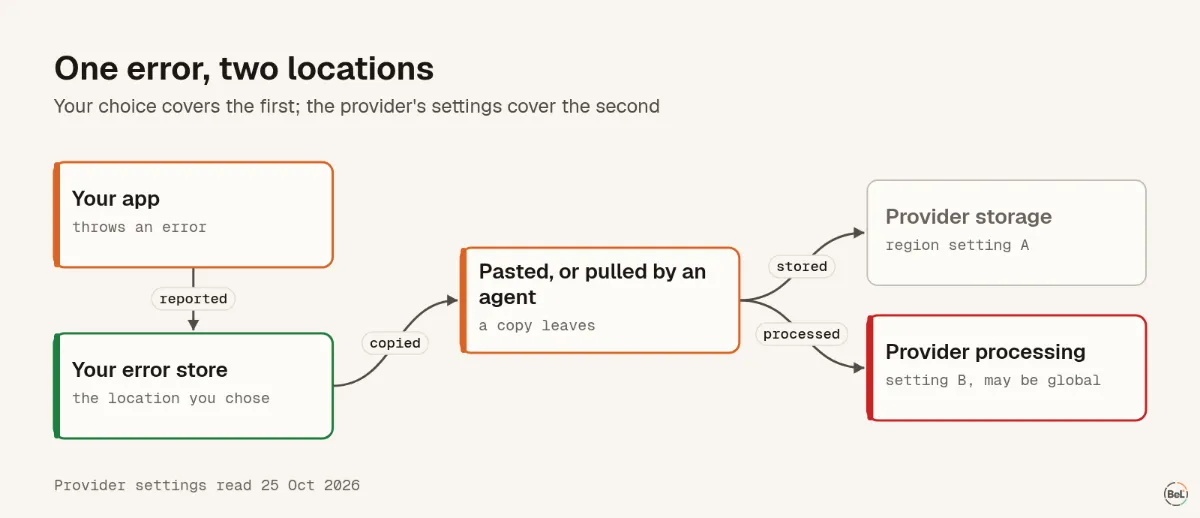
An error starts in your app and lands in your error store. You chose that location, often for a reason: a contract, a customer's question, a law. When someone pastes the error into a chat, or a coding agent pulls it in, a copy goes to the AI provider. That copy follows the provider's rules, not your error store's.
What four providers offer#
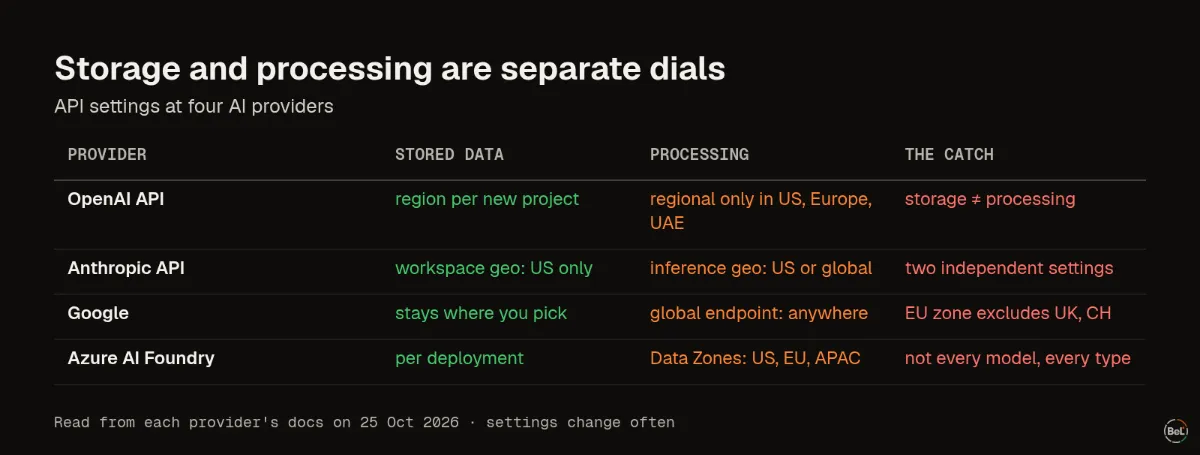
| Provider | Where stored data can stay | Where requests are processed | The catch |
|---|---|---|---|
| OpenAI API | A region set per new project: US, Europe and several others | Regional processing only in the US, Europe and the UAE | Storage and processing are separate; some data is outside the setting |
| Anthropic API | Workspace geo: US only | Inference geo: US or global | Two independent settings |
| Google (Gemini Enterprise Agent Platform) | Data at rest stays in the location you pick | A global endpoint may process anywhere; multi-region endpoints stay inside their area | The EU multi-region leaves out the UK and Switzerland |
| Azure AI Foundry | Per deployment | Data Zones: US, EU or APAC | Not every model supports every deployment type |
Three details are easy to miss.
Storage is not processing#
OpenAI says it directly: “Support for regional storage does not imply support for regional processing.” It also notes that it “may also process and temporarily store Customer Content outside of the Region to deliver the services.”
“Global” means anywhere#
Google's docs say requests to a global endpoint “may be processed in any Google Cloud location around the world”. Anthropic offers two settings, inference geo and workspace geo, and “Two independent settings govern this”.
It depends on the model#
Microsoft notes that “Not all models support all deployment types.” OpenAI's residency covers listed endpoints, models and snapshots. A newer model may not have the option you rely on.
Why the law cares about the second copy#
This is not legal advice, only the parts of the rules that make the second copy matter.
- EU. Chapter V of the GDPR, Articles 44 to 46, governs transfers of personal data outside the EU. The EU–US Data Privacy Framework covers “companies in the United States that participate in the Data Privacy Framework”, not every US recipient.
- Vietnam. Decree 13/2023/NĐ-CP already required an impact assessment dossier for transfers of personal data abroad. The Personal Data Protection Law, 91/2025/QH15, took effect on 1 January 2026 and requires a cross-border transfer impact dossier, within 60 days of the first transfer, according to a published copy of the law.
An error that contains an email, a name or an IP address is personal data. Pasting it into an AI tool hosted elsewhere can be a transfer.
Where an error store can live#
We read Hetzner's location list on 26 October 2026: six locations, three of them in the EU (Falkenstein and Nuremberg in Germany, Helsinki in Finland), two in the US and one in Singapore. Belvador creates each customer's node in one of the three EU locations, inside the customer's own Hetzner project. That settles the first dial. The second is still yours.
A checklist before errors go to an AI tool#
- Write down where your error data is stored, and why that location was chosen.
- For each AI tool your team uses, find both settings: where data is stored and where requests are processed. Note the date you read them.
- Check that the model you actually call supports those settings.
- Remove personal data before sending, so most errors carry none. The PII scrubbing post shows what automatic rules miss.
- If you are small and the rules feel heavy, the small-team observability guide helps you decide what to collect in the first place.
Where Belvador fits#
Belvador stores error data on a node in your own Hetzner project, in Germany or Finland, and sends none of it to an AI provider. Data protection shows each place your data goes, and Connect your node shows how the node is created. The BYOC on Hetzner and data processing pages explain who holds what.
Keep reading#
Part of the guide: How to send production errors to an LLM safely
Related posts
All posts
Guides
How to send production errors to an LLM safely
Error events hold secrets, personal data and text users typed. We sent one with a hidden instruction to four models 72 times; pasted raw, one model obeyed every time and once said to turn off auth.
Andrew Babo6 min read

Engineering
Secrets in exception messages: what the Node SDK sends by default
We put a fake secret into 14 real Node.js errors and reported them with Sentry's Node SDK at its defaults. 13 of 15 secrets left the process, in the message, a breadcrumb or the source lines.
Andrew Babo6 min read
Read next in the docs
See your own production errors this way
Belvador runs on your own Hetzner server: errors, cron jobs, uptime and traces, with your data staying yours.