

SLO burn-rate alerts explained with four outages
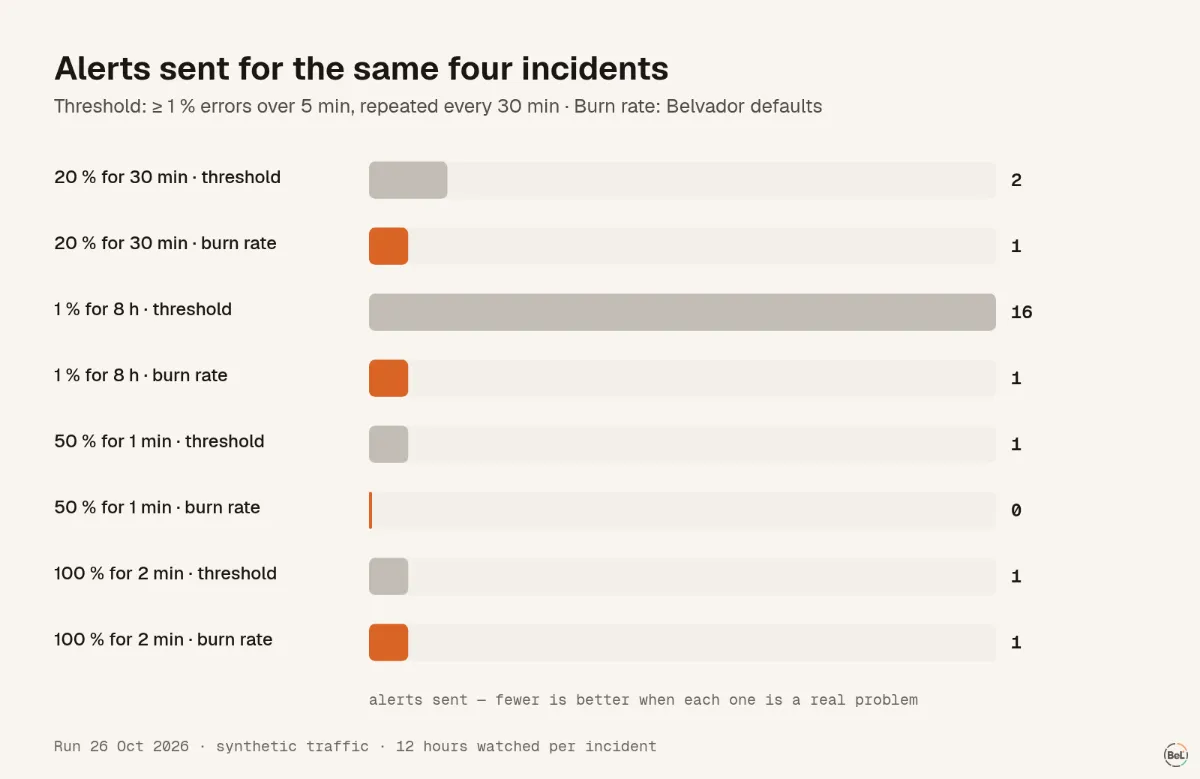
We replayed four synthetic incidents through the SLO evaluator Belvador runs every minute. A plain threshold alert on the same traffic fired 16 times for one slow leak.
Andrew Babo6 min read
On this page
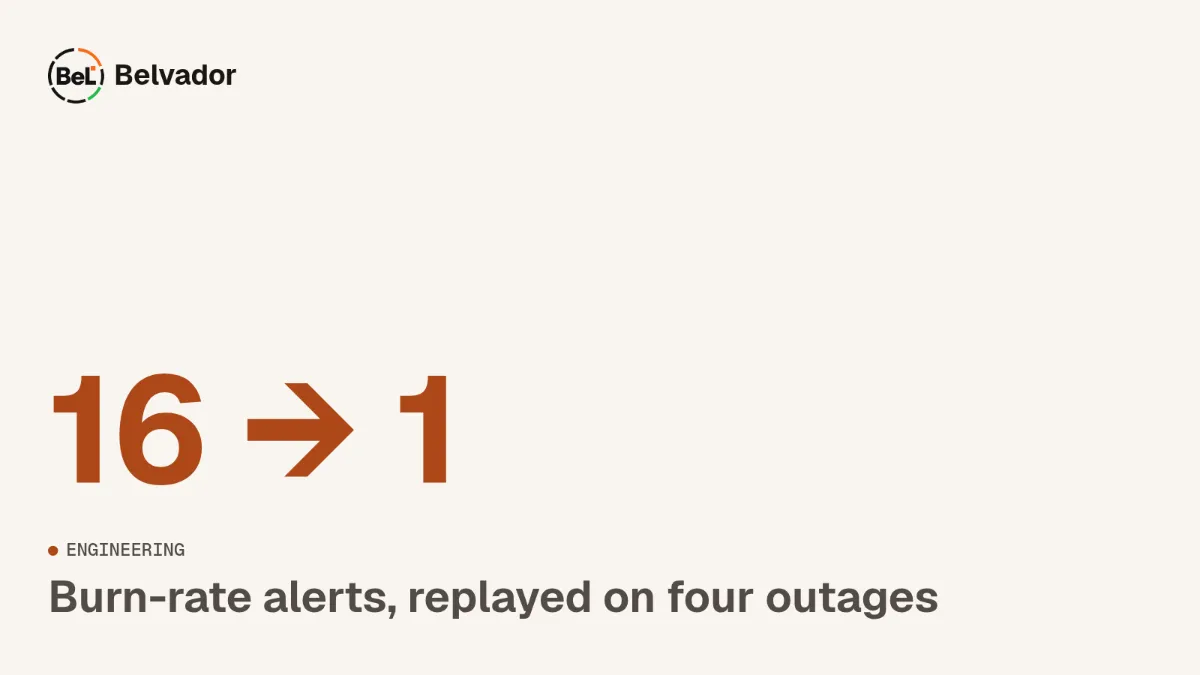
A burn-rate alert pages when your error budget is being spent fast, and it checks that in two windows at once: a long one that shows the problem is big enough to matter, and a short one that shows it is still happening. In our replay of four synthetic incidents it paged within 5 minutes of a 20 % outage and ignored a one-minute blip. It caught a slow 1 % leak after 3.6 hours with one alert, on the same traffic where a plain 5-minute threshold sent 16.
Error budget and burn rate in two lines#
A 99.9 % availability SLO over 30 days allows 0.1 % of requests to fail. That allowance is the error budget: 43.2 minutes of total outage, or the same number of failed requests spread out. The Google SRE workbook defines burn rate as "how fast, relative to the SLO, the service consumes the error budget". A burn of 1 spends exactly the budget by the end of the window; a burn of 14.4 spends 2 % of a 30-day budget in one hour.
The workbook's recommended setup, which Belvador uses as its default, has three rules:
| Severity | Long window | Short window | Burn above | Budget spent when it fires |
|---|---|---|---|---|
| Page | 1 hour | 5 minutes | 14.4 | 2 % |
| Page | 6 hours | 30 minutes | 6 | 5 % |
| Ticket | 3 days | 6 hours | 1 | 10 % |
Both windows must be above the threshold. The long window keeps a brief spike from paging; the short window lets the alert close soon after a fix.
The replay#
Numbers in a table are easy to agree with and hard to feel. So on 26 October 2026 we wrote a small script that feeds minute-by-minute traffic into the same evaluator Belvador's SLO tick runs, and records every time an alert would open or close. The SLO: 99.9 % availability over 30 days, 100 requests per minute, no background errors, a month of clean history. We watched 12 hours from the start of each incident.
For comparison we used a rule many teams start with: alert when 1 % or more of requests failed in the last 5 minutes, and repeat every 30 minutes while that holds.
| Incident | Budget spent | Burn-rate alert | Threshold alerts |
|---|---|---|---|
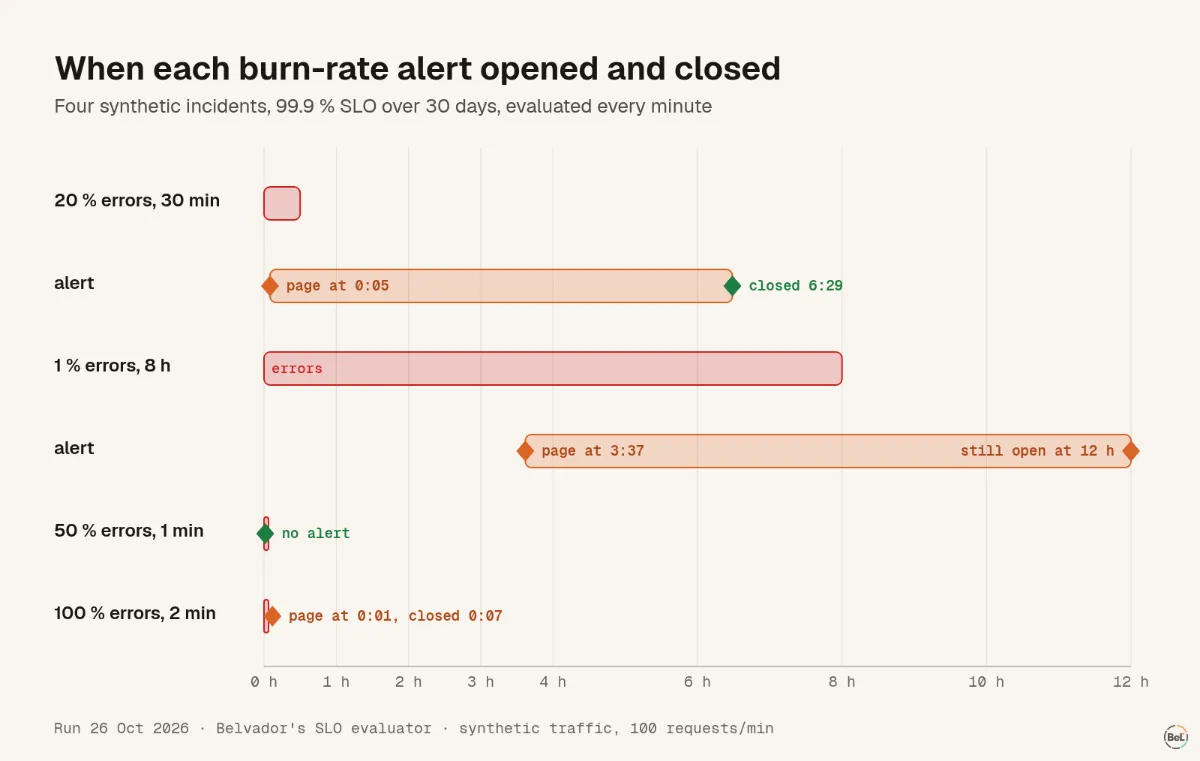
| 20 % errors for 30 min | 13.9 % | page at 5 min, one alert, closed at 6 h 29 min | 2 |
| 1 % errors for 8 h | 11.1 % | page at 3 h 37 min, still open at 12 h | 16 |
| 50 % errors for 1 min | 1.2 % | none | 1 |
| 100 % errors for 2 min | 4.6 % | page at 1 min, closed at 7 min | 1 |
What the four incidents show#
A real outage pages in minutes#
At 20 % errors the one-hour burn passes 14.4 after five minutes: five minutes at 20 % is 1.67 % of an hour's requests, a burn of 16.7. The five-minute window is far above the line from the first minute, so the page opens at minute five.
A blip that costs little does not page#
One minute at 50 % errors spends 1.2 % of the month's budget. The one-hour burn peaks at 8.3, under 14.4, so nothing fires. The threshold rule paged once for it. Whether that page was worth it is a judgment call, but the SRE book is clear about the cost of getting it wrong: "When pages occur too frequently, employees second-guess, skim, or even ignore incoming alerts".
Two minutes of total outage is different: it spends 4.6 % of the budget, and the page opens after the first minute. It closes at minute seven, once the five-minute window is clean, even though the one-hour burn is still 33. That is the short window doing its job.
A slow leak is the case thresholds handle worst#
A steady 1 % error rate is a burn of 10. It never crosses the fast page's 14.4, so the one-hour rule stays quiet. The six-hour rule, with a threshold of 6, opens a page after 3 hours 37 minutes, when the leak has spent about 5 % of the budget.
The threshold rule sat right on its 1 % line for eight hours and repeated itself every half hour: 16 alerts for one problem. Nobody reads the sixteenth.
One alert, until every window agrees#
After the 30-minute outage, the burn-rate alert stayed open for six and a half hours. The fast page condition cleared within an hour, but the three-day ticket rule still saw the budget burning until its six-hour short window was clean. Belvador keeps that as one open alert instead of closing the page and opening a ticket, and it only closes once every rule for that severity is judged healthy. Missing data never closes an alert.
Picking an SLO you can alert on#
The method is only as good as the indicator under it. A few rules that hold up for small teams:
- Measure what users feel. Availability of the main request path, or a scheduled job's runs, beats CPU or queue depth.
- Start at 99.5 % or 99.9 %, not 99.99 %. A four-nines monthly budget is 4.3 minutes, and a single slow deploy spends it.
- Make sure the indicator has traffic. With very little traffic, one failed request is a large share of the window; the alert will be jumpy no matter what the thresholds say.
- Send pages and tickets to different places. A page should wake someone; a ticket can wait until morning.
For errors that are not tied to an SLO, the same idea applies at the issue level: alert on new problems and regressions, not on every event. Stop paging on every exception covers that side, and cron jobs that never finish covers jobs whose failure is silence.
Where Belvador fits#
Belvador evaluates SLOs over uptime checks, monitor runs, ping URLs or trace spans every minute, with the three presets above as the default. You choose whether an SLO sends pages, tickets, both or nothing, and you can mute alerts during maintenance. The SLO alert docs list the presets and messages, the SLO overview explains the indicators, and the alerts page shows where pages and tickets go.
Keep reading#
- Observability for small teams, the guide this post belongs to.
- Stop paging on every exception
- Cron jobs that never finish: what your heartbeat actually sees
Part of the guide: Observability for small teams: five signals, in the order you need them
Related posts
All posts
Guides
Observability for small teams: five signals, in the order you need them
A two-person team does not need a metrics platform on day one. It needs to know when users hit errors, when a job stops, when the site is down, and later, whether users are having a bad week.
Andrew Babo5 min read
Engineering
Stop paging on every exception: one noisy day, four alert policies
We pushed one synthetic day of 2,268 errors through four alert policies. One alert per event sent 2,268 messages; the policy most teams end up with sent 5, and two of those were still noise.
Andrew Babo5 min read
Read next in the docs
See your own production errors this way
Belvador runs on your own Hetzner server: errors, cron jobs, uptime and traces, with your data staying yours.